| Version 1 (modified by , 17 years ago) ( diff ) |
|---|
Revision parameter missing. Current base revision is 339
Outras línguas:
Bem vindo ao sistema on-line de ajuda do JOSM
Você pode ajudar a melhorar esta ajuda clicando em "Abrir no navegador".
If you have reached this page from pressing F1 in JOSM, then you can get more specific help on a particular window, dialog, or tool, if you have the mouse cursor over that item prior to pressing F1.
Beware: This help might get outdated from time to time! Please help improving it by fixing parts that are missing or outdated - this is a wiki!
Table of Contents
Getting Started
- Introduction to JOSM
- How Tos about JOSM
- Working with Relations
- Audio mapping: playing voice notes and synchronizing them with your GPS tracks in JOSM
- FAQ about OSM in general
- Keyboard shortcuts
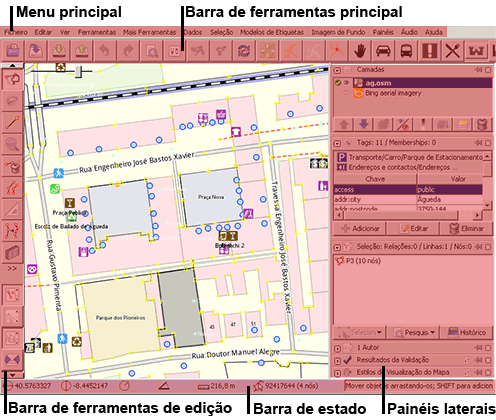
JOSM interface
- Main Menu (note: depending on which plugins you have installed you may have more options on this menu)
- Main Toolbar (the toolbar above the main JOSM window). This toolbar is highly customisable, with the ability to add and remove menus items from the preferences dialog.
- Edit Toolbar (the toolbar down the left hand side of the main JOSM window) buttons below the delete tool affect the display of dialog windows described under 'views' below
- Views
- Map View
- Layer List Dialog
- Properties/Memberships Dialog
- History Dialog
- Current Selection Dialog
- Authors Dialog
- Conflict Dialog
- Command Stack Dialog
- Relations List Dialog
- (... other buttons depending on the Plugins loaded)
JOSM Plugins
Information and Documentation about various JOSM plugins can be found here: http://wiki.openstreetmap.org/index.php/JOSM/Plugins
JOSM Preferences
You can set your preferences for display and other options.
JOSM error messages
Attachments (2)
-
josm-screen-commented_PT.png
(47.7 KB
) - added by 12 years ago.
JOSM screenshot in portuguese
- Josm_main.jpg.svg (532.5 KB ) - added by 15 months ago.
Download all attachments as: .zip
Note:
See TracWiki
for help on using the wiki.