| Version 2 (modified by , 4 years ago) ( diff ) |
|---|
Andere talen:
- Ελληνικά
- English
- Esperanto
- føroyskt
- français
- norsk bokmål
- Nederlands
- norsk nynorsk
Inhoud
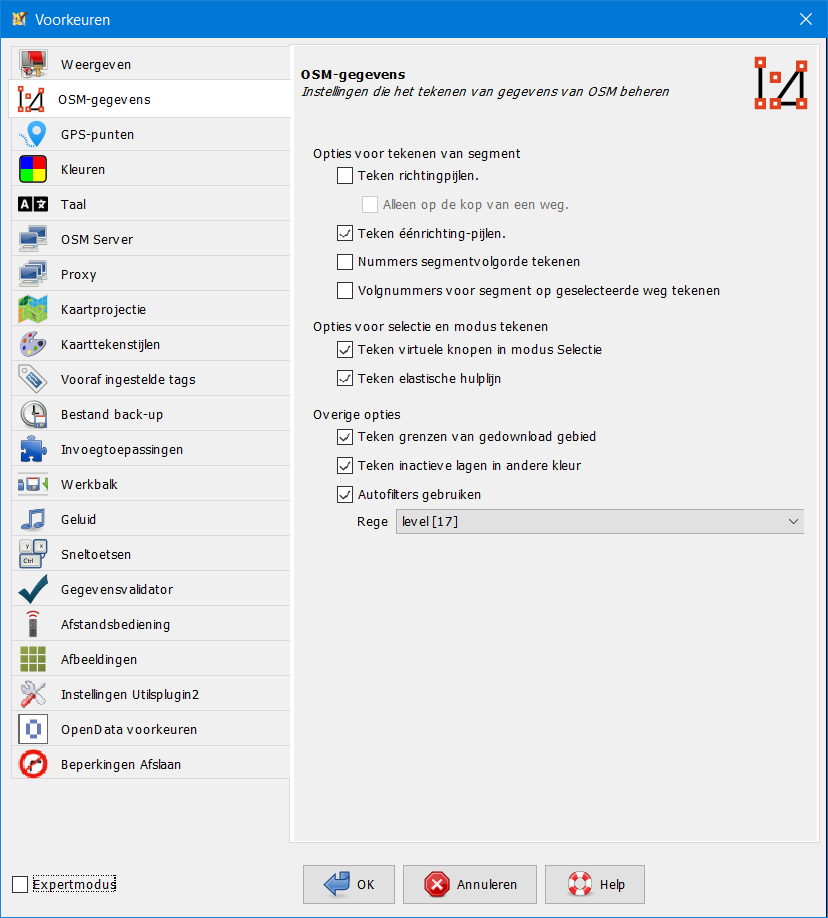
Voorkeuren > OSM-gegevens

Instellingen die het tekenen van gegevens van OSM beheren.
Sommige worden alleen weergegeven in modus Expert.
Opties voor tekenen van segment
- Teken richtingpijlen
-
hints voor tekenen van richting voor wegsegmenten.
Smalle pijlen aan het einde van elk segment geven de richting aan waarin het werd getekend.
Gevorderde voorkeur:draw.segment.direction
Met Alleen op de kop van een weg worden alleen pijlen getekend aan het einde van een weg.
Gevorderde voorkeur:draw.segment.head_only
- Teken éénrichting-pijlen
-
Teken pijlen in één richting en andere gerichte objecten.
Voor sommige wegen die richtingsafhankelijke tags hebben (zoals oneway) kunnen meerdere éénrichting-pijlen op de weg worden getekend.
Gevorderde voorkeur:draw.oneway
- Nummers segmentvolgorde tekenen
-
Teken de volgnummers van alle segmenten op hun weg.
Gevorderde voorkeur:draw.segment.order_number
- Volgnummers voor segment op geselecteerde weg tekenen
-
Teken alleen de volgnummers voor wegen in de selectie.
Gevorderde voorkeur:draw.segment.order_number.on_selected

Opties voor selectie en modus Tekenen
- Teken virtuele knopen in modus Selectie
-
Teken virtuele knopen in modus Selectie om wegen gemakkelijk aan te passen.
Maakt het mogelijk knopen toe te voegen door het kruis in het midden van elk wegsegment te slepen in de modi Selectie of Lasso.
Gevorderde voorkeur:mappaint.node.virtual-size
- Teken elastische hulplijn
-
Een variabel segment tussen de laatst ingestelde knoop en de muisaanwijzer wordt weergegeven in modus Tekenen.
Gevorderde voorkeur:draw.helper-line
Options that affect drawing performance
These options are only available in Expert mode.
- Smooth map graphics (antialiasing)
-
Apply antialiasing to the map view resulting in a smoother appearance.
Gevorderde voorkeur:mappaint.use-antialiasing
- Smooth map graphics in wireframe mode (antialiasing)
-
Apply antialiasing to the map view in wireframe mode resulting in a smoother appearance.
Gevorderde voorkeur:mappaint.wireframe.use-antialiasing
- Highlight target ways and nodes
-
Highlight target nodes and ways while drawing or selecting.
Other objects glow when they are in the catch radius of the mouse pointer.
Gevorderde voorkeur:draw.target-highlight
- Draw only outlines of areas
-
This option suppresses the filling of areas, overriding anything specified in the active styles.
Gevorderde voorkeur:draw.data.area_outline_only
- Hide labels while dragging the map
-
This option hides the textual labels of OSM objects while dragging the map.
Gevorderde voorkeur:mappaint.hide.labels.while.dragging
Other options
- Draw boundaries of downloaded data
-
Draw the boundaries of data loaded from the server.
When downloading an area you get and see all the data within the rectangular bounding box you chose. This includes some ways extending outside that box. It therefore becomes difficult to distinguish which areas contain full or partial data. If you check the "Draw boundaries of downloaded data" box, yellow hatching is drawn over all the areas into which data has not been fully downloaded. You should avoid adding or editing data in areas of yellow hatching as it may duplicate already existing data or conflict with data you don't see.
Gevorderde voorkeur:draw.data.downloaded_area
This option can be changed with Draw boundaries of downloaded data on the View menu, too.
- Draw inactive layers in other color
-
Draw the inactive data layers in a different color.
Map objects not on the Active data layer are drawn in grey color.
Gevorderde voorkeur:draw.data.inactive_color
- Display discardable keys
-
Display keys which have been deemed uninteresting to the point that they can be silently removed. (Expert mode only)
They will be listed in light grey color in the Tags/Memberships panel. These outdated keys will be stripped off from modified objects on upload.
Gevorderde voorkeur:display.discardable-keys
- Use auto filters
-
Display buttons to automatically filter numeric values of a predefined tag.
Auto filters can be enabled here and the tag to be used for the autofilter can be chosen.
Gevorderde voorkeur:auto.filter.enabled
- Rule
-
Rule defining which tag will provide automatic filters, below a certain zoom level.
Gevorderde voorkeur:auto.filter.rule
Additional Tabs
Additional tabs may be added by Plugins.
Back to Preferences
Back to Edit Menu
Back to Main Menu
Back to Main Help
Attachments (2)
-
PreferencesOsmData_nl.png
(65.9 KB
) - added by 4 years ago.
Dutch screenshot
-
PreferencesOsmDataExpert_nl.png
(74.7 KB
) - added by 4 years ago.
Dutch screenshot
Download all attachments as: .zip
Note:
See TracWiki
for help on using the wiki.