| Version 22 (modified by , 8 years ago) ( diff ) |
|---|
Languages:
Preferences Dialog
 Keyboard shortcut:
 F12
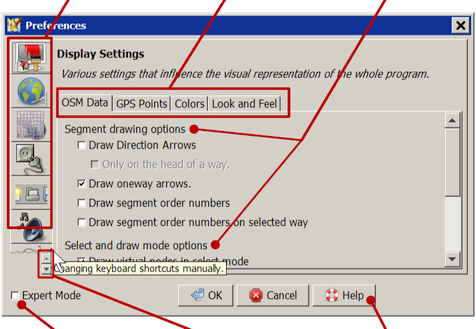
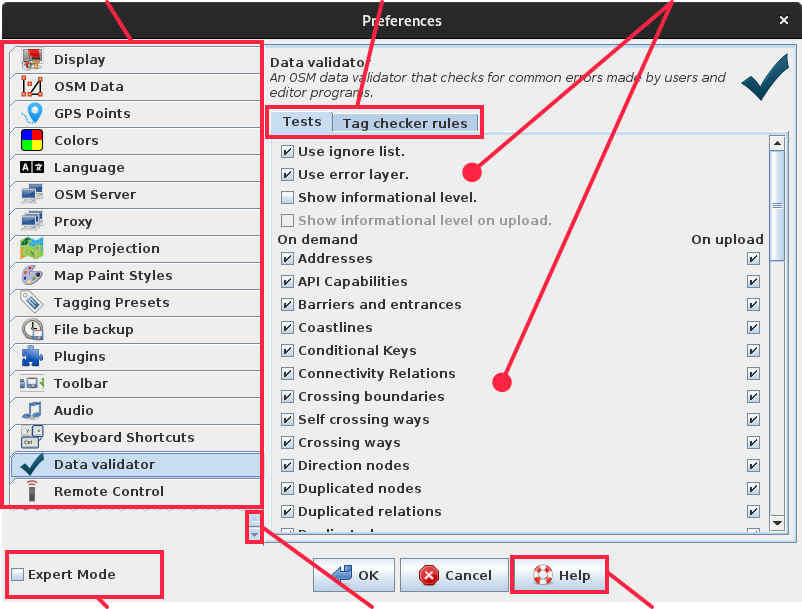
Each tab on the left-hand-side of the dialog box stands for a group of settings:
 | Display Settings | Various settings that influence the visual representation of the whole program. |
 | Connection Settings | configure the API URL of the OSM server, how to authenticate, and whether to use a proxy |
 | Map Settings | Settings for the map projection and data interpretation |
 | Plugins | Configure available plugins and plugin update policy |
 | Toolbar Customization | Customize the elements on the toolbar. |
 | Audio Settings | Settings for the audio player and audio markers and also the Audio menu |
 | Keyboard Shortcuts | Changing keyboard shortcuts manually. |
 | Data validator | Setting for validator and list of checks it runs |
 | Remote Control | Settings for the remote control feature. |
 | Imagery Preferences | Modify the list of imagery sources displayed in the imagery menu, imagery settings and list of offset bookmarks |
 | Advanced Preferences | Setting preferences entries directly. Use with caution! (only in Expert mode) |
Other tabs may be added according to which plugins you have installed.
See also
- Help/Preferences – Preferences Overview
Attachments (3)
- PreferencesDialog.png (99.8 KB ) - added by 6 years ago.
- PreferencesDialog2021.png (607.8 KB ) - added by 5 years ago.
-
Josm_preferences_validator.jpg.svg
(113.9 KB
) - added by 5 years ago.
New screenshot
Download all attachments as: .zip
Note:
See TracWiki
for help on using the wiki.