| Version 101 (modified by , 6 years ago) ( diff ) |
|---|
Languages:
Table of Contents
Windows
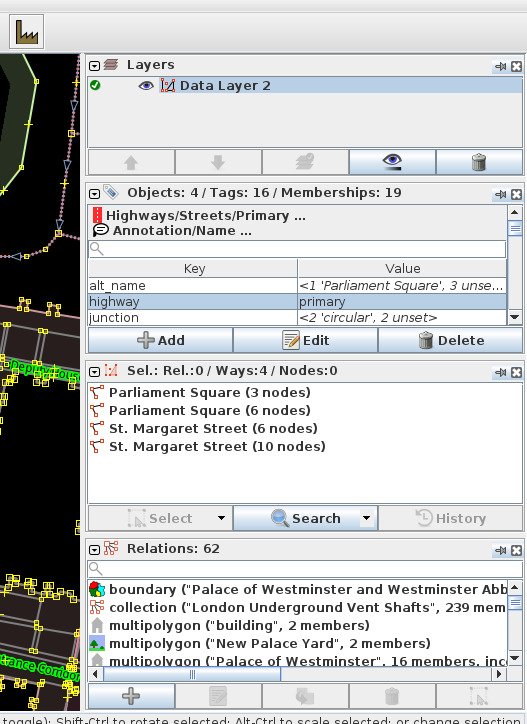
To activate a window
- click on its icon in the lower part of the Edit Toolbar on the left side of JOSM
- click on its menu item under "Windows" in the main menu
- by searching its name (in
Ctrl+Spacebarmenu) - by its keyboard shortcut (see table below)
Window pinning
- To pin a separated window: Click the ordinary close button
- To unpin a window: press pin icon
Header buttons for each window when it's pinned
- The
 black, downheaded arrow head rolls the window up and the
  black, rightheaded arrow head respectively rolls it out.
- The
 eye symbol switches dynamic buttons on and off.
- The
 pin icon unpins the window (e.g. opens it in a separate window). Note: non-standard icons will disappear in this mode
- The
 cross closes the window.


Windows
| Icon | Name | Shortcut | Description |
 | Changeset Manager | Ctrl+Alt+C | Extended manager for changesets (main menu "windows" only) (expert mode only) |
 | Layers | Alt+Shift+L | List of all open layers. Note that it contains different menus for the different layer types. |
 | Tags/Memberships | Alt+Shift+P | Tags and memberships of selected objects. |
 | Selection | Alt+Shift+C | Selection window. |
 | Relations | Alt+Shift+R | List of all relations. |
 | Mini Map | Displays a minimap for better overview of the currently displayed area in the Map View. | |
 | Command Stack | Alt+Shift+O | List of all commands (undo buffer) |
 | Authors | Alt+Shift+A | List of Authors of selected objects |
 | Conflicts | Alt+Shift+C | List of unsolved conflicts. |
 | Validator | Alt+Shift+V | Validator window |
 | Filter | Alt+Shift+F | Filter objects and disable (or optionally hide) them. |
 | Changeset List | Changeset List (expert mode only) | |
 | Map Style | Alt+Shift+M | Configure the map painting style. |
 | Notes | List of OSM notes | |
 | Geotagged Images | Y | (only if photos are loaded; defaults to open as unpinned window) |
 | Customize toolbar | Show/hide icons | |
There might be more buttons depending on the loaded plugins, e.g. Mapillary Main Dialog, Mapillary History Dialog or Mapillary Filter Dialog.
OS specific window management for unpinned windows
Microsoft Windows
- Desktop Window Manager (dwm.exe) is used by default
- 2*2 tiles
- Default shortcuts
- more alternative ways
bug.nGithub recommended as open source alternativeAquaSnapnurgo-software.com is recommended as non-free, priced alternative
MacOS
SpectacleSpectacle open source alternative- 2*2 tiles
- Shortcuts
Moomfrom Many Tricks (10$ in app store)- others
Linux
Ubuntu 16.04 LTS
- Uses Compiz
- 2*2 tiles
- Default shortcuts under "Window Placement" section
Others
- Gnome shortcuts
- Comparison of tiling window managers at Arch wiki
Attachments (1)
-
sidebar.jpg
(129.4 KB
) - added by 5 years ago.
screenshot
Download all attachments as: .zip
Note:
See TracWiki
for help on using the wiki.