| Version 24 (modified by , 10 years ago) ( diff ) |
|---|
Languages:
Selection List Dialog
 keyboard shortcut:
 Shift+Alt+T
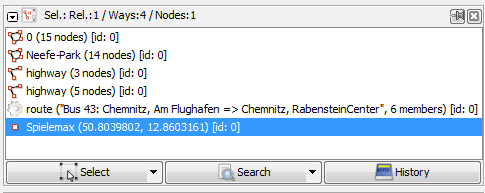
This list shows the currently selected objects (nodes, ways, closed ways and relations).
Additional notes:
- Selection is independent per each layer
- Selection in other layers will be preserved after an unsuccessful search - it is safe to change (or even erase) selection in one layer and expect to selection in other layer to kept
- Selection in the active layer will be empty after unsuccessful search
- This dialogue has not 3, but 5 control elements in total. Triangles are often overlooked at first, but provide a very powerful tools
- List of currently selected object(s) can be erased:
- after
Left mouse clickon empty space in viewport (main editing window) - after using one of many Deselection tools
- after running search query (explained above)
- after
Espacetool
- after

Naming
 Nodes are shown with their names (likewise their OSM-ID) and their position in brackets.
 Ways and
  closed ways are shown with their names and if no name-tags exist with their main tag (eg highway, landuse, railway ...). If JOSM is not able to interpreted any tag the OSM-IDs are shown. The numbers of nodes the ways consist of are always shown in brackets.
 Relations are shown with their type and in brackets the name and the number of members.


Control buttons
Select
 Select selects the objects currently selected in the selection list.
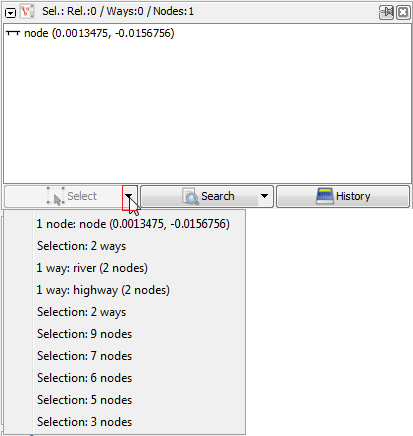
Small triangle in Select button
Small triangle  within the you can restore previous selections from a drop down list:

Search
 Search feature: it allows a very sophisticated search.
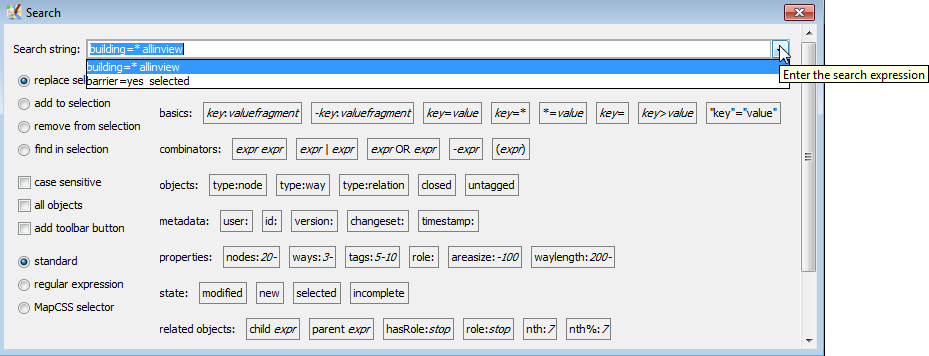
Small triangle in Search button
Like Select the small triangle within the Search button also offers a drop down search list of previous search.


History
 History opens the History Browser
See also
Back to Toggle Dialogs
Back to Main Help
Attachments (6)
-
selection_dialog.png
(9.9 KB
) - added by 11 years ago.
screenshot
- 9900-en-selection-history.png (19.8 KB ) - added by 10 years ago.
- 9900-en-Search button-triangle.png (10.6 KB ) - added by 10 years ago.
- 9900-en-Search button-triangle-autocomplete in search action.png (27.1 KB ) - added by 10 years ago.
- selection-context-menu-right-click-menu.png (6.6 KB ) - added by 10 years ago.
- filters warning.png (2.3 KB ) - added by 10 years ago.
Download all attachments as: .zip
Note:
See TracWiki
for help on using the wiki.