Modify

Opened 5 years ago

Closed 5 years ago

Last modified 5 years ago

#19463 closed defect (fixed)

HiDPI font problems with 3840x2160 screen (Windows)

Reported by: erickdeoliveiraleal Owned by: erickdeoliveiraleal
Priority: normal Milestone: 20.08
Component: Core Version:
Keywords: template_report hidpi Cc: johsin18

Description (last modified by simon04)

What steps will reproduce the problem?

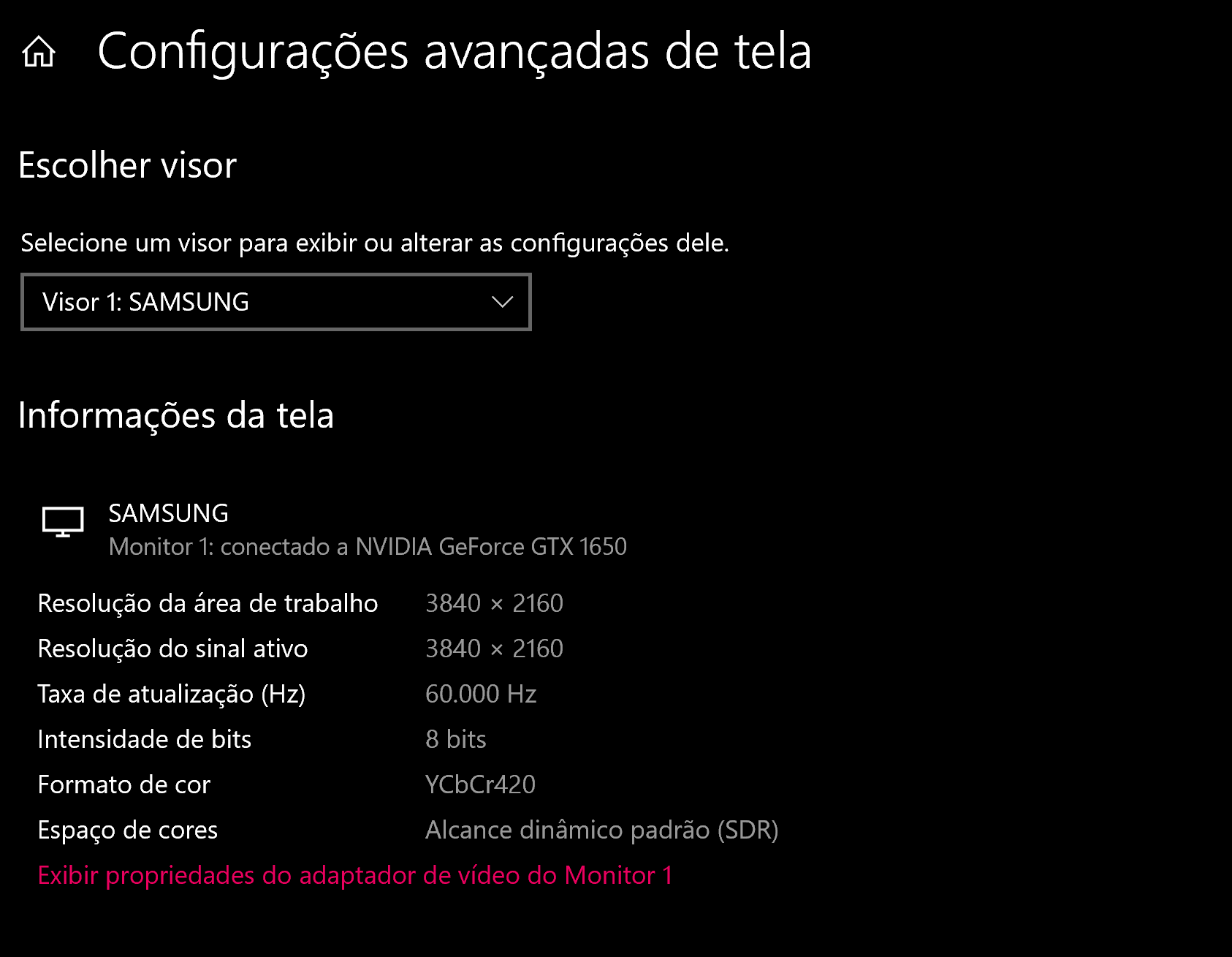
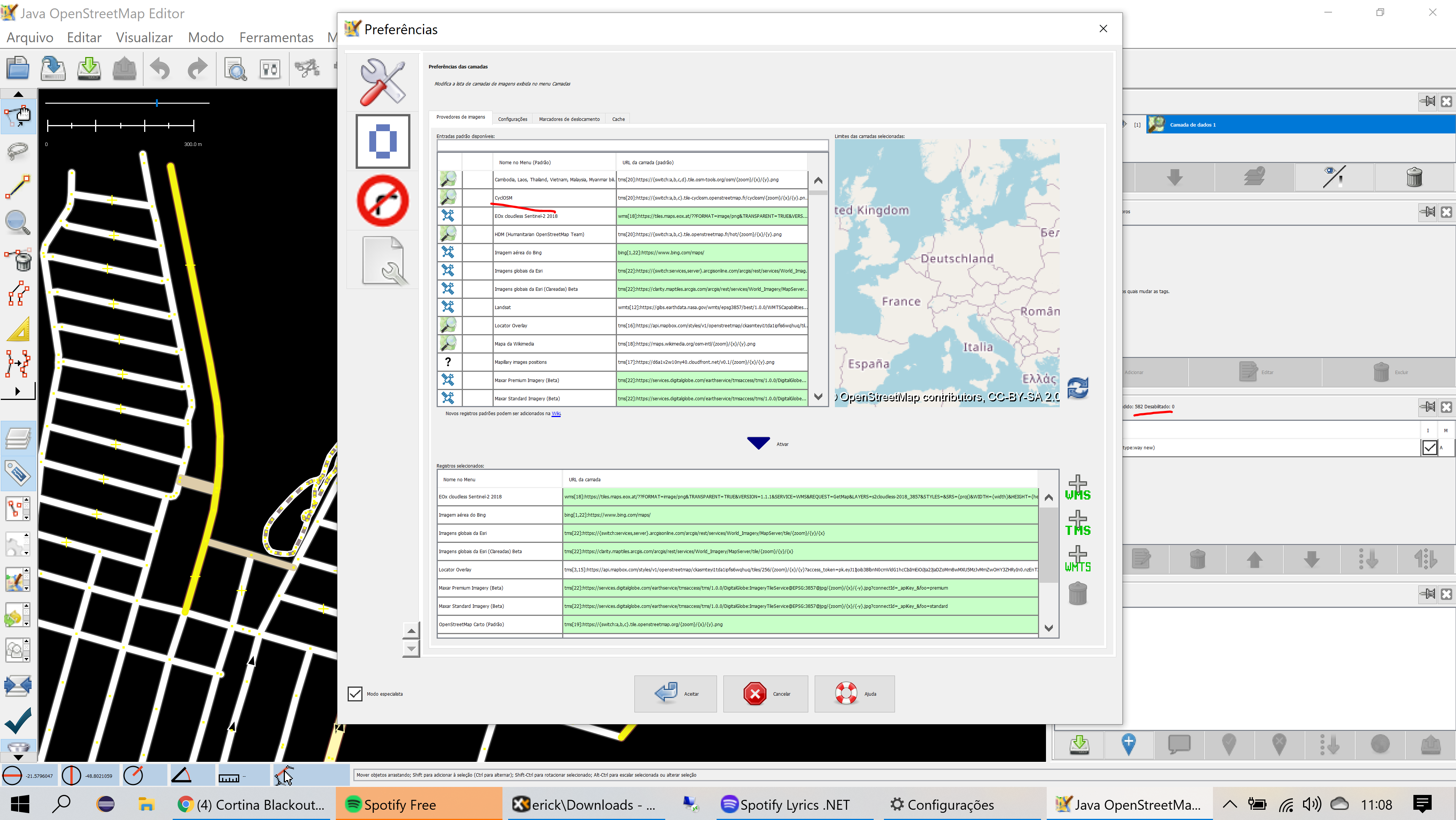
I connected my notebook via hdmi cable to a 4k resolution TV, and I expected to have all text in a size that I can read. But JOSM has some parts of its UI with very small font. Below is the report from report bug feature.

Please provide any additional information below. Attach a screenshot if possible.

Relative:URL: ^/trunk
Repository:UUID: 0c6e7542-c601-0410-84e7-c038aed88b3b
Last:Changed Date: 2020-06-28 19:08:21 +0200 (Sun, 28 Jun 2020)
Revision:16727
Build-Date:2020-06-29 01:30:50
URL:https://josm.openstreetmap.de/svn/trunk

Identification: JOSM/1.5 (16727 pt_BR) Windows 10 64-Bit
OS Build number: Windows 10 Home Single Language 2004 (19041)
Memory Usage: 308 MB / 4080 MB (115 MB allocated, but free)
Java version: 11.0.6+8-LTS, Oracle Corporation, Java HotSpot(TM) 64-Bit Server VM
Look and Feel: com.sun.java.swing.plaf.windows.WindowsLookAndFeel
Screen: \Display0 3840x2160 (scaling 3.0x3.0)
Maximum Screen Size: 3840x2160
Best cursor sizes: 16x16 -> 96x96, 32x32 -> 96x96

Plugins:
+ PicLayer (35405)
+ apache-commons (35362)
+ dataimport (35248)
+ ejml (35313)
+ geotools (35169)
+ jaxb (35092)
+ jts (35122)
+ michigan_left (35248)
+ opendata (35405)
+ reverter (35499)
+ turnrestrictions (35405)
+ utilsplugin2 (35487)

Map paint styles:
+ https://josm.openstreetmap.de/josmfile?page=Styles/iD&zip=1
- https://github.com/hotosm/HDM-JOSM-style/archive/master.zip
- https://github.com/bastik/mapcss-tools/raw/osm/mapnik2mapcss/osm-results/mapnik.zip
- https://josm.openstreetmap.de/josmfile?page=Styles/MapWithAI&zip=1

Last errors/warnings:
- W: extended font config - overriding 'filename.Mongolian_Baiti=monbaiti.ttf' with 'MONBAITI.TTF'

Attachments (2)

Capturar.png (794.8 KB ) - added by simon04 5 years ago.
Capturar.PNG (69.8 KB ) - added by erickdeoliveiraleal 5 years ago.

Download all attachments as: .zip

Change History (16)

comment:1 by stoecker, 5 years ago

Ticket #19454 has been marked as a duplicate of this ticket.

comment:2 by Klumbumbus, 5 years ago

Description: modified (diff)
Keywords: hidpi added

comment:3 by Klumbumbus, 5 years ago

You can try if using Java 14 instead of 11 improves the situation.

by simon04, 5 years ago

Attachment: Capturar.png added

comment:4 by simon04, 5 years ago

Description: modified (diff)

comment:5 by simon04, 5 years ago

Cc: johsin18 added

Related: #11806, #17048, #18376

@johsin18, in case you want some more HiDPI challenges… ;-)

comment:6 by johsin18, 5 years ago

I'm a bit surprised there is only one screen listed in the Status Report, as the reporter talks about the notebook and the TV.
@erickdeoliveiraleal Did you switch off your notebook screen? Did you restart JOSM after doing that? Did you try Java 14?
In case two screens are attached, it might help to declare the high-resolution one (so the 4K TV) the "main display" in the Window settings.

by erickdeoliveiraleal, 5 years ago

Attachment: Capturar.PNG added

comment:7 by erickdeoliveiraleal, 5 years ago

I only tested Oracle JDK 11.0.8.
My notebook screen is off and only TV is on. But if I open my notebook open and both screen are on the same happens. And yes I restarted JOSM.

comment:8 by simon04, 5 years ago

Summary: issues with 4k resolutionHiDPI font problems with 3840x2160 screen (Windows)

comment:9 by Klumbumbus, 5 years ago

@erickdeoliveiraleal: please try Java 14. I just tried it and saw no font size problems, see first attachment at #19703.

comment:10 by Klumbumbus, 5 years ago

Owner: changed from team to erickdeoliveiraleal
Status: newneedinfo

comment:11 by erickdeoliveiraleal, 5 years ago

hello, I tried the josm-latest today and it looks good, using Java 11.

comment:12 by erickdeoliveiraleal, 5 years ago

Resolution: fixed
Status: needinfoclosed

comment:13 by skyper, 5 years ago

probably fixed with #8334.

comment:14 by Don-vip, 5 years ago

Milestone: 20.08

Modify Ticket

Change Properties
Set your email in Preferences
Action
as closed The owner will remain erickdeoliveiraleal.
as The resolution will be set.
The resolution will be deleted. Next status will be 'reopened'.

Add Comment


E-mail address and name can be saved in the Preferences .
 
Note: See TracTickets for help on using tickets.