Languages:
Relations panel
 Keyboard shortcut:
 Alt+Shift+R — one of the JOSM panels. Don't confuse it with the Relation Editor.
The Relations panel lists all relations in the active layer.
You can type in the box above the list to filter the relations. It searches in all keys and values of the relations.
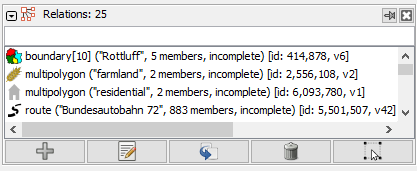
It is possible to select multiple relations in the relation list: Hold down Ctrl to select one by one or Shift to select a range. Then you can do actions for all selected relations at once.
Panel Buttons
| Icon | Name | Description and notes |
|---|---|---|
 | Create | Opens the Relation editor to create a new relation. |
 | Edit | Opens a Relation editor for each chosen relation. The  small arrow has a recent history of the relations called or created. small arrow has a recent history of the relations called or created.
|
 | Duplicate | Duplicates the chosen relation and opens it with the Relation editor. |
 | Delete | Deletes the relations chosen in the panel. |
 | Select relation | Selects those relations on the map which were chosen in this panel. |
Context menu
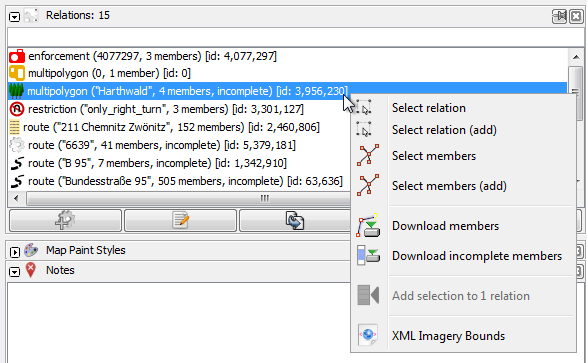
The right click menu (context menu) provides the following features:
| Icon | Name | Description and notes |
|---|---|---|

| Edit | Opens a Relation editor for each in the relation panel selected relation to edit the relations. |
|
| Duplicate | Duplicates the chosen relation and opens it with the Relation editor. |
|
| Delete | Deletes the in the relation panel selected relations. |
|
| Select relation | Sets the current selection in the Selection panel to the in the relation panel selected relations. This is the double-click action too. |
|
| Select relation (add) | Adds the in the relation panel selected relations to the selection in the Selection panel. |

| Select members | Sets the current selection in the Selection panel to all members of the in the relation panel selected relations. |
|
| Select members (add) | Adds the members of the in the relation panel selected relations to the selection in the Selection panel. |

| Download with members | Downloads the relations with all members of the in the relation panel selected relations, except for new relations. Usually, this results in less network traffic than downloading only the members but may update the relations and their member lists which might be unpleasant when undeleting or reverting objects. |
|
| Download members | Downloads all members of the in the relation panel selected relations. |

| Download incomplete members | Downloads all incomplete members of the in the relation panel selected relations. |

| Export GPX file starting from first member | Flattens this relation to a single gpx track recursively, starting with the first member, successively continuing to the last and exports it as a gpx file (Route relation only). |
|
| Export GPX file starting from last member | Flattens this relation to a single gpx track recursively, starting with the last member, successively continuing to the first and exports it as a gpx file. (Route relation only). |

| Convert to GPX layer starting from first member | Flattens the relations to a single gpx track recursively, starting with the first member, successively continuing to the last and converts it to a gpx layer. (Route relation only). |
|
| Convert to GPX layer starting from last member | Flattens the relations to a single gpx track recursively, starting with the last member, successively continuing to the first and converts it to a gpx layer. (Route relation only). |

| Add selection to X relation
| Adds the in the in the Selection panel selected objects to the in the relation panel selected relations. X is replaced by the number of the in the relation panel selected relations. (expert mode only)
|

| Open/View "link" Search on ... (Tag2Link) | Optional items to open websites corresponding to the keys of selected relations in the panel, like website, url or wikidata, in the external web browser
|

| XML Imagery Bounds | Creates a shape for the source code of an Imagery entry. Requires a multipolygon or boundary relation. Requires the plugin Imagery-XML-Bounds |
Preferences
There are some (advanced) settings, available, to influence the displayed object`s information in the list, see Selection list preferences.
See also
Back to Windows menu
Back to Sidebar
Back to Main Menu
Back to Main Help
Attachments (2)
- relation-list-dialog-popup.png (28.7 KB ) - added by 10 years ago.
- relation-list-dialog.png (8.9 KB ) - added by 6 years ago.
Download all attachments as: .zip