| Version 1 (modified by , 15 years ago) ( diff ) |
|---|
Revision parameter missing. Current base revision is 59
Altres idiomas:
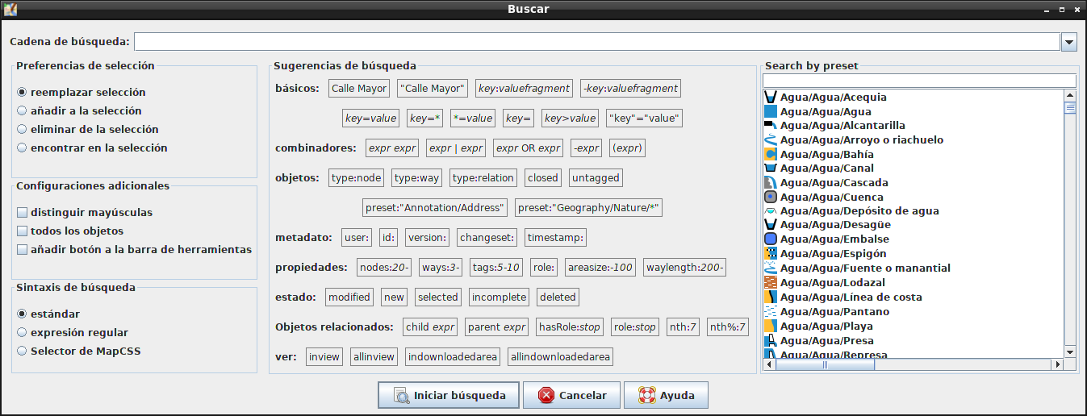
Buscar
 Atajo de teclado:
 Ctrl-F
Buscar objetos en la capa de datos actual
Algunos ejemplos de consultas:
- type:way selecciona todas las vías
- name:Herrengasse selecciona todos los elementos con el nombre indicado
- type:way name:- selecciona todas las vías que no tienen un nombre
- id:123465678 selecciona un objeto (vía o nodo) con un ID específico
There is also a very under-used and under-documented feature that lets you enter a web URL (file://, http://, https://, ftp://) in the search field. JOSM will then attempt to load that URL, and select any objects that it finds referenced in that file. JOSM will look for XML tags "way", "node", and "relation" in the document, and use their id attribute. This means you can access another OSM file on your hard disk this way and have JOSM select all objects that are present in the file (provided they are present in JOSM's dataset too).
Las expresiones especiales "selected" y "modified" seleccionan todas las resp. seleccionadas. todos los objetos modificados en la actual sesión.
Más ejemplos aquí: http://wiki.openstreetmap.org/wiki/JOSM_search_function
Véase también
Volver a Menú Editar
Volver a Ayuda principal
Attachments (2)
- Search.png (142.5 KB ) - added by 9 years ago.
- Search_expert.png (208.5 KB ) - added by 9 years ago.
Download all attachments as: .zip