| Version 13 (modified by , 15 years ago) ( diff ) |
|---|
Languages:
File > Open Location
 Keyboard shortcut:
 Ctrl-L
Load OSM data from an URL either in the current data layer or in a new data layer.
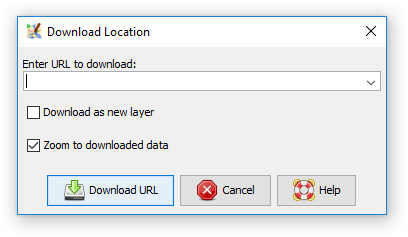
The following dialog is displayed:

You can enter the URL where to download data from and click Download URL.
You can control whether the data is loaded into the current or in a new layer:
- if Separate Layer is selected, the data is loaded in a new layer
- if Separate Layer is not selected, the data is loaded in the current data layer
If there isn't a data layer yet, a new data layer is always created.
Data sources
The OSM web server is the main data source you can use here. For instance, if you know the object id of a node, way, or relation you can load the respective object with one of the following URLs:
- for a node the URL is
http://api.openstreetmap.org/api/0.6/node/123456789(replace123456789with the node id) - for a way the URL is
http://api.openstreetmap.org/api/0.6/way/123456789(replace123456789with the way id) - for a relation the URL is
http://api.openstreetmap.org/api/0.6/relation/123456789(replace123456789with the relation id)
TODO: XAPI servers
Older versions of objects
You can also load older versions of an object
- for a node the URL is
http://api.openstreetmap.org/api/0.6/node/<node id>/123(replace123with the version number) - for a way the URL is
http://api.openstreetmap.org/api/0.6/way/<way id>/123(replace123with the version number) - for a relation the URL is
http://api.openstreetmap.org/api/0.6/relation/<relation id>/123(replace123with the version number)
See also


Attachments (2)
- Download location 11223.png (20.3 KB ) - added by 10 years ago.
- download-location.png (10.4 KB ) - added by 9 years ago.
Download all attachments as: .zip
Note:
See TracWiki
for help on using the wiki.