| Version 11 (modified by , 7 years ago) ( diff ) |
|---|
Languages:
Status bar > Jump to Position
Shortcut key: Ctrl+J
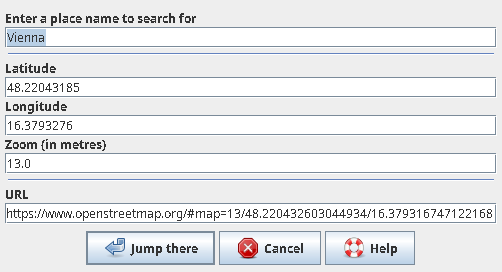
The dialog checks the content of the clipboard on opening.
- If a valid Openstreetmap URL is found, then it is used to fill the fields.
An OK will move the Mapview to that position.
- If the clipboard could not be interpreted, then the fields get the coordinate in the middle of the Mapview and the zoom level.
The action is to read the current values and move the Mapview to that position.
The coordinate is always shown with eight decimal places. This equals to millimeter precision on the ground. The zoom level is given as integer from -1 to 30. This value is rounded from JOSMs internal zoom level which has fractions. Constantly the URL field is updated with the other fields data to automatically form a valid OSM URL. The coordinate formats Degree and Nautical are supported as well (since r8670).
Currently this action takes the data in the zoom field as value in meters. Which is not perfectly consistent. So to achieve an OSM zoom level of 13 (e.g. for a village) in the zoom field a number of ~1300 is needed.
For example you can copy the URL to open that view in your web browser or vice versa copy the URL from your web browser to jump to that position in JOSM.
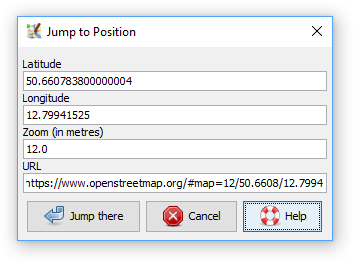
The dialog is reached via the status bar by mouse click in the latitude or longitude fields. Additionally via the View menu in Expert access mode.
Attachments (2)
- JumpToPosition.png (11.5 KB ) - added by 7 years ago.
- JumpToPositionPlace.png (7.5 KB ) - added by 6 years ago.
Download all attachments as: .zip