


| Version 3 (modified by , 7 years ago) ( diff ) |
|---|
Languages:
File > Download along
 Keyboard shortcut:
 Alt+Shift+D
Download from OSM along selected ways
This action will download data inside a certain corridor along the Selection.
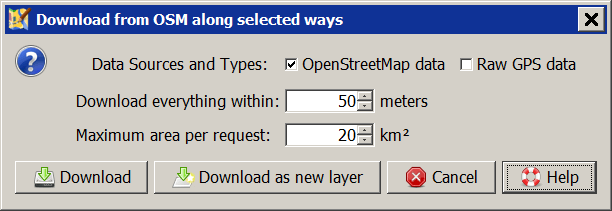
- Data Sources and Types
- Available are OpenStreetMap data (objects, no nodes) and Raw GPS data from GPX tracks. Source of the data is an OSM API server.
- Download everything within
- Sets the width of the corridor in which the presence of the data is guaranteed. It is valid to both sides of the selected way. The default value of 50 m will give a corridor width of 100 m.
- Maximum area per request
- This size affects the amount of objects being downloaded outside of the corridor. The heading of the selected ways has effects on this amount too. The default of 20 km² may result that all objects up to a distance of ~2,100 meters are downloaded.
See also


Attachments (1)
- scrDownloadAlongWayAction.png (8.8 KB ) - added by 7 years ago.
Download all attachments as: .zip
Note:
See TracWiki
for help on using the wiki.

