


#8538 closed defect (fixed)
Captcha needs external scripts to work
| Reported by: | skyper | Owned by: | skyper |
|---|---|---|---|
| Priority: | normal | Milestone: | |
| Component: | Trac | Version: | |
| Keywords: | Cc: |
Description
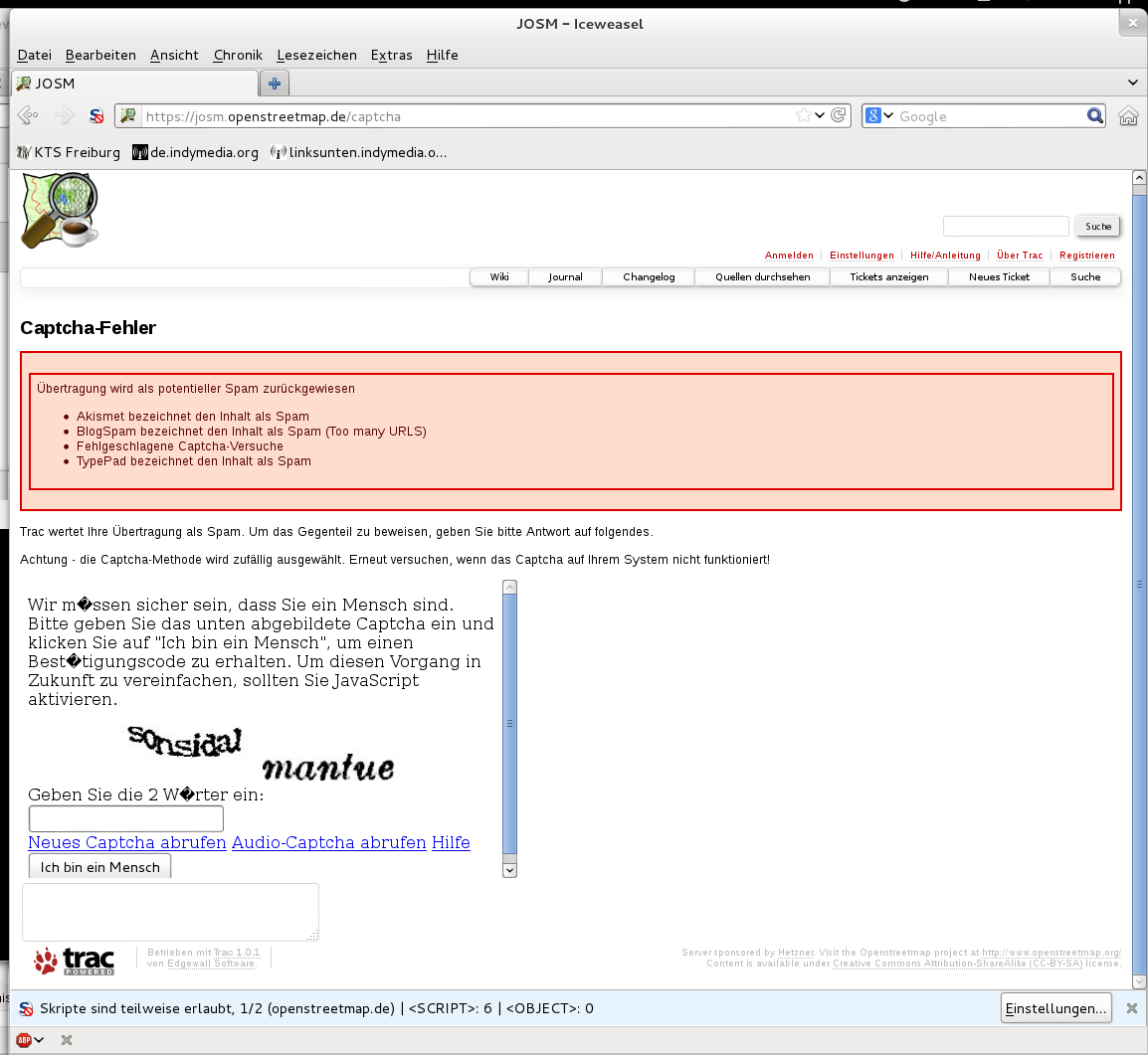
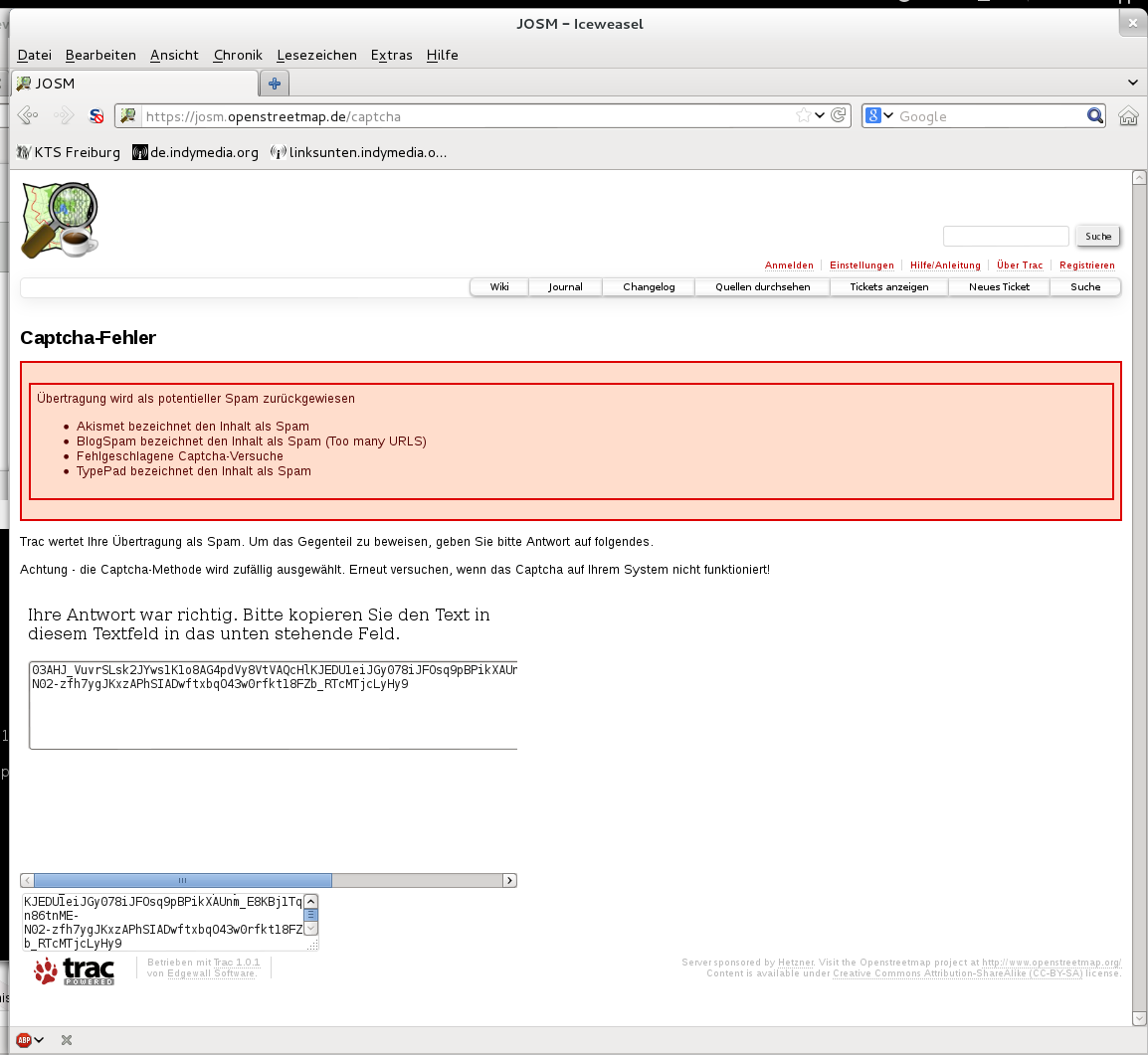
I tried to move the news from last year from StartupPageSource to VersionHistorySource and needed to enter a captcha. I successfully entered the "two words" and got a string but there is no way to get the sting accepted as I did not find any button.
By the way, the former method solving a string equation was much nicer.
Attachments (2)
Change History (12)
follow-up: 2 comment:1 by , 14 years ago
| Owner: | changed from to |
|---|---|
| Status: | new → needinfo |
follow-up: 3 comment:2 by , 14 years ago
| Priority: | major → normal |
|---|---|
| Summary: | Captcha not working with iceweasel 10.0.12 → Captcha needs external scripts to work |
Replying to stoecker:
Captcha type is chosen random, this should also be stated on the captcha page itself.
Yes, it is (with typo in German) but I do not get a different method when I ask for a new captcha.
I did play around with SandBox and the major problem are the external scripts. I had even "facebook" in my list of blocked scripts and the list contained several entries.
Without the scripts enabled the page often misses the bottom button.
It finally did work with different methods and the server seems to save the info (e.g. You have to always start a new session to test.)
I also noticed that the "string equation" method does not need any extra script.
follow-up: 6 comment:4 by , 14 years ago
The string equation is much too easy and gets solved automatically by some spam bots already :-)
A simple reload <F5> should bring a new method. I disabled the 2 methods which rely on Javascript and Co.
P.S. For tests you can always use the name of the blue pills. It will never cross the filters even if you successfully enter the captcha ;-)
comment:5 by , 14 years ago
| Resolution: | → fixed |
|---|---|
| Status: | needinfo → closed |
comment:6 by , 14 years ago
Replying to stoecker:
The string equation is much too easy and gets solved automatically by some spam bots already :-)
But it is still one method
A simple reload <F5> should bring a new method.
Thanks
I disabled the 2 methods which rely on Javascript and Co.
Still have to allow "google.com" to get the "two words" method to work.
P.S. For tests you can always use the name of the blue pills. It will never cross the filters even if you successfully enter the captcha ;-)
Does not work: Sandbox
comment:7 by , 14 years ago
| Resolution: | fixed |
|---|---|
| Status: | closed → reopened |
follow-up: 9 comment:8 by , 14 years ago
| Resolution: | → fixed |
|---|---|
| Status: | reopened → closed |
Still have to allow "google.com" to get the "two words" method to work.
No. reCAPTCHA also works without JavaScript. Thought it is more complicated without.
Does not work: Sandbox
You passed with 0 points. Seems the external services had connection trouble. So "never" is probably a bit too optimistic :-)
comment:9 by , 14 years ago
Replying to stoecker:
Still have to allow "google.com" to get the "two words" method to work.
No. reCAPTCHA also works without JavaScript. Thought it is more complicated without.
and then the original bug appears again:

works.

no button to confirm

Captcha type is chosen random, this should also be stated on the captcha page itself.
Please supply a screenshot of your problem.
P.S. A login would have helped to prevent the captcha.