


Opened 19 months ago
Last modified 19 months ago
#24228 needinfo defect
Color area way polygon settings, strange behaviour.
| Reported by: | Allroads | Owned by: | Allroads |
|---|---|---|---|
| Priority: | normal | Milestone: | |
| Component: | Core | Version: | tested |
| Keywords: | Cc: |
Description (last modified by )
Making a style, I have strange behaviour, the multipolygon way line is black but I use #b100ff the bicycle color.
Even when I remove color: #b100ff, the black color stays, also when I remove on the other area’s the color they also stays. Also when I give them a other color, green to blue hex, the green stays.
If there is some kind of cache?
( all other mappaint styles are unchecked)
I deleted the style several times, closed Josm, start it up again. Still this behaviour.
Switched to fill-color set /*fill-image */ inactive, then there is no black and the wayline is the same color.
What can this be?
Could this be, because I use a .svg made in inkscape and saved it as a plain file.

area|z21-[area:highway=footway]::footway_area_layer {
  z-index: 2;
/* fill-color: #00ff00; */
  fill-opacity:0.5;
  fill-image: a.h.footway.svg;

}

area|z21-[area:highway=pedestrian]::pedestrian_area_layer {
  z-index: 2;
/* color: #00ff00; */
  fill-opacity:0.5;
  fill-image: a.h.pedestrian.svg;
}

area|z21-[area:highway=path]::path_area_layer {
  z-index: 2;
/*  fill-color: #00ff00; */
  fill-opacity:0.5;
  fill-image: a.h.path.svg;
}


area|z21-[area:highway=steps]::steps_area_layer {
  z-index: 2;
/*  fill-color: #ff0000; */
  fill-opacity:0.5;
  fill-image: a.h.steps.svg;
}

area|z21-[area:highway=cycleway]::cycleway_area_layer {
  z-index: 2;
/*  color:#b100ff; */
/*  fill-color: #b100ff; */
  fill-opacity:0.5;
  fill-image: a.h.cycleway.svg;
}
Attachments (8)
Change History (15)
by , 19 months ago
| Attachment: | line color.png added |
|---|
by , 19 months ago
| Attachment: | a.h.cycleway.svg added |
|---|
by , 19 months ago
| Attachment: | a.h.footway.svg added |
|---|
by , 19 months ago
| Attachment: | a.h.path.svg added |
|---|
by , 19 months ago
| Attachment: | a.h.steps.svg added |
|---|
comment:1 by , 19 months ago
| Description: | modified (diff) |
|---|
comment:2 by , 19 months ago
| Description: | modified (diff) |
|---|
follow-up: 5 comment:3 by , 19 months ago
| Owner: | changed from to |
|---|---|
| Status: | new → needinfo |
comment:4 by , 19 months ago
I used a local file .mapcss with the images in the folder.
There I got that area:highway=cyclway problem.
After ticket writing, I wrote more in the file. More highway values in notepad++.
Open a .osm file with all kind of area:highway
Then I see the same problem with area:highway=unclassified, all the other highway values get a color like in the .svg, but i did not give the mapcss for these value's a colorhex in the code.
This later .mapcss with images, I zipped them in a.zip file, and set it on a server.
http://mijndev.openstreetmap.nl/~allroads/JOSM/Styles/NL_area_highway.zip
I open this url in JOSM, the same problem.
Then after your read.
I deleted all the cache in JOSM in Appdata Local JOSM cache folder.
Open Josm again, on both mapcss en url still the same problem.
Then I deleted both mapcss and urlzip in mappaintstyle also a othere,which was all the time unchecked other style which have totaly different colors.
I delete the cache again.
Then I only installed the urlzip. There where no other styles checked.
I still have this problem.
This is what I have done so far.

This is area:highway=track (pink) and area:highway=unclassified.
area|z21-[area:highway=track]::track_area_layer {
  z-index: 2;
  fill-opacity:0.5;
  fill-image: a.h.track.svg;
}
area|z21-[area:highway=unclassified]::unclassified_area_layer {
  z-index: 2;
  fill-opacity:0.5;
  fill-image: a.h.unclassified.svg;
When I wrote a.h.track and a.h.unclassified, I never put color or fill-color in the code. And tested it.
I find it strange, how does JOSM know, the track color, from the .svg?
by , 19 months ago
comment:5 by , 19 months ago
Replying to stoecker:
Otherwise please tell exactly how you activate the style (locale file?, which URL, ...).
Now, I looked at the svg files a.h.unclassified.svg and a.h.track.svg, which I made in Inkscape and saved it as a plain file.
Where in the file is it different, where does it tricker to give a colored outline and where the black outline.
Top of the file is the same.
Looking at the text, all the same, only the color fill for the letter and ofcourse U and T letter shape is not similair.
  <text
     xml:space="preserve"
     style="font-weight:bold;font-size:11.2045px;font-family:sans-serif;-inkscape-font-specification:'sans-serif Bold';fill:#ff66cc;fill-opacity:1;stroke:#000000;stroke-width:0;stroke-linecap:round"
     x="12.756303"
     y="20"
     id="text253"><tspan
       id="tspan251"
       x="12.756303"
       y="20"
       style="fill:#ff66cc;fill-opacity:1;stroke-width:0">T</tspan></text>
Looking at the rectangle part in the Inscape file.
I noticed that a.h.unclassified has at the end,fill-opacity:1, and a negative x, x="-2.6811603e-07"
     style="fill:#00ffff;stroke:#000000;stroke-width:0;stroke-linecap:round;fill-opacity:1"
     id="rect517"
     width="32"
     height="1.9999995"
     x="-2.6811603e-07"
     y="30" />
and with a.h.track, fill-opacity:1 on the second position and a positive x, x="2.3188393e-07"
     style="fill:#ff66cc;fill-opacity:1;stroke:#000000;stroke-width:0;stroke-linecap:round"
     id="rect517"
     width="31.999998"
     height="1.9999995"
     x="2.3188393e-07"
     y="30" />
Changes the position did not change the visualisation difference.
Strange that Inkscape does it different.
Then, I made a very simple svg for a.h.unclassified and placed it in the folder with mapcss.
<svg xmlns="http://www.w3.org/2000/svg" width="32" height="32" viewBox="0 0 32 32" fill="none">
<rect width="32" height="2" x="0" y="30" fill="#00ffff"/>
</svg>
and a.h.track, only give it a other fill.
<svg xmlns="http://www.w3.org/2000/svg" width="32" height="32" viewBox="0 0 32 32" fill="none">
<rect width="32" height="2" x="0" y="30" fill="#ff66cc"/>
</svg>
Now I have on both a black outline. With x="0".
This made me think, what should I expect in JOSM, is getting a black outline normal or a different colored one?
Which is the problem?

When I give a.h.track a x, positive of 2, like in the orignal Inkscape file, so that the rectangle is a little of, outside the viewbox.
This is then still a black outline, not getting the pink one.
<svg xmlns="http://www.w3.org/2000/svg" width="32" height="32" viewBox="0 0 32 32" fill="none">
<rect width="32" height="2" x="2" y="30" fill="#ff66cc"/>
</svg>
Now I give the a.h.track, the Inkscape x, 2.3188393e-07, notation.
This number with e-07 still gives a black outline, expected that something must tricker to make it a pink outline, as in the Inkscape version, it must be something else.
<svg xmlns="http://www.w3.org/2000/svg" width="32" height="32" viewBox="0 0 32 32" fill="none">
<rect width="32" height="2" x="2.3188393e-07" y="30" fill="#ff66cc"/>
</svg>
I also used a total different key value combination, that is not used in OSM with all the different svg I made.
Till now, I can not figure out what tricker to get a pink outline with a a.h.track.svg
by , 19 months ago
follow-up: 7 comment:6 by , 19 months ago
I'd assume that
a) The outline will have the default color, either black or grey.
b) I'd expect that the SVG does not influence the outline color at all.
I think if the SVG does influence the outline this is probably a bug.
comment:7 by , 19 months ago
Replying to stoecker:
I'd assume that
a) The outline will have the default color, either black or grey.
b) I'd expect that the SVG does not influence the outline color at all.
I think if the SVG does influence the outline this is probably a bug.
Then it is a bug. It should be equaly handled. Report it here, is that good enough? I also saw that a other a.h.living_street has black, this is also a hard black outline. Also the colored outlined ones, are hard, not the color as I give the fill-image a fill-opacity:0.5;
I would like to give all the outline a color and a opacity of my choice. If possible?
We are going to use the JOSM style over several WMTS layers, the lines are black, a BGT Omtrekgericht layer with polygons, but also a cadastral layer, DKK, with more greyed lines. Then it is good to seen these underlaying black linespopping out next to al colored line.
If adjacent polygone does not hav the same nodes,lines could be a bit away of each other that you maybe see the problem notbeing adjacent. Only with different a.h. and other polygons.
Also to see through watching the yearly aerial layer. This one is from 2024. If all are correctly lined up.
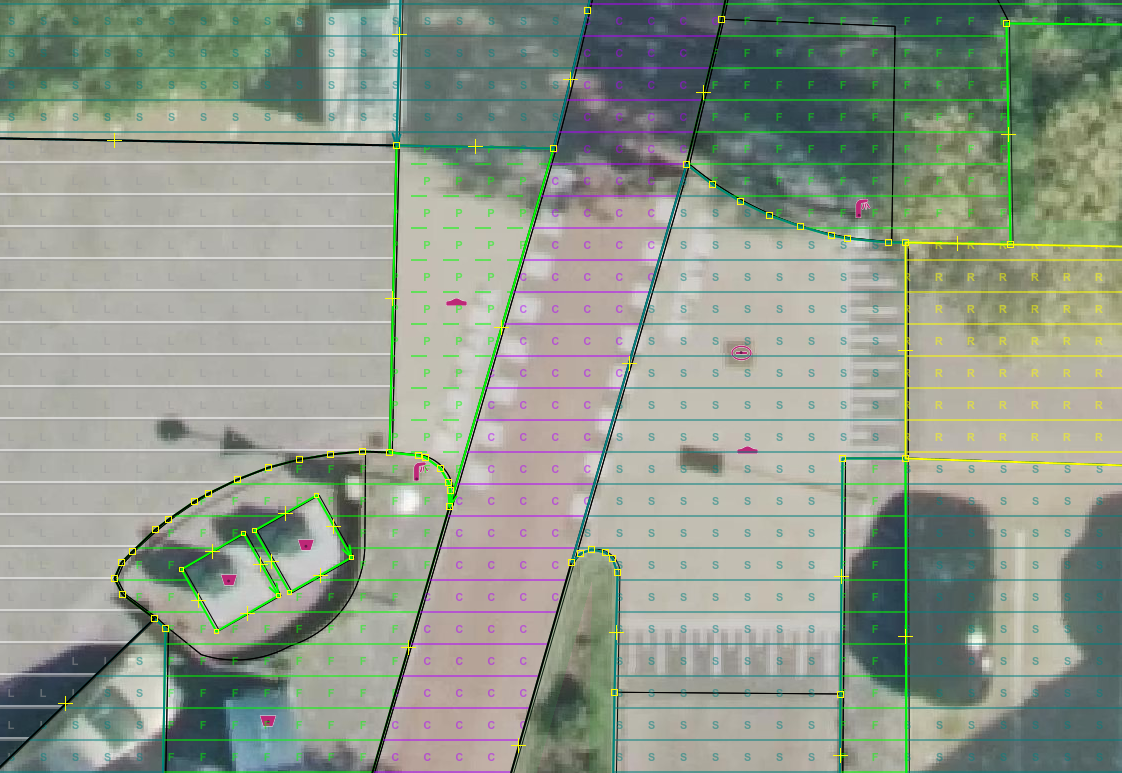
In the image you see here a.h.cycleway (purple C) and a.h.living_street (greywhite L) with black outline.
There is also a.h.path (green dashed P) a.h.footway (green F) a.h.residential (yellow R) a.h.service (dark green S) colored outline.
I have more a.h. with colored then with black outline

Thanks for your help.
Allroads
by , 19 months ago
| Attachment: | aboveblacklines.png added |
|---|



Yes, JOSM has a lot of caching. Without further details how exactly you use the style it's hard to say.
Important rule learned during programming: During development add something which shows you whether your new code is active. In this case that could be a displayed text or a rule for a strange key with always changing value or whatever. If in doubt, that helps to show that the file you expect to be active really is active.
JOSM has a cache directory. Try clearing it.
Otherwise please tell exactly how you activate the style (locale file?, which URL, ...).