


Opened 3 years ago
Last modified 2 years ago
#23392 closed defect
JOSM doesn't work well when not maximized — at Version 11
| Reported by: | GerdP | Owned by: | team |
|---|---|---|---|
| Priority: | normal | Milestone: | 24.07 |
| Component: | Core | Version: | |
| Keywords: | template_report | Cc: | gaben |
Description (last modified by )
What steps will reproduce the problem?
- start JOSM with clean home dir (JOSM opens in a non-maximized window)
- Open BING background layer
What is the expected result?
Empty data layer and side windows for tags, relations etc are visible with reasonable geometry
What happens instead?
The side windows are far too small, barely visible and a new user probably has no idea what to do.

Please provide any additional information below. Attach a screenshot if possible.
Maybe this doesn't happen always. I noticed it first opening a BING layer in latest r18934, tried again with older versions and then tried with CTRL+N for a new data layer. Always saw the same problem.
After creating this ticket I am no longer able to reproduce with CTRL+N, but BING still works, so I changed the description. Hope you can reproduce.
Build-Date:2024-01-05 09:09:15
Revision:18934
Is-Local-Build:true

Identification: JOSM/1.5 (18934 SVN de) Windows 10 64-Bit
OS Build number: Windows 10 Home 2009 (19045)
Memory Usage: 284 MB / 1753 MB (54 MB allocated, but free)
Java version: 1.8.0_272-b10, AdoptOpenJDK, OpenJDK 64-Bit Server VM
Look and Feel: com.sun.java.swing.plaf.windows.WindowsLookAndFeel
Screen: \Display0 1920×1080 (scaling 1.00×1.00)
Maximum Screen Size: 1920×1080
Best cursor sizes: 16×16→32×32, 32×32→32×32
System property file.encoding: Cp1252
System property sun.jnu.encoding: Cp1252
Locale info: de_DE
Numbers with default locale: 1234567890 -> 1234567890
VM arguments: [-Djosm.dir.name=23362]
Dataset consistency test: No problems found
Change History (14)
by , 3 years ago
| Attachment: | minimized.JPG added |
|---|
comment:1 by , 3 years ago
| Description: | modified (diff) |
|---|
comment:2 by , 3 years ago
| Description: | modified (diff) |
|---|
comment:3 by , 3 years ago
| Description: | modified (diff) |
|---|
follow-up: 8 comment:4 by , 3 years ago
comment:5 by , 3 years ago
That could be an easy work around but I think there must be a timing problem. My guess is that the code which calculates the geometry of the side bar runs parallel to the code which opens the background layer, and both change the layout of the windows. Unfortunately my Eclipse installation refuses to compile JOSM since some months, so I cannot debug anything right now.
Besides that: JOSM seems to open the background layer for lat=0,lon=0 at a low zoom, resulting in an a black background with an error message "Keine Kacheln auf dieser Zoomstufe". I think this is be very frustrating for newbies. Maybe JOSM could use a larger zoom or a "neutral" point on earth which shows some (interesting) data?
comment:6 by , 3 years ago
a "neutral" point on earth which shows some (interesting) data?
?? doesn't that conflict?
whoever used lat=0,lon=0, intentionally or not, already picked a rather neutral spot..
comment:7 by , 3 years ago
Yes, any other point on earth would probably cause trouble. My idea was to show an unpopulated area like desert that looks beautiful so that anybody understands that this is not his home area.
A black screen with an error messages doesn't say that and doesn't invite to continue.
comment:8 by , 3 years ago
Replying to stoecker:
Probably we should restrict the minimum size of the sidebar. Something like 100px or so.
This would be "easy" to do. See source:trunk/src/org/openstreetmap/josm/gui/MapFrame.java@18934:239#L237 .
Replying to GerdP
A black screen with an error messages doesn't say that and doesn't invite to continue.
Maybe geolocation? If the OS supports it anyway.
Replying to GerdP
Unfortunately my Eclipse installation refuses to compile JOSM since some months
I'm willing to help you troubleshoot, but I bet it will work after you run ant dist on the command line. It is probably the generated sources (I'm betting MapCSS) that are at issue, and the Eclipse project isn't "smart" enough to know that some packages are generated. I think this can be fixed via #8269.
EDIT: Poke me on #josm IRC so we don't spam this ticket.
comment:9 by , 3 years ago
Reg. my Eclipse installation: I updated Eclipse and started to immport JOSM project from scratch and got it working again. I think I did that ten times before but probably didn't do ir right. I am now able to compile and debug (at least the java 8 version).
I'll try again to debug this ticket tomorrow.
comment:10 by , 3 years ago
OK, reg. the too small side windows:
When I comment this line in AddImageryLayerAction
AlignImageryPanel.addNagPanelIfNeeded(infoToAdd);
the layout is OK. Also, when I first add a new data layer and then a background image.
So, the additional panel at the top somehow corrupts the calculation of the layout. No idea where to fix that.
by , 3 years ago
| Attachment: | 23392-nag.JPG added |
|---|
comment:11 by , 3 years ago
| Description: | modified (diff) |
|---|


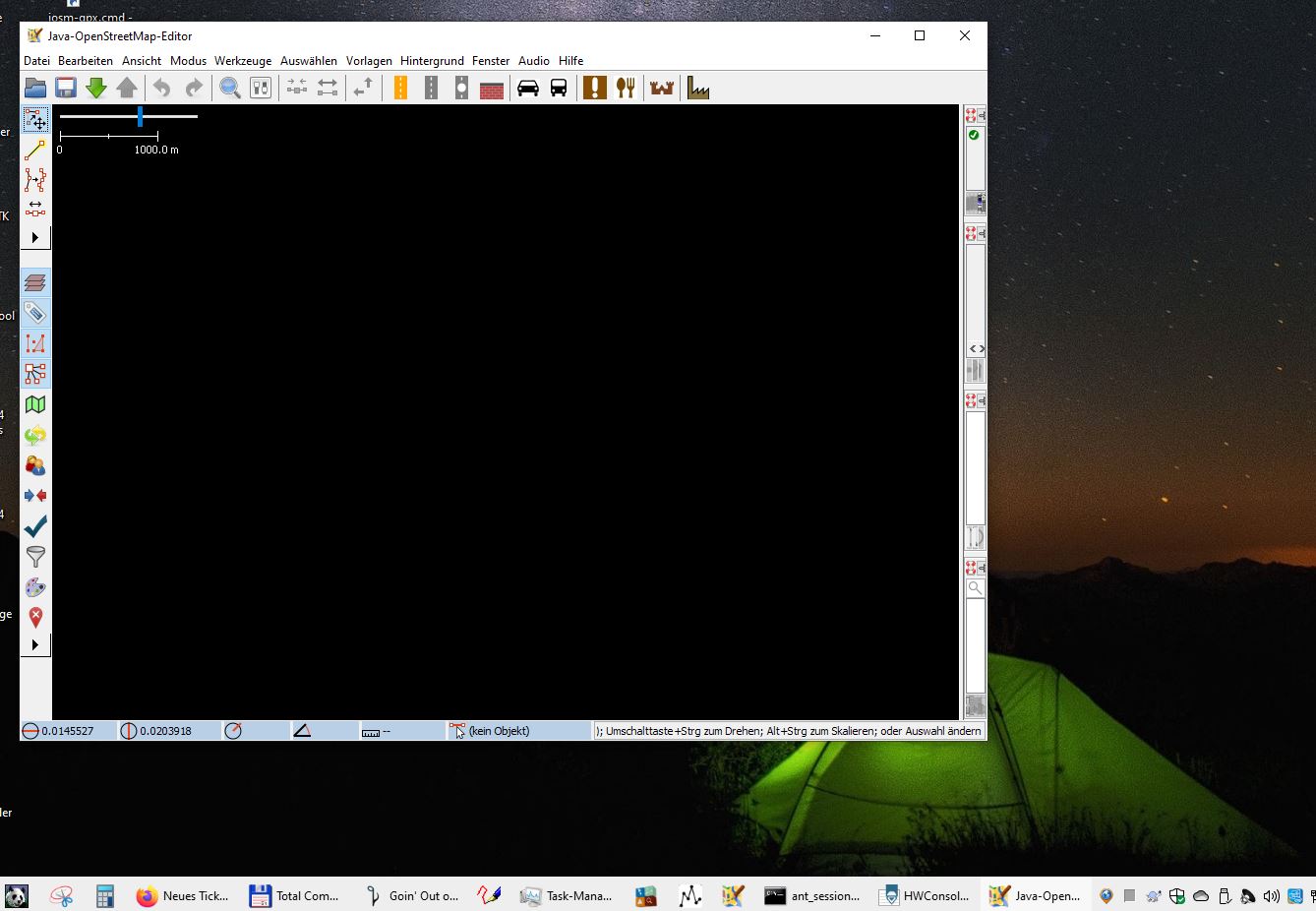

Probably we should restrict the minimum size of the sidebar. Something like 100px or so.