


Opened 6 years ago
Last modified 5 years ago
#20419 closed defect
Map Paint Style icons are duplicated — at Version 1
| Reported by: | JeroenHoek | Owned by: | team |
|---|---|---|---|
| Priority: | normal | Milestone: | 21.08 |
| Component: | Core | Version: | |
| Keywords: | Cc: |
Description (last modified by )
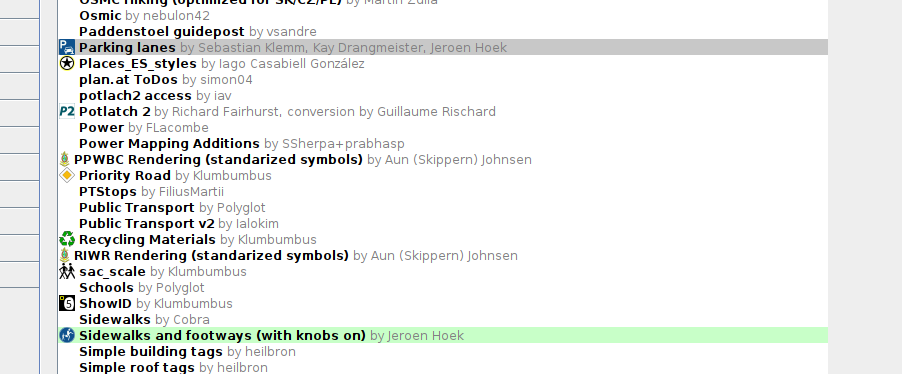
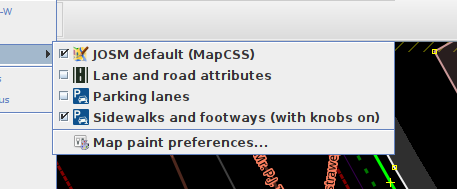
With two Map Paint Styles in use that both have an icon called 'icon.svg' attached to their respective Trac-pages, JOSM shows them correctly in the Map paint preferences dialog where they can be downloaded, but uses the same icon from one of them for both in the menu and preferences window.
It looks like the icons get conflated if the name is the same. The icon name should probably be prefixed with the Map Paint Style name.
Reproduction
- Go to the Map paint preferences, and refresh the list of styles
- See that Parking lanes and Sidewalks and footways (with knobs on) both have distinct icons
- Enable them both
- See that the same icon is reused for both
Correct

Incorrect

Versions tested
Seen in version 17428 and 17475.
Change History (3)
by , 6 years ago
| Attachment: | Screenshot from 2021-01-23 14-28-08.png added |
|---|
by , 6 years ago
| Attachment: | 2021-01-23-142850_2560x1440_scrot.png added |
|---|
Map Paint Styles menu. Icon of Parking lanes is reused for Sidewalks and footways.
comment:1 by , 6 years ago
| Description: | modified (diff) |
|---|
Note:
See TracTickets
for help on using tickets.

Map paint preferences. This is as it should be.