


#17300 closed enhancement (worksforme)
How to Select the desired way (when multiple ways are overlapping) ?
| Reported by: | AnkEric | Owned by: | team |
|---|---|---|---|
| Priority: | normal | Milestone: | |
| Component: | Core | Version: | latest |
| Keywords: | Cc: |
Description
Suppose: two Ways are Connected, Overlapping, Follow line.
F.i. [landuse=grass] + [leisure=playgound] + [amenity=parking]. Or [landuse=forest] + [landuse=forest] (adjacent Areas).
I want to Select (and Edit) one of those Ways.
- How can I select just one? And - also - the correct/desired one?
- After selecting the wrong way, I want to select the other way?
- Selecting just left of the way should select the Area to the left?
What I do now (work-around):
- Select one of those ways (whatever comes first)
- Move one - new - node from the selected way.
- The other way becomes visible and can now be selected easily.
- To finalize: I should restore the moved node back to its original position, or delete it. Which I always forget...
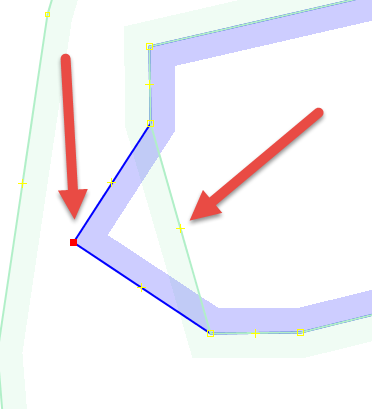
I have no suggestion as to how to enhance. Challenge?
I suppose my request cannot be resolved.
But I can always just ask.
And if you have a solution or better work-around it would be greatly appreciated.
Otherwise: just Close my ticket.
One fool may ask more questions than seven wise men can answer.
Also: current Bad-Practice by some Mappers is they will 'Unglue' adjacent Area's just to "make editing more easily". Ignoring the fact these Areas are adjacent and should be connected.
Which might be considered as "Mapping for the Mapper".
And caused by hard-to-edit (even in JOSM).
/AnkEric
Attachments (0)
Change History (4)
comment:1 by , 8 years ago
comment:2 by , 8 years ago
| Resolution: | → worksforme |
|---|---|
| Status: | new → closed |

Press Alt while clicking on the way until the wanted object is selected.