


Opened 10 years ago
Closed 9 years ago
#13166 closed defect (duplicate)
Popup dialogs open on different monitor when using multiple displays
| Reported by: | anonymous | Owned by: | team |
|---|---|---|---|
| Priority: | normal | Milestone: | |
| Component: | Core | Version: | tested |
| Keywords: | template_report regression | Cc: |
Description
What steps will reproduce the problem?
- Use multiple monitors in the 'Extend' mode of Windows
- Open JOSM and place it on the secondary display
- Perform any action that calls a popup window
What is the expected result?
Popup window opens in same screen
What happens instead?
Popup window opens in different screen
Please provide any additional information below. Attach a screenshot if possible.
See attachment video
URL:http://josm.openstreetmap.de/svn/trunk
Repository:UUID: 0c6e7542-c601-0410-84e7-c038aed88b3b
Last:Changed Date: 2016-07-11 23:04:49 +0200 (Mon, 11 Jul 2016)
Build-Date:2016-07-12 01:31:48
Revision:10526
Relative:URL: ^/trunk

Identification: JOSM/1.5 (10526 en_GB) Windows 10 64-Bit
Memory Usage: 529 MB / 989 MB (209 MB allocated, but free)
Java version: 1.8.0_91-b15, Oracle Corporation, Java HotSpot(TM) Client VM
Dataset consistency test: No problems found

Plugins:
- FastDraw (32639)
- PicLayer (32495)
- buildings_tools (32639)
- geochat (32561)
- jogl (1.0.46)
- log4j (32309)
- turnrestrictions (32629)
- utilsplugin2 (32584)

Map paint styles:
- D:\Box Sync\Downloads\mapnik.zip
- https://josm.openstreetmap.de/josmfile?page=Styles/SimpleRoofTags&zip=1

Last errors/warnings:
- W: Old style SideButton usage for action org.openstreetmap.josm.gui.help.ContextSensitiveHelpAction@119ac5a
- W: Unable to delete file <josm.cache>\tiles\WMS.key
- W: Unable to delete file <josm.cache>\tiles\WMS.data
- W: Unable to delete file <josm.cache>\tiles\WMS_INDEX.key
- W: Unable to delete file <josm.cache>\tiles\WMS_INDEX.data
- W: Unable to delete file <josm.cache>\tiles\WMS_INDEX_v2.key
- W: Unable to delete file <josm.cache>\tiles\WMS_INDEX_v2.data
- W: Old style SideButton usage for action org.openstreetmap.josm.gui.dialogs.DeleteFromRelationConfirmationDialog$OKAction@1f47720
- W: Old style SideButton usage for action org.openstreetmap.josm.gui.dialogs.DeleteFromRelationConfirmationDialog$CancelAction@f6909c
- W: Old style SideButton usage for action org.openstreetmap.josm.gui.help.ContextSensitiveHelpAction@194d4d6
Attachments (2)
Change History (15)
by , 10 years ago
| Attachment: | 2016-07-18_08-37-39_muted.mp4 added |
|---|
comment:1 by , 10 years ago
| Owner: | changed from to |
|---|---|
| Status: | new → needinfo |
by , 10 years ago
| Attachment: | Capture.PNG added |
|---|
comment:2 by , 10 years ago
I use a laptop with a second display that isn't plugged in all the time, so clearing preferences every time is not a viable solution.
If I choose 'restart' however, the main windows does open in the secondary display as expected, but the popup dialogs still appear in the primary monitor.
If I choose 'make this my main display' in Windows, JOSM dialogs do appear in the external monitor, but this is not a full solution, as this also has an effect on other applications and on Windows Explorer behaviour.
comment:3 by , 10 years ago
| Owner: | changed from to |
|---|---|
| Status: | needinfo → new |
I can confirm this issue running Linux on two monitors:
- Start with empty preferences
- Launch JOSM on the left monitor
- Open the download dialog, resize it a bit
- Close JOSM
- Launch JOSM on the right monitor
- Open the download dialog. It appears on the left monitor
comment:4 by , 10 years ago
| Keywords: | regression added |
|---|---|
| Milestone: | → 16.07 |
| Priority: | minor → normal |
Sounds like a regression no?
comment:5 by , 10 years ago
I've been experiencing this behaviour for a long time (>1 year). For some use-cases it might be the desired behaviour (say, putting the relation editor on the second screen outside of the JOSM window).
comment:6 by , 10 years ago
That's a feature. A lot of work dialogs remember their last position. It would only be a bug when it happens for dialogs like error messages and "Are you sure" dialogs.
follow-up: 8 comment:7 by , 10 years ago
I agree unless the main JOSM window is moved to a different screen. In that case, dialogs start popping up outside of the main window when they have shown up inside before.
follow-up: 9 comment:8 by , 10 years ago
Replying to simon04:
I agree unless the main JOSM window is moved to a different screen. In that case, dialogs start popping up outside of the main window when they have shown up inside before.
There is no way around, as distributing the windows to different screens actually is the idea of that. If you don't keep the position, then a stable rearranging of the windows will be impossible. Whatever logic you choose to work around the move issue, there will always be a case where exactly this breaks the idea of multiple screens.
I think the current method
- dialogs keep positions
- requests are relative to main window
is the most understandable solution.
If certain windows violate these rules they should be fixed.
comment:9 by , 10 years ago
Replying to stoecker:
If you don't keep the position, then a stable rearranging of the windows will be impossible.
The current behaviour constrains the use of multiple monitors and the freedom to use JOSM on any of them. We might want to make the rearranging configurable:
- do not remember size and position at all
- do only remember size, but not position
- remember size and position (current behaviour)
I just tested the implementation in LibreOffice (with the replace dialog / Ctrl+H): it remembers the position (also after exit) as long as the dialog is on the same monitor. When launching LibreOffice on a different monitor, the dialog also shows up on that one.
comment:10 by , 10 years ago
That would be another option nobody finds and uses and it will complicate the code. I don't really like that a lot.
comment:11 by , 10 years ago
| Milestone: | 16.07 |
|---|
comment:13 by , 9 years ago
| Resolution: | → duplicate |
|---|---|
| Status: | new → closed |
Closed as duplicate of #4925.


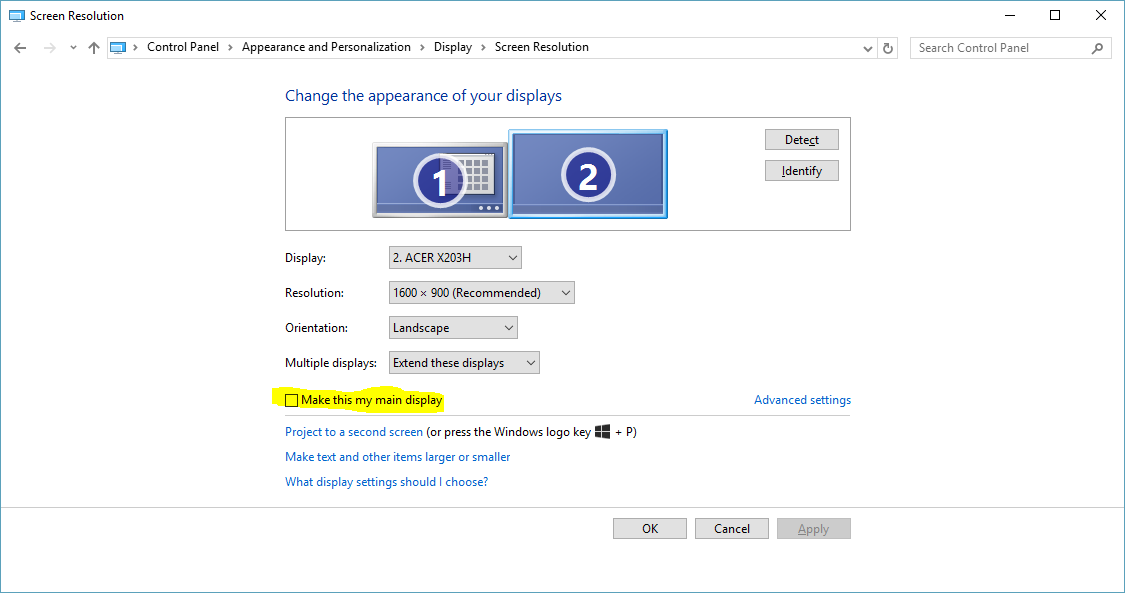

Are you sure about this? In your video in first case the JOSM window is spread over two screens, so it's not totally clear which one would be right and in second case JOSM may have remembered your previous position. Try with a clean installation (clear preferences) to see the default behaviour.
There is a lot of logic in JOSM to handle multiple screens and for me it normally works as expected.