


#10799 closed defect (worksforme)
svg displays wrongly in map paint style (transform matrix)
| Reported by: | SanderH | Owned by: | team |
|---|---|---|---|
| Priority: | normal | Milestone: | |
| Component: | External mappaint style | Version: | |
| Keywords: | template_report | Cc: |
Description (last modified by )
What steps will reproduce the problem?
- Configure paint style http://duinoord.home.xs4all.nl/OSM/JOSM/NL_traffic_signs/Styles_Traffic_signs-style.mapcss
- Load this part of the map into JOSM: http://www.openstreetmap.org/#map=17/51.45683/3.88451
- Look at the rendered icons for node: 311166052, 3167097354, 3167412965
What is the expected result?
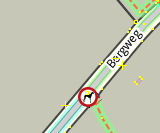
At the position of the nodes with the tag traffic_sign=NL:L1030 an icon is displayed, representing a white circle with a red border and the picture of a dog inside.
http://duinoord.home.xs4all.nl/OSM/JOSM/NL_traffic_signs/traffic_signs/NL/NL_L1030.svg


What happens instead?
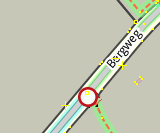
The circle with the red border is displayed correctly, but the dog is displayed only partly (only the dogs back is displayed in the bottom right corner.

Please provide any additional information below. Attach a screenshot if possible.
It appears that the svg renderer within JOSM cannot handle the
<g id="g3809" transform="matrix(0.13389816,0,0,0.18045415,21.156818,24.705262)">
within the svg which should scale that part of the svg down and reposition it in the center of the icon.
Other applications (Chrome, Firefox, IE, Inkscape) properly display the image.
Revision: 7643
Repository Root: http://josm.openstreetmap.de/svn
Relative URL: ^/trunk
Last Changed Author: Don-vip
Last Changed Date: 2014-10-21 21:19:16 +0200 (Tue, 21 Oct 2014)
Build-Date: 2014-10-21 19:23:06
URL: http://josm.openstreetmap.de/svn/trunk
Repository UUID: 0c6e7542-c601-0410-84e7-c038aed88b3b
Last Changed Rev: 7643

Identification: JOSM/1.5 (7643 en) Windows 7 64-Bit
Memory Usage: 367 MB / 1806 MB (123 MB allocated, but free)
Java version: 1.8.0_25, Oracle Corporation, Java HotSpot(TM) 64-Bit Server VM
VM arguments: [-Djava.security.manager, -Djava.security.policy=file:C:\Program Files\Java\jre1.8.0_25\lib\security\javaws.policy, -DtrustProxy=true, -Djnlpx.home=<java.home>\bin, -Djnlpx.origFilenameArg=C:\Users\Sander\AppData\LocalLow\Sun\Java\Deployment\cache\6.0\56\1ee8cfb8-5330e0dc, -Djnlpx.remove=false, -Djava.util.Arrays.useLegacyMergeSort=true, -Djnlpx.splashport=4799, -Djnlp.application.href=https://josm.openstreetmap.de/download/josm.jnlp, -Djnlpx.jvm=<java.home>\bin\javaw.exe, -Djnlpx.vmargs=LURqYXZhLnV0aWwuQXJyYXlzLnVzZUxlZ2FjeU1lcmdlU29ydD10cnVlAC1Eam5scC5hcHBsaWNhdGlvbi5ocmVmPWh0dHBzOi8vam9zbS5vcGVuc3RyZWV0bWFwLmRlL2Rvd25sb2FkL2pvc20uam5scAA=]
Dataset consistency test: No problems found

Plugins:
- DirectDownload (30737)
- FixAddresses (30737)
- PicLayer (30762)
- download_along (30762)
- geotools (30762)
- graphview (30762)
- jts (30762)
- measurement (30737)
- mirrored_download (30762)
- notes (v0.9.4)
- ods-bag (0.5.0)
- opendataservices (0.5.0)
- poly (30738)
- reverter (30737)
- scripting (30700)
- turnlanes (30737)
- undelete (30762)
- utilsplugin2 (30762)

Last errors/warnings:
- E: Failed to locate image 'http://duinoord.home.xs4all.nl/OSM/JOSM/NL_traffic_signs/traffic_signs/NL/NL_D05-L,NL_OB11.svg'
- E: Failed to locate image 'http://duinoord.home.xs4all.nl/OSM/JOSM/NL_traffic_signs/traffic_signs/NL/NL_C04,NL_OB54.svg'
- E: Failed to locate image 'http://duinoord.home.xs4all.nl/OSM/JOSM/NL_traffic_signs/traffic_signs/NL/NL_C03,NL_OB54,NL_G05.svg'
- E: Failed to locate image 'http://duinoord.home.xs4all.nl/OSM/JOSM/NL_traffic_signs/traffic_signs/NL/NL_C07,NL_G05,NL_C03,NL_OV54.svg'
- E: Failed to locate image 'http://duinoord.home.xs4all.nl/OSM/JOSM/NL_traffic_signs/traffic_signs/NL/NL_B02,NL_A01-30-ZB.svg'
Attachments (3)
Change History (10)
comment:1 by , 12 years ago
| Description: | modified (diff) |
|---|
comment:2 by , 12 years ago
| Owner: | changed from to |
|---|---|
| Status: | new → needinfo |
comment:3 by , 12 years ago
| Owner: | changed from to |
|---|---|
| Status: | needinfo → new |
Attached 2 screenshots with how JOSM currently displays the icon and an manually modified version of how JOSM should display the icon.
comment:4 by , 12 years ago
| Description: | modified (diff) |
|---|
by , 12 years ago
| Attachment: | 10799_worksforme.png added |
|---|
comment:5 by , 12 years ago
Mmmm it still works for me, maybe it's a strange combination of map paint styles?

comment:6 by , 12 years ago
| Resolution: | → worksforme |
|---|---|
| Status: | new → closed |
OK, I think I get to understand why it fails. I was updating the image to add the dog. JOSM does some caching to the images and doesn't detect changes directly when resources are on the internet. In the earlier stages of developing the style was stored locally, JOSM immediately refreshes the display.
Until now I tried removing the paint style, restarting JOSM and adding the paint style to see if that might resolve it. But apparently the old cached icon wasn't purged from cache when the associated paint style was removed.
Now I looked up the cache folder, deleted the icon (luckily it's easily recognisable) and it's now displaying OK after JOSM has downloaded a fresh copy.
I was not looking for an option to easily purge the download cache, but apart from the 'Flush tile cache' I don't see an option for that. I guess I'll have to do it manually then.
This was user error unfortunately. Thanks for the prompt responses and sorry for bothering you.
comment:7 by , 12 years ago
You're welcome :) Nice you have found the bug, your icons are great by the way :)

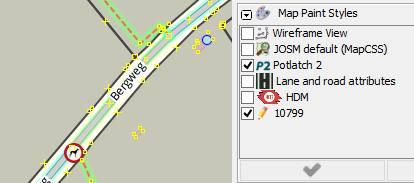
I don't see what the problem is. The icons are correctly displayed, although being rotated to follow the orientation of the way. Could you please attach a screenshot?