| Version 2 (modified by , 11 years ago) ( diff ) |
|---|
Languages:
Minimap Dialog
 Keyboard shortcut:
 none yet
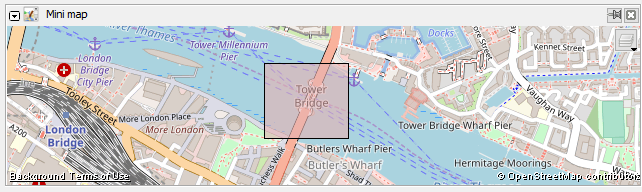
This dialog presents a minimap for better overview of the currently displayed area in the Map View.

Showing and hiding the Notes Dialog Window
Show or hide this dialog window by
- using the Window menu (or, to hide, the dialog's buttons).
- clicking on
 in the tool palette on the left of the JOSM main window
Using the minimap
In the minimap you can zoom with the mousewheel, move and define a new rectangle as editing area.
At the  button you can choose between different maps/aerial imageries, like in the Download Window.
This dialog is availible since r8732.
Back to Toggle Dialogs
Back to Main Help
Attachments (1)
- minimap.png (75.4 KB ) - added by 7 years ago.
Download all attachments as: .zip
Note:
See TracWiki
for help on using the wiki.