| Version 2 (modified by , 10 years ago) ( diff ) |
|---|
Languages:
Accessible from:
- "Imagery" menu as "New offset" item.
- in context menu of "Imagery layer"
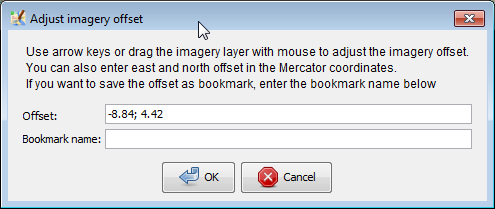
User is prompted to enter two real (R) numbers separated by semicolon and a name of offset. Further instructions displayed directly in the dialogue.

See also
- Plugin imagery_offset_db - a collaborative database with imagery offsets for variety of imagery sources. You could re-use existing offsets instead of guessing right numbers by inaccurate GPS traces
- Using_Imagery - how to use imagery that is offset from a real position
Attachments (1)
- imagery prompt.png (13.4 KB ) - added by 10 years ago.
Download all attachments as: .zip
Note:
See TracWiki
for help on using the wiki.