| Version 6 (modified by , 15 years ago) ( diff ) |
|---|
Tools > Follow line
 Keyboard shortcut:
 F
Makes easier to draw a line that shares points with another line.
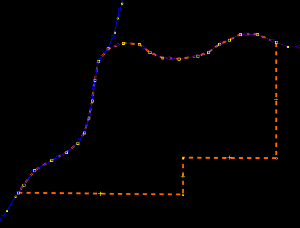
Aimed at those who want to draw two or more lines related with each other, but carry different information, I.e. a river that acts as boundary at some part of its course or a meadow along a riverbank.
Usage
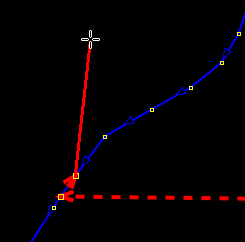
Manually extend the new line to at least two consecutive nodes of the line to follow.

Then press F so many times as needed. The new line is automatically extended point by point along the path of the existent one.
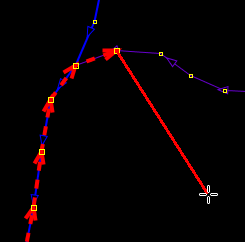
If the new line were to follow a different path (after a junction or at the end of the guide-line), simply extend it manually until there is another line to follow.

The result: a lot of time saved and no skipped or wrongly placed nodes!

Note
Instead of overlapping ways like this, use a boundary relation to include the relevant split section of river with other boundary=administrative ways.
Back to Menu Tools
Back to Main Help
Attachments (3)
- followline_example1.png (4.5 KB ) - added by 15 years ago.
- followline_example2.png (5.8 KB ) - added by 15 years ago.
- followline_example3.png (6.8 KB ) - added by 15 years ago.
Download all attachments as: .zip