


| Version 9 (modified by , 10 years ago) ( diff ) |
|---|
This page is more or less an incomplete copy of https://wiki.openstreetmap.org/wiki/JOSM/Plugins/FastDraw.
Languages:
Fast Draw - creating lines with mouse or pen
Suggested usage - tracing forests, rivers, lakes, twisted roads etc. Without clicking A button or left mouse click too much.
Usage with streams
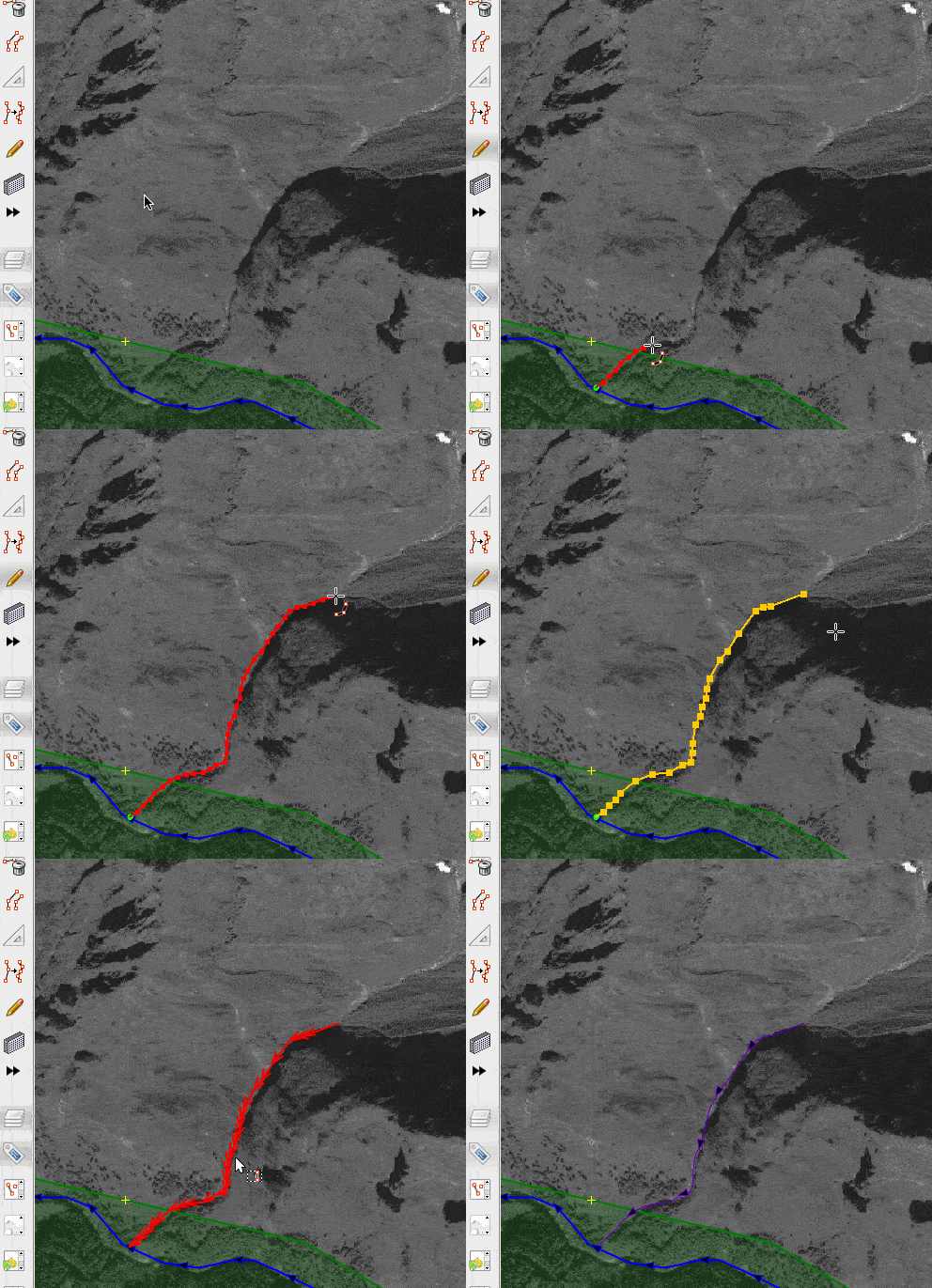
- Enter the drawing mode, click pen toolbar icon (or
Shift+F)). Icon will be set to cross. - Point cursor at starting position. Move mouse. Press or hold:
Spacebaror left mouse button - when you want to add more nodes. Icon will we switched to (icon: cross with 3 nodes), it means that nodes will be added.
- You can move nodes simply by dragging them
Backspace- to delete one of previous nodes sequentiallyCtrl+Clickon free node makes it fixed (icon: a green dot) - that will not be affected by simplification; you may use it for corners or other significant parts of shape but this is not required- If you point cross cursor over node that was entered by other JOSM tools, it will be added as fixed node
Ctrl+Clickon fixed node (icon: a green dot inside red dot) - makes it normal nodeShift+Click(icon: red cross) - to delete selected nodeShift+Click(icon: red cross) - can also used to delete sequence of insignificant nodes between two fixed nodes; it will be highlighted in blue. After you removed a segment, you will enter redrawing mode, a segment that is currently redrawn will be displayed in yellow:- - You can use other shortcuts as usual;
- - To finish redrawing and save new nodes of a segment press
Shift+ClickorEscape Ctrl+Shift+Click(icon: red cross) - will remove all nodes, tool will be ready to use againEscape- to stop editing (you will be prompted to save your edits)- Click on the first node (icon: rectangle with red corners) - will create continuous contour
Enter. Line is simplified to reduce number of nodes.- (optionally) fine tune simplification using
UporDownbuttons. Enteragain. Line (Way) is created and selected.
Please use simplification and validator! Do not upload huge and self-intersecting lines.
Configuration menu (Q)

See also
Attachments (2)
-
fastdraw-stream.gif
(240.9 KB
) - added by 10 years ago.
https://github.com/mapbox/mapping/wiki/Mapping%20with%20JOSM#plugins https://github.com/mapbox/mapping/issues/162
-
fastdraw-q-settings.png
(12.9 KB
) - added by 10 years ago.
https://github.com/mapbox/mapping/wiki/Mapping%20with%20JOSM#plugins https://github.com/mapbox/mapping/issues/162
Download all attachments as: .zip
Note:
See TracWiki
for help on using the wiki.


