


| Version 18 (modified by , 3 years ago) ( diff ) |
|---|
Languages:
Plugin -> UtilsPlugin2 -> Adjacent Nodes
 Keyboard shortcut:
 E
Select adjacent nodes
Selects neighbors of already selected nodes.
Recognizes ways and first selects their nodes before advancing to other ways.
- If some ways are already selected only these are used for advance selection.
- If only ways are selected, their nodes are selected instead.
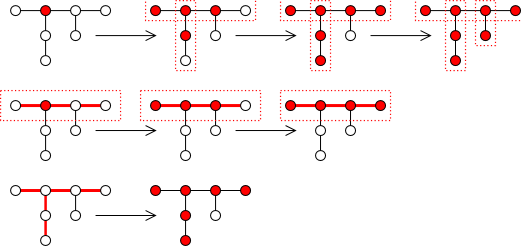
Example of usage: select one node (and possibly its way), press E (3 nodes are selected now), press L to put the node on straight line.
See also


Back to UtilsPlugin2
Back to Main Help
Attachments (1)
- adjnodes.png (20.6 KB ) - added by 16 years ago.
Download all attachments as: .zip
Note:
See TracWiki
for help on using the wiki.

