| Version 1 (modified by , 13 years ago) ( diff ) |
|---|
Traduction en cours
Autres langues:
Récupérer des groupes de modifications
TOC(inline,heading=Table des Matières)
Ouvrir la fenêtre
La fenêtre de requête sur groupe de modifications est lancée à partir du Gestionnaire deq groupes de modifications.
- Ouvrir le gestionnaire des groupes de modifications
- Cliquer sur
 dans la barre d'outil du gestionnaire deq groupes de modifications

Récupérer des groupes de modifications

Requêtes simples

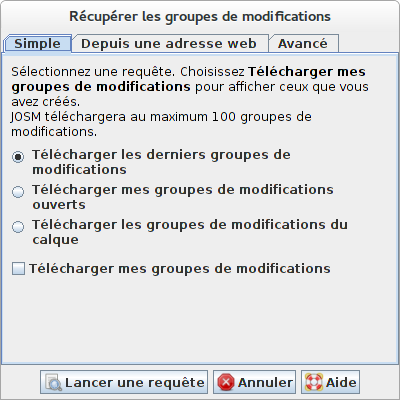
Cliquer sur l'onglet Simple pour sélectionner une des requêtes standard prédéfinies
Vous avez le choix entre :
- Télécharger les derniers groupes de modifications - Cela interrogera et téléchargera du serveur OSM les derniers groupes de modification envoyés. Un maximum de 100 groupes de modifications est renvoyé. Si vous cochez Télécharger uniquement mes groupes de modifications, seuls vos derniers groupes de modifications seront transmis.
- Télécharger mes groupes de modifications ouverts - Cela interrogera et téléchargera vos groupes de modifications restés ouverts. Un maximum de 100 groupes de modifications est renvoyé. Cette requête est inaccessible si vous utilisez JOSM en mode anonyme, c'est-à-dire si vous n'avez pas saisi de profil OSM et de mot de passe dans les préférences JOSM.
- Download changesets in the current map view - this will query the changesets related to the bounding box in the current Map View. This query is disabled unless there is a current map view, i.e. unless there is at least one layer.
Queries from OSM API URLs
You can also copy a query URL used on the OSM Website to define a changeset query in JOSM. In order to do so, copy and paste the URL in the input field in the tab From URL, see below:

You can paste both URL used to query changesets for browsing and URL used to query changesets in the OSM API. Two examples are provided in the dialog, see the screenshot.
If the URL pasted into the input field represents a valid changeset query, the icon  is displayed, otherwise you will see the icon
  .
.
Advanced Queries
It is possible to query changesets on the OSM server based on four criteria:
- based on the changeset owner
- based on whether the changeset is open or closed
- based on when the changeset was created or closed
- based on the area which is affected by the changesets
The Advanced tab provides a UI for defining a changeset query based on these four criteria. There are four checkbox you can select, one checkbox for each kind of query restriction, see below. If a checkbox is selected the respective query restriction will be applied in the query. Depending on the checkbox you select, additional parameters have to be entered, please refer to the following sections.

Query changesets owned by a specific user

You can either restrict the changeset to
- changesets owned by yourself. Note that this option is disabled if you are running JOSM in anonymous mode, i.e. if you don't have an OSM user account or if you didn't enter its name and its password in the JOSM preferences.
- a specific user given its user ID. This is the most precise query option for user based query because the user ID is guaranteed to be unique.
- a specific user given by its user name. This is a slightly less precise query because, for historical reasons, the same user name could be assigned to more than one user.
Query changesets depending on whether they are open or closed

Query changesets based on the date/time they have been created or closed

The OSM API currently supports two kinds of date/time based queries.
- In the first query you have to supply a date/time as parameter. The OSM server replies all changesets closed after this date/time.
- In the first query you have to supply two date/time values as parameters. The OSM server replies all changesets closed after the first date/time and created before the second date/time.
It is not intuitively clear why the OSM server provides exactly these two features for date/time based changeset queries but as of API 0.6 (the current API version) that's what JOSM can and does support.
Date/time values have to be entered as two seperate values: (1) a date value and (2) a time value. The time value is optional. Both date and time values can be entered in the format familiar in your locale. Hover over one of the date or time fields to see the list of supporte formats in the tooltip text.
Query changesets covering a specific bounding box

Changesets can be queried based on the area they cover. In order to restrict a changeset query to a specific area you have to enter its bounding box.
Either enter the lower left (minimum latitude/minimum longitude) and the upper right (maximum latitude/maximum longitude) corners or copy/paste a download URL for a specific area in the field URL.
Attachments (8)
- basic-tab-fr.png (3.0 KB ) - added by 13 years ago.
- advanced-based-on-bbox-fr.png (6.7 KB ) - added by 13 years ago.
- advanced-based-on-datetime-fr.png (7.1 KB ) - added by 13 years ago.
- advanced-based-on-openclosed-fr.png (3.1 KB ) - added by 13 years ago.
- advanced-tab-fr.png (21.4 KB ) - added by 13 years ago.
- advanced-based-on-user-fr.png (5.7 KB ) - added by 13 years ago.
- changeset-query-dialog-ss-fr.png (29.8 KB ) - added by 13 years ago.
- url-based-query-fr.png (26.9 KB ) - added by 13 years ago.
Download all attachments as: .zip