


Opened 14 years ago
Last modified 14 years ago
#8252 new defect
irregular black border around pictures — at Version 4
| Reported by: | skyper | Owned by: | team |
|---|---|---|---|
| Priority: | normal | Milestone: | |
| Component: | Plugin importimage | Version: | |
| Keywords: | Cc: |
Description (last modified by )
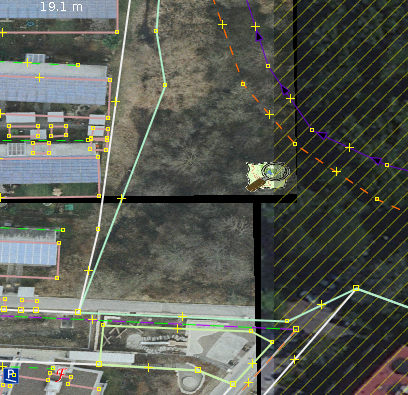
I get irregular black borders around pictures after reprojection. This is annoying working with overlapping pictures and this border should be transparent.
You can see it right away with only one picture and another background (Bing).
Have a look at #8248 for an example picture.
I also noticed that this picture is misaligned about some metres compared to the piclayer but I am not really sure which one is wrong.
[EDIT]:
I did open the picture with both plugins in its projection (Gauß-Krüger 3) and they show up on the same possition. E.g. the reprojection of either data or picture does not work.

Repository Root: http://josm.openstreetmap.de/svn
Build-Date: 2012-12-04 02:31:51
Last Changed Author: Don-vip
Revision: 5611
Repository UUID: 0c6e7542-c601-0410-84e7-c038aed88b3b
URL: http://josm.openstreetmap.de/svn/trunk
Last Changed Date: 2012-12-04 00:43:04 +0100 (Tue, 04 Dec 2012)
Last Changed Rev: 5611

Identification: JOSM/1.5 (5611 de)
Memory Usage: 403 MB / 592 MB (118 MB allocated, but free)
Java version: 1.6.0_24, Sun Microsystems Inc., OpenJDK 64-Bit Server VM
Operating system: Linux
Dataset consistency test: No problems found

Plugin: ImportImagePlugin (29028)
Plugin: geotools (29026)
Plugin: jts (28945)
Plugin: log4j (28968)
Plugin: utilsplugin2 (28807)
Change History (5)
by , 14 years ago
| Attachment: | black_border.png added |
|---|
comment:1 by , 14 years ago
| Description: | modified (diff) |
|---|
follow-up: 3 comment:2 by , 14 years ago
I don't really understand your setup, which plugin do you use and in which projection? Can you attach the image and worldfile?
You cannot use Bing in Gauss-Kruger if that is the problem.
comment:3 by , 14 years ago
Replying to bastiK:
I don't really understand your setup, which plugin do you use and in which projection? Can you attach the image and worldfile?
I use ImportImagePlugin. Map projection is set to WSG84 and picture projection is default (31467) for the screenshot. If I move the different picture layers up and down I noticed the black border which covers the layers below. This border is produced in the reprojection process of the picture (31467->WSG84).
The other problem concerns also ImportImagePlugin with the same projections. I did draw from AEROWEST with map projection Gauß-Krüger-3 (31467) and now the picture of ImportImage is misaligned compared to the data. Then I started to switch map projection and opening the picture again with ImportImage and with Piclayer and with map projection set to Gauß-Krüger the picture are the same with Piclayer and ImportImage. E.g. either the image or the data are wrong projected. See #8253 for the full story.
You cannot use Bing in Gauss-Kruger if that is the problem.
No, I sometimes use it to make sure that AEROWEST is still up to date but not for drawing. That is exactly why I tried to use ImportImage with WSG84. I thought I might be able to align Bing and be able to draw of both sources without switching map projection all the time.
comment:4 by , 14 years ago
| Description: | modified (diff) |
|---|

screenshot