


Opened 9 months ago
Closed 9 months ago
#24607 closed defect (fixed)
Needed an easy way to render TMS layer on BufferedImage in a plugin
| Reported by: | zkir | Owned by: | team |
|---|---|---|---|
| Priority: | normal | Milestone: | |
| Component: | Core | Version: | tested |
| Keywords: | Satellite imagery, TMS, plugin | Cc: |
Description (last modified by )
Hello!
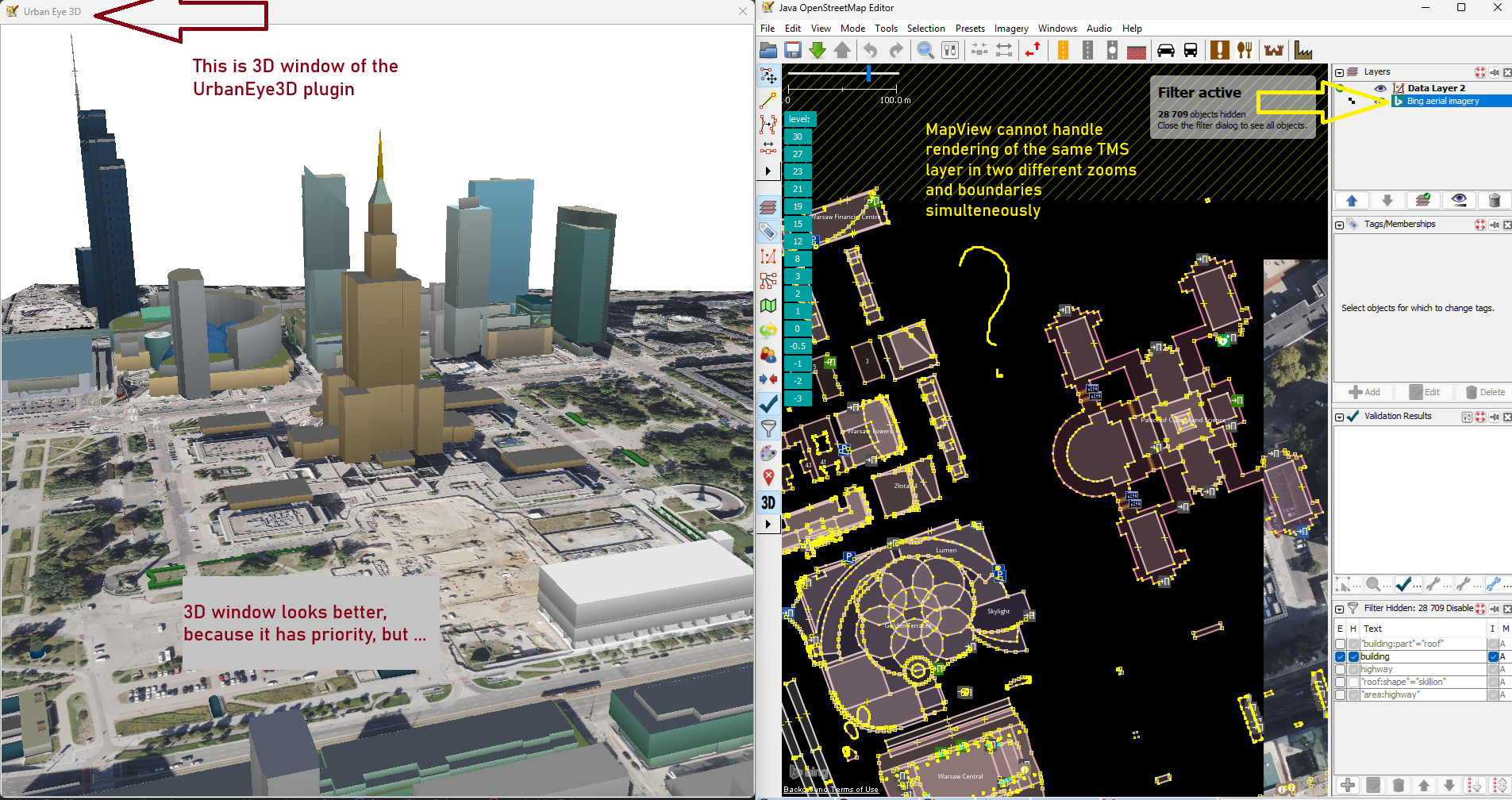
I'm the developer of the UrbanEye3D plugin (https://github.com/Zkir/UrbanEye3D) and I'm currently working on a new feature: displaying satellite imagery in the 3D window (see the attached screenshot).
I've managed to get the imagery to display using some tricks with the MapView and JosmMapViewer classes. However, rendering in the 3D window conflicts with rendering the same imagery in the 2D window: tiles reload multiple times and the 2D window flashes. The reason is pretty obvious — MapView is a descendant of javax.swing.JComponent and is tightly coupled with the GUI.
What I need is just a simple way to render a TMS layer into a BufferedImage, given pixel dimensions and geographical bounds, without it affecting any GUI elements.
public BufferedImage renderLayerToImage(TMSLayer layer, Bounds bounds, int textureWidth, int textureHeight){
    // ...
}
I've already spent several days on this and am completely stuck.
Please advise — maybe I'm missing something obvious.
Best regards,
Kirill (aka Zkir)
Attached:
(https://josm.openstreetmap.de/raw-attachment/ticket/24607/ue3d_bug_report.png).
Attachments (1)
Change History (9)
by , 9 months ago
| Attachment: | ue3d_bug_report.png added |
|---|
comment:1 by , 9 months ago
| Description: | modified (diff) |
|---|
comment:2 by , 9 months ago
| Description: | modified (diff) |
|---|
comment:3 by , 9 months ago
| Description: | modified (diff) |
|---|
comment:4 by , 9 months ago
comment:5 by , 9 months ago
You want to display the existing layers in the main MapView and additionally in the 3D view?
Yes, exactly. The whole idea of the plugin is that 3D View is synchronized with the main 2D map view (except zoom and camera angle).
So if a satelite layer is visible in 2D window, I would like to display it in 3D view also.
For buildings it works pretty well, since I just read data from OsmDataLayer via OsmDataLayer.getDataSet()
So the question may be put in other way: how to read tiles from AbstractTileSourceLayer ?
Please advice :)
comment:6 by , 9 months ago
Only reading the tiles wont help, as there is a lot of projection, reprojection, alignment, ... involved.
Very likely you need to extend the existing rendering somehow. Issue is: You need to find out yourself how to do, there is nobody who can advise except the code itself or doc.
If you find a proper way which needs addition of some cleanly designed interface functions you can provide a patch and it will be integrated. Though I assume it should be possible to reach your goal without changes to the core.
comment:7 by , 9 months ago
Well, if I could get tiles from the tile cache, that will cover 90% оf the job. I have a pretty good idea of what to with them, since projection etc. in the 3D window is different.
But OK, I will proceed on my own and see how far I can get. For now, feel free to close this ticket. If I come up with any reasonable changes in the JOSM core, I'll be back!
comment:8 by , 9 months ago
| Resolution: | → fixed |
|---|---|
| Status: | new → closed |
If you're using the tile cache you will be limited to TMS images. JOSM supports a lot of different layer types. If you use the higher level layer functions it will be more generic.



You want to display the existing layers in the main MapView and additionally in the 3D view? Sounds dangerous.
You probably need to step in somewhere in the middle. AbstractTileSourceLayer.paint() with different targets or something alike.
I'm not sure somebody did something similar already.
Vincent spent a lot of time decoupling the MapView component from the main view screen, but there is probably enough work left...