Opened 9 months ago
#24581 new defect
Can't update plugin in JOSM if Dark Mode is active
| Reported by: | anonymous | Owned by: | simon04 |
|---|---|---|---|
| Priority: | normal | Milestone: | |
| Component: | Plugin flatlaf | Version: | |
| Keywords: | template_report | Cc: |
Description
Hi there,
I have installed the Flatlaf plugin in order to enable the Dark Mode in JOSM, unfortunately I keep getting an error message when launching JOSM, saying that the plugin can't be updated since it's already in use.
To update the plugin, I need to disable it, restart JOSM, perform the update, re-enable and restart JOSM again.
That's quite annoying, hope it can be fixed somehow!
Thank you so much,
Max
What steps will reproduce the problem?
- Launch JOSM
- Install the Flatlaf plugin
- Enable the Dark mode and restart JOSM
- Use JOSM regularly, until an update for Flatlaf becomes available
- When update is available, on JOSM startup, select the option to update all the plugins
What is the expected result?
Flatlaf plugin is updated, as well as the others.
What happens instead?
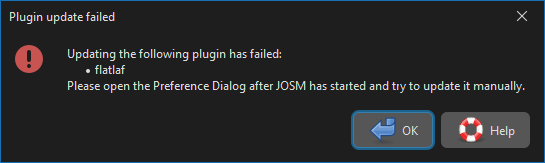
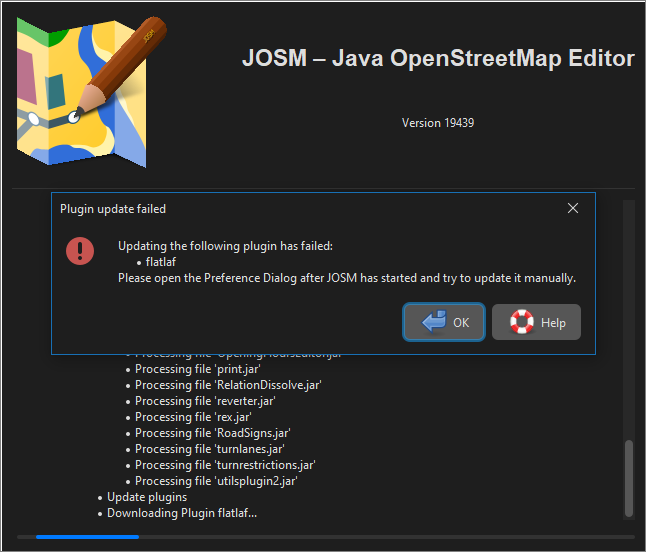
Flatlaf plugin fails with message "Updating the following plugin has failed: 'flatlaf'. Please open the Preferences dialog after JOSM has started and try to update it manually".
If I select Continue, JOSM starts normally;
If i Open the Settings menu and try to update the plugin manually, I get the error message:
"Downloading the following plugin has failed:
flatlaf
Error message(untranslated): java.nio.file.FileSystemException: C:\Users\Utente\AppData\Roaming\JOSM\plugins\flatlaf.jar.new: Cannot access file. File is used by another process"
Please provide any additional information below. Attach a screenshot if possible.
Revision:19439
Build-Date:2025-09-01 09:22:37

Identification: JOSM/1.5 (19439 en) Windows 10 64-Bit
OS Build number: Windows 10 Pro 22H2 (19045)
Memory Usage: 624 MB / 18432 MB (303 MB allocated, but free)
Java version: 21.0.8+9-LTS, Azul Systems, Inc., OpenJDK 64-Bit Server VM
Look and Feel: com.formdev.flatlaf.themes.FlatMacDarkLaf
Screen: \Display0 1920x1080x32bpp@60Hz (scaling 1.00×1.00)
Maximum Screen Size: 1920×1080
Best cursor sizes: 16×16→32×32, 32×32→32×32
System property file.encoding: UTF-8
System property sun.jnu.encoding: Cp1252
Locale info: en_IT
Numbers with default locale: 1234567890 -> 1234567890
VM arguments: [-Djpackage.app-version=1.5.19439, -XX:MaxRAMPercentage=75.0, --add-modules=java.scripting,java.sql,javafx.controls,javafx.media,javafx.swing,javafx.web, --add-exports=java.base/sun.security.action=ALL-UNNAMED, --add-exports=java.desktop/com.sun.imageio.plugins.jpeg=ALL-UNNAMED, --add-exports=java.desktop/com.sun.imageio.spi=ALL-UNNAMED, --add-opens=java.base/java.lang=ALL-UNNAMED, --add-opens=java.base/java.nio=ALL-UNNAMED, --add-opens=java.base/jdk.internal.loader=ALL-UNNAMED, --add-opens=java.base/jdk.internal.ref=ALL-UNNAMED, --add-opens=java.desktop/javax.imageio.spi=ALL-UNNAMED, --add-opens=java.desktop/javax.swing.text.html=ALL-UNNAMED, --add-opens=java.prefs/java.util.prefs=ALL-UNNAMED, -Djpackage.app-path=%UserProfile%\AppData\Local\JOSM\JOSM.exe]

Plugins:
+ FastDraw (36438)
+ HouseNumberTaggingTool (36438)
+ OpeningHoursEditor (36438)
+ RelationDissolve (0.2.0)
+ RoadSigns (36438)
+ apache-commons (36438)
+ areaselector (366)
+ austriaaddresshelper (101)
+ buildings_tools (36438)
+ changessum (v0.1.1)
+ continuosDownload (128)
+ easypresets (1623509627)
+ editgpx (36438)
+ ejml (36438)
+ fastdriveway (v1.0.1)
+ flatlaf (36176)
+ imagery_offset_db (36438)
+ log4j (36438)
+ measurement (36438)
+ notesolver (0.5.0)
+ print (36438)
+ reverter (36447)
+ rex (60)
+ turnlanes (36438)
+ turnrestrictions (36458)
+ utilsplugin2 (36438)

Tagging presets:
+ <josm.pref>/EasyPresets.xml

Map paint styles:
+ https://josm.openstreetmap.de/josmfile?page=Styles/Potlatch2&zip=1
- https://josm.openstreetmap.de/josmfile?page=Styles/iD&zip=1

Last errors/warnings:
- 00001.074 W: extended font config - overriding 'filename.Myanmar_Text=mmrtext.ttf' with 'MMRTEXT.TTF'
- 00001.075 W: extended font config - overriding 'filename.Mongolian_Baiti=monbaiti.ttf' with 'MONBAITI.TTF'
- 00008.569 E: java.security.KeyStoreException: Windows-ROOT not found. Cause: java.security.NoSuchAlgorithmException: Windows-ROOT KeyStore not available
- 00012.589 W: Update plugins - You updated your JOSM software. To prevent problems the plugins should be updated as well.  Update plugins now?
- 00018.277 E: org.openstreetmap.josm.plugins.PluginDownloadException: java.nio.file.FileSystemException: <josm.pref>\plugins\flatlaf.jar.new: Impossibile accedere al file. Il file è utilizzato da un altro processo. Cause: java.nio.file.FileSystemException: <josm.pref>\plugins\flatlaf.jar.new: Impossibile accedere al file. Il file è utilizzato da un altro processo
- 00018.775 E: Plugin update failed - <html>Updating the following plugin has failed:<ul><li>flatlaf</li></ul>Please open the Preference Dialog after JOSM has started and try to update it manually.</html>
- 00021.202 W: Failed to delete outdated plugin '<josm.pref>\plugins\flatlaf.jar'.
- 00021.202 W: Failed to install already downloaded plugin 'flatlaf'. Skipping installation. JOSM is still going to load the old plugin version.
- 00028.724 E: java.nio.file.NoSuchFileException: <josm.pref>\EasyPresets.xml
- 00028.724 E: <josm.pref>/EasyPresets.xml
Attachments (2)
Change History (2)
by , 9 months ago
| Attachment: | Flatlaf_update_error_01.png added |
|---|
by , 9 months ago
| Attachment: | Flatlaf_update_error_02.png added |
|---|