


Opened 10 months ago
Closed 9 months ago
#24580 closed defect (fixed)
JOSM won't load DGT's Ortho corrected images
| Reported by: | anonymous | Owned by: | anonymous |
|---|---|---|---|
| Priority: | normal | Milestone: | 26.01 |
| Component: | Core | Version: | |
| Keywords: | template_report | Cc: |
Description
What steps will reproduce the problem?
- I've updated JOSM because I thought that this would solve the viewing of the "Ortosat 2023" provided by Portugal DGT, it stopped working about a bit more than a week ago. The other resources of DGT used to work fine. Since the update of JOSM, neither the 2021 works and the 2018 is not even possible to add it as layer in the list, it keeps being deleted. The other Bing, Mapbox work but they are not Ortho corrected, so it's really a hassle to work with them in the areas I map.
What is the expected result?
It should show the imagery background.
What happens instead?
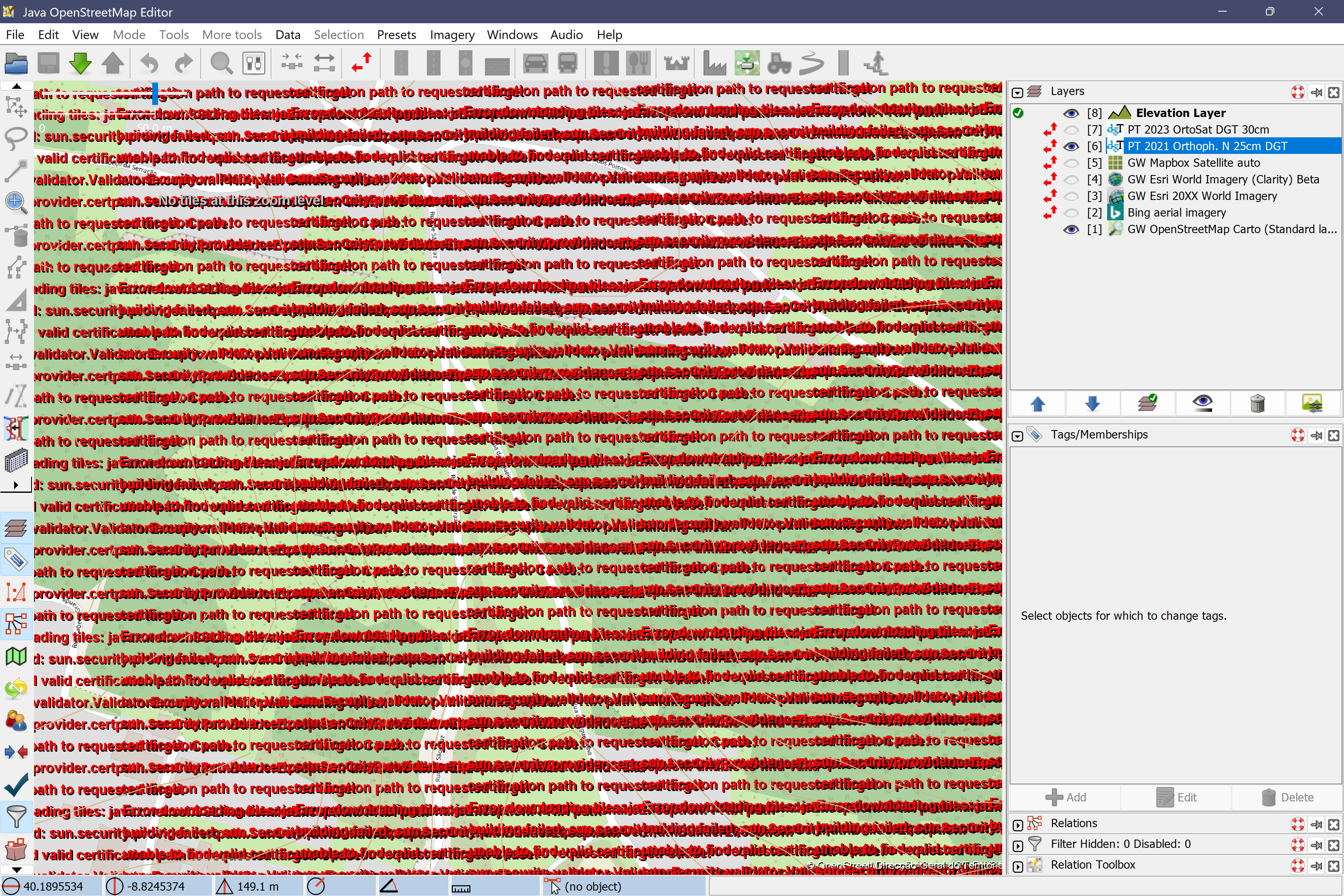
Showing error in red text, there is so much overlapping that it is not even readable. Something to do with "SSL" and "certification path to request target".
Please provide any additional information below. Attach a screenshot if possible.
Revision:19439
Build-Date:2025-09-01 09:22:37

Identification: JOSM/1.5 (19439 en_GB) Windows 11 64-Bit
OS Build number: Windows 10 Pro 25H2 (26200)
Memory Usage: 992 MB / 12232 MB (309 MB allocated, but free)
Java version: 21.0.8+9-LTS, Azul Systems, Inc., OpenJDK 64-Bit Server VM
Look and Feel: com.sun.java.swing.plaf.windows.WindowsLookAndFeel
Screen: \Display0 3240x2160x32bpp@60Hz (scaling 2.50×2.50)
Maximum Screen Size: 3240×2160
Best cursor sizes: 16×16→64×64, 32×32→64×64
System property file.encoding: UTF-8
System property sun.jnu.encoding: Cp1252
Locale info: en_GB
Numbers with default locale: 1234567890 -> 1234567890
VM arguments: [-Djpackage.app-version=1.5.19439, -XX:MaxRAMPercentage=75.0, --add-modules=java.scripting,java.sql,javafx.controls,javafx.media,javafx.swing,javafx.web, --add-exports=java.base/sun.security.action=ALL-UNNAMED, --add-exports=java.desktop/com.sun.imageio.plugins.jpeg=ALL-UNNAMED, --add-exports=java.desktop/com.sun.imageio.spi=ALL-UNNAMED, --add-opens=java.base/java.lang=ALL-UNNAMED, --add-opens=java.base/java.nio=ALL-UNNAMED, --add-opens=java.base/jdk.internal.loader=ALL-UNNAMED, --add-opens=java.base/jdk.internal.ref=ALL-UNNAMED, --add-opens=java.desktop/javax.imageio.spi=ALL-UNNAMED, --add-opens=java.desktop/javax.swing.text.html=ALL-UNNAMED, --add-opens=java.prefs/java.util.prefs=ALL-UNNAMED, -Djpackage.app-path=%UserProfile%\AppData\Local\JOSM\JOSM.exe]

Plugins:
+ Elevation (0.17.1)
+ ImageWayPoint (36438)
+ ImportImagePlugin (36438)
+ SimplifyArea (36438)
+ alignways (36438)
+ apache-commons (36438)
+ apache-http (36438)
+ buildings_tools (36438)
+ continuosDownload (128)
+ contourmerge (v0.2.2)
+ easypresets (1623509627)
+ ejml (36438)
+ geotools (36438)
+ imagery_offset_db (36438)
+ jackson (36438)
+ jaxb (36438)
+ jna (36438)
+ jts (36438)
+ log4j (36438)
+ photo_geotagging (36438)
+ photoadjust (36463)
+ rasterfilters (1.0.5)
+ reltoolbox (36438)
+ reverter (36447)
+ turnrestrictions (36458)
+ undelete (36438)
+ utilsplugin2 (36438)

Tagging presets:
+ <josm.pref>/EasyPresets.xml

Map paint styles:
+ https://github.com/gmgeo/osmic-josm-style/archive/master.zip
- https://josm.openstreetmap.de/josmfile?page=Styles/FixmeAndNote&zip=1
+ https://josm.openstreetmap.de/josmfile?page=Styles/SidewalksAndFootways&zip=1

Last errors/warnings:
- 00167.215 W: javax.net.ssl.SSLHandshakeException: PKIX path building failed: sun.security.provider.certpath.SunCertPathBuilderException: unable to find valid certification path to requested target. Cause: sun.security.validator.ValidatorException: PKIX path building failed: sun.security.provider.certpath.SunCertPathBuilderException: unable to find valid certification path to requested target. Cause: sun.security.provider.certpath.SunCertPathBuilderException: unable to find valid certification path to requested target
- 00167.240 W: javax.net.ssl.SSLHandshakeException: PKIX path building failed: sun.security.provider.certpath.SunCertPathBuilderException: unable to find valid certification path to requested target. Cause: sun.security.validator.ValidatorException: PKIX path building failed: sun.security.provider.certpath.SunCertPathBuilderException: unable to find valid certification path to requested target. Cause: sun.security.provider.certpath.SunCertPathBuilderException: unable to find valid certification path to requested target
- 00167.254 W: javax.net.ssl.SSLHandshakeException: PKIX path building failed: sun.security.provider.certpath.SunCertPathBuilderException: unable to find valid certification path to requested target. Cause: sun.security.validator.ValidatorException: PKIX path building failed: sun.security.provider.certpath.SunCertPathBuilderException: unable to find valid certification path to requested target. Cause: sun.security.provider.certpath.SunCertPathBuilderException: unable to find valid certification path to requested target
- 00167.268 W: javax.net.ssl.SSLHandshakeException: PKIX path building failed: sun.security.provider.certpath.SunCertPathBuilderException: unable to find valid certification path to requested target. Cause: sun.security.validator.ValidatorException: PKIX path building failed: sun.security.provider.certpath.SunCertPathBuilderException: unable to find valid certification path to requested target. Cause: sun.security.provider.certpath.SunCertPathBuilderException: unable to find valid certification path to requested target
- 00167.281 W: javax.net.ssl.SSLHandshakeException: PKIX path building failed: sun.security.provider.certpath.SunCertPathBuilderException: unable to find valid certification path to requested target. Cause: sun.security.validator.ValidatorException: PKIX path building failed: sun.security.provider.certpath.SunCertPathBuilderException: unable to find valid certification path to requested target. Cause: sun.security.provider.certpath.SunCertPathBuilderException: unable to find valid certification path to requested target
- 00167.302 W: javax.net.ssl.SSLHandshakeException: PKIX path building failed: sun.security.provider.certpath.SunCertPathBuilderException: unable to find valid certification path to requested target. Cause: sun.security.validator.ValidatorException: PKIX path building failed: sun.security.provider.certpath.SunCertPathBuilderException: unable to find valid certification path to requested target. Cause: sun.security.provider.certpath.SunCertPathBuilderException: unable to find valid certification path to requested target
- 00167.324 W: javax.net.ssl.SSLHandshakeException: PKIX path building failed: sun.security.provider.certpath.SunCertPathBuilderException: unable to find valid certification path to requested target. Cause: sun.security.validator.ValidatorException: PKIX path building failed: sun.security.provider.certpath.SunCertPathBuilderException: unable to find valid certification path to requested target. Cause: sun.security.provider.certpath.SunCertPathBuilderException: unable to find valid certification path to requested target
- 00167.335 W: javax.net.ssl.SSLHandshakeException: PKIX path building failed: sun.security.provider.certpath.SunCertPathBuilderException: unable to find valid certification path to requested target. Cause: sun.security.validator.ValidatorException: PKIX path building failed: sun.security.provider.certpath.SunCertPathBuilderException: unable to find valid certification path to requested target. Cause: sun.security.provider.certpath.SunCertPathBuilderException: unable to find valid certification path to requested target
- 00167.354 W: javax.net.ssl.SSLHandshakeException: PKIX path building failed: sun.security.provider.certpath.SunCertPathBuilderException: unable to find valid certification path to requested target. Cause: sun.security.validator.ValidatorException: PKIX path building failed: sun.security.provider.certpath.SunCertPathBuilderException: unable to find valid certification path to requested target. Cause: sun.security.provider.certpath.SunCertPathBuilderException: unable to find valid certification path to requested target
- 00167.374 W: javax.net.ssl.SSLHandshakeException: PKIX path building failed: sun.security.provider.certpath.SunCertPathBuilderException: unable to find valid certification path to requested target. Cause: sun.security.validator.ValidatorException: PKIX path building failed: sun.security.provider.certpath.SunCertPathBuilderException: unable to find valid certification path to requested target. Cause: sun.security.provider.certpath.SunCertPathBuilderException: unable to find valid certification path to requested target
Attachments (1)
Change History (10)
by , 10 months ago
| Attachment: | JOSM error.jpg added |
|---|
comment:1 by , 10 months ago
follow-up: 3 comment:2 by , 10 months ago
| Owner: | changed from to |
|---|---|
| Status: | new → needinfo |
Probably another new certificate authority. It seems "Hellenic Academic and Research Institutions CA" is used, which Java very likely doesn't know about.
Please be more specific which site exactly you fail to load? URL?
comment:3 by , 10 months ago
Replying to stoecker:
Probably another new certificate authority. It seems "Hellenic Academic and Research Institutions CA" is used, which Java very likely doesn't know about.
Please be more specific which site exactly you fail to load? URL?
Thanks for helping!
I tried to update Azul Zulu JDK to 25, still not working. By the way, if I read correctly some time ago, JOSM developers prefer Azul over the original Oracle package for compatibility reasons?
If by site you mean URL with "get capabilities": https://ortos.dgterritorio.gov.pt/wms/ortosat2023?service=wms&request=getcapabilities
Or without: https://geo2.dgterritorio.gov.pt/wms/sc2500k that I found on this site here https://www.dgterritorio.gov.pt/cartografia/cartografia-topografica/scn2500k
comment:4 by , 10 months ago
comment:7 by , 9 months ago
| Milestone: | → 25.10 |
|---|
comment:9 by , 9 months ago
| Resolution: | → fixed |
|---|---|
| Status: | needinfo → closed |


I add: