


Modify ↓
Opened 14 months ago
Last modified 4 weeks ago
#24448 new enhancement
WARNING: package sun.security.action not in java.base
| Reported by: | pl71 | Owned by: | team |
|---|---|---|---|
| Priority: | normal | Milestone: | |
| Component: | Core | Version: | tested |
| Keywords: | template_report java24+ | Cc: |
Description (last modified by )
What steps will reproduce the problem?
- Start JOSM in Windows 10 with the following bat file
java ^
   --module-path "D:\graaljs-24.1.1\lib" ^
   --add-modules org.graalvm.polyglot,org.graalvm.word,org.graalvm.collections ^
   --add-opens java.prefs/java.util.prefs=ALL-UNNAMED ^
   --add-exports java.base/sun.security.action=ALL-UNNAMED ^
   --add-exports java.desktop/com.sun.imageio.plugins.jpeg=ALL-UNNAMED ^
   --add-exports java.desktop/com.sun.imageio.spi=ALL-UNNAMED ^
   -jar -Xms1g -Xmx8g ^
   josm-tested.jar
What is the expected result?
No warnings in console
What happens instead?
WARNING: package sun.security.action not in java.base
Please provide any additional information below. Attach a screenshot if possible.
Relative:URL: ^/trunk
Repository:UUID: 0c6e7542-c601-0410-84e7-c038aed88b3b
Last:Changed Date: 2025-07-11 10:12:51 +0200 (Fri, 11 Jul 2025)
Revision:19423
Build-Date:2025-07-12 01:30:35
URL:https://josm.openstreetmap.de/svn/trunk

Identification: JOSM/1.5 (19423 bg) Windows 10 64-Bit
OS Build number: Windows 10 Education 22H2 (19045)
Memory Usage: 1024 MB / 8192 MB (619 MB allocated, but free)
Java version: 24.0.2+11-jvmci-b01, GraalVM Community, OpenJDK 64-Bit Server VM
Look and Feel: com.sun.java.swing.plaf.windows.WindowsLookAndFeel
Screen: \Display0 1920x1080x32bpp@59Hz (scaling 1.00×1.00)
Maximum Screen Size: 1920×1080
Best cursor sizes: 16×16→32×32, 32×32→32×32
System property file.encoding: UTF-8
System property sun.jnu.encoding: Cp1251
Locale info: bg_BG
Numbers with default locale: 1234567890 -> 1234567890
VM arguments: [-XX:ThreadPriorityPolicy=1, --module-path=D:\graaljs-24.1.1\lib, --add-modules=org.graalvm.polyglot,org.graalvm.word,org.graalvm.collections, --add-opens=java.prefs/java.util.prefs=ALL-UNNAMED, --add-exports=java.base/sun.security.action=ALL-UNNAMED, --add-exports=java.desktop/com.sun.imageio.plugins.jpeg=ALL-UNNAMED, --add-exports=java.desktop/com.sun.imageio.spi=ALL-UNNAMED]

Plugins:
+ Mapillary (1813)
+ apache-commons (36438)
+ conflation (273)
+ ejml (36438)
+ geotools (36438)
+ imagery_offset_db (36438)
+ jackson (36438)
+ jaxb (36438)
+ jts (36438)
+ opendata (36440)
+ pmtiles (36438)
+ reverter (36447)
+ scripting (v0.3.5)
+ splinex (36438)
+ urbaneye3d (1.2.0)
+ utilsplugin2 (36438)

Tagging presets:
+ https://josm.openstreetmap.de/josmfile?page=Presets/NewParkingFeatures&zip=1

Map paint styles:
- https://josm.openstreetmap.de/josmfile?page=Styles/Lane_and_Road_Attributes&zip=1
- https://josm.openstreetmap.de/josmfile?page=Styles/ParkingLanes&zip=1
- https://josm.openstreetmap.de/josmfile?page=Styles/MapWithAI&zip=1

Last errors/warnings:
- 00000.448 W: extended font config - overriding 'filename.Malgun_Gothic=malgun.ttf' with 'MALGUN.TTF'
- 00000.449 W: extended font config - overriding 'filename.Myanmar_Text=mmrtext.ttf' with 'MMRTEXT.TTF'
- 00000.449 W: extended font config - overriding 'filename.Mongolian_Baiti=monbaiti.ttf' with 'MONBAITI.TTF'
Attachments (1)
Change History (5)
by , 14 months ago
| Attachment: | Security.PNG added |
|---|
comment:1 by , 13 months ago
I'm on Mac and can't add a new imagery layer, probably due to the same problem:
Error getting layers: PKIX path building failed:
sun.security.provider.certpath.SunCertPathBuilderException: unable to find valid certification path to requested target
comment:2 by , 4 weeks ago
I removed the java.base/sun.security.action=ALL-UNNAMED exports from the code, buildscripts and runtime params locally, and the warning disappeared. Not sure if it breaks anything, but JOSM seems to work just like before.
comment:3 by , 4 weeks ago
| Keywords: | java24+ added |
|---|
https://bugs.openjdk.org/browse/JDK-8062515
There are some hardening updates in java24 and java25.
comment:4 by , 4 weeks ago
| Description: | modified (diff) |
|---|
Note:
See TracTickets
for help on using tickets.


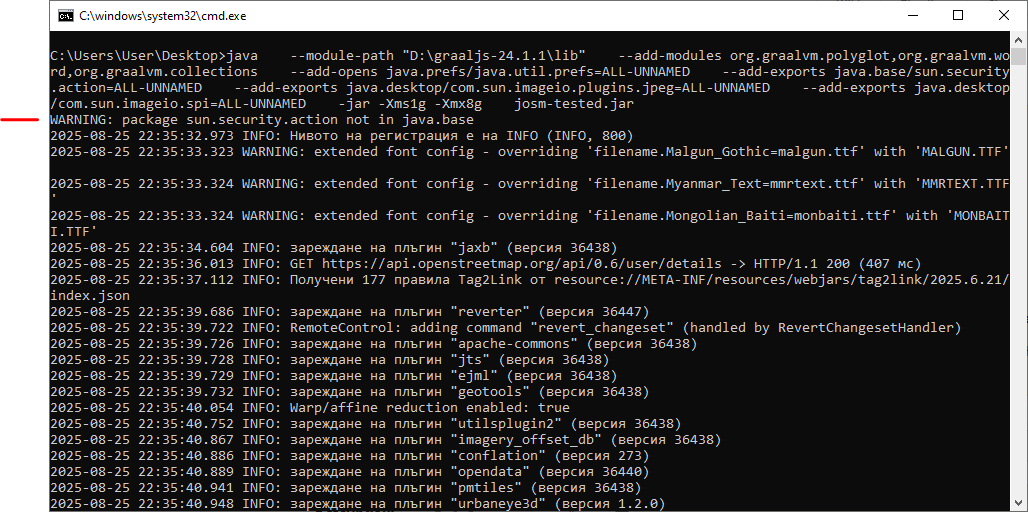
WARNING: package sun.security.action not in java.base