


Opened 2 years ago
Last modified 3 weeks ago
#23680 needinfo enhancement
Make jump to coordinates accept unsplit coordinates
| Reported by: | felagund | Owned by: | felagund |
|---|---|---|---|
| Priority: | normal | Milestone: | 26.09 |
| Component: | Core | Version: | |
| Keywords: | Cc: | felagund |
Description
CTRL+J opens a dialog that allows one to put in coordinates. It works but is inefficient:
1) Latitude and Longtitude are separate. However, I usually paste the coordinates from another program, so I have something like “-71.44939,-44.15408” in my clipboard. I need to manually split it, which takes time.
2) Unhelpfully on Linux, when either of the two fields gets focus, there is a prefilled value, which gets selected, causing the prefilled value to get to X clipboard (the one accessed by selecting text, not pressing CTRL+C), erasing the value I just wanted to paste.
It would be great if the dialog just accepted coordinates like "-71.44939,-44.15408" directly.
Also see discussion here, I am apparently not the only one trying to get around this: https://community.openstreetmap.org/t/efficient-way-to-jump-to-coordinates-in-josm/113228
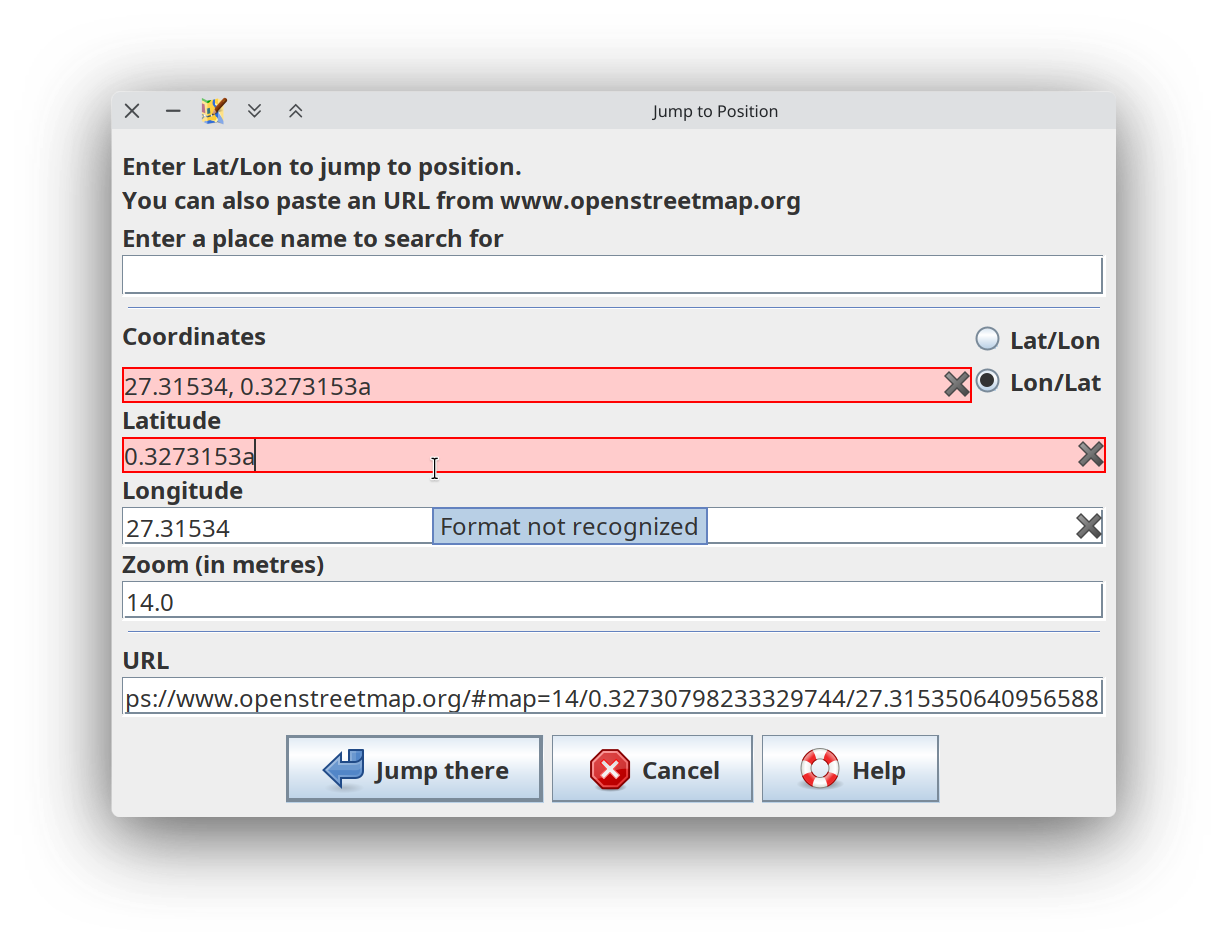
Attachments (3)
Change History (25)
follow-up: 3 comment:1 by , 2 years ago
| Owner: | changed from to |
|---|---|
| Status: | new → needinfo |
comment:2 by , 2 years ago
I also prefer to use Shift+D (Add node) since that dialog accepts many formats, but it requires a data layer.
I'll attach a small patch which tries to parse the place field in the same way as Shift+D in preference to the call of nominatim.
by , 2 years ago
| Attachment: | 23680.patch added |
|---|
try to interpret the place name as lat lon pair before asking Nominatim for a result (ignores Zoom field)
comment:3 by , 2 years ago
Replying to stoecker:
The format you suggest is simply not usable, because it isn't defined enough. There are people using lat,lon and others are using lon,lat. There is no way for JOSM to reliable detect what's meant and we don't want to add heuristics that may guess, as this will only produce much more trouble.
The given format is accepted by LatLonParser.parse().
comment:4 by , 2 years ago
Problem with -71.44939,-44.15408 is that it is not obvious whether this means lat=-71.44939 and lon=-44.15408 or vice versa.
With the patch JOSM jumps to a place in the ocean, not to this node https://www.osm.org/node/402088091.
comment:5 by , 2 years ago
LatLonParser is currently only called in situations where the order is defined. You'd extend this to a place where it is not.
comment:6 by , 2 years ago
Yes, that's true. Probably Shift+D only works for me because my lat/lon pairs are in the correct order.
comment:7 by , 2 years ago
TL;DR what about adding a radio button to choose either "lat/lon" or "lon/lat"? (ideally it would remember the last order selected). That would also be helpful for SHIFT+D.
Longer version:
Indeed, the Add Node/Shift+S dalog is much better for my needs. It would make sense to me if these two would reuse their component or were even combined into one dialog on different tabs (still activable with separate shorcuts for each tab, or possibly one could have "add node at coordinates" checked). However, that seems like a major undertaking.
A simpler thing, even for Add Node, it would make a lot of sense to me if the order of Lat/Lon was configurable. I guess an ideal situation would be that CTRL+J accepts what SHIFT+D accepts. Either merge Latitude and Longtitute into one field or add a third Lat/Lon field. Either solution could then have a radio button with either "Lat/Lon" or "Lon/Lat" which would govern how to interpret ambigious coordinates (about half of examples in the Shift+D dialog are ambigious). Such a button would also be helpful in the the SHIFT+D dialog.
I did some reading now and while Lat/Lon is the standard, this is not adhered to universally:
https://docs.geotools.org/latest/userguide/library/referencing/order.html
https://stackoverflow.com/questions/7309121/preferred-order-of-writing-latitude-longitude-tuples-in-gis-services
Specifically my coordinates come from a KML file which uses the reverse order (oddly enough, user output from Google Maps gives the correct order). And I guess KML si not going anywhere soon so there are always going to be times when the reverse order is used.
In any case, even without specifying the order, having one field that accepts both lon and lat would be very helpful on its own. I assume people often paste these values and they get them as a pair and splitting them manually is a lot of effort.
comment:8 by , 2 years ago
We could extend the dialog a bit so that Lat and Lon fields are more intelligent.
- If you paste one of the accepted formats of LatLonParser into lon fields it's handled as lon/lat
- If you paste one of the accepted formats of LatLonParser into lat fields it's handled as lat/lon
Needs to ignore a leftover number in the other field or clear it when combined format is detected.
This could also extend lat/lon fields to more possible formats of LatLonParser, as currently it only accepts a number.
follow-up: 10 comment:9 by , 2 years ago
Yes, that would be an improvemet, but it would still not help with reversed coordinates (which are a fact of life, it seems).
Is there big value in having the lon/lat fields separate anyway? Especially since there is the other dialog (SHIFT+D) that has only one field, it seems inconsistent to me.
follow-up: 11 comment:10 by , 2 years ago
Replying to felagund:
Yes, that would be an improvemet, but it would still not help with reversed coordinates (which are a fact of life, it seems).
Why not?
Is there big value in having the lon/lat fields separate anyway? Especially since there is the other dialog (SHIFT+D) that has only one field, it seems inconsistent to me.
Different methods are for different users. It's one of the JOSM philosophies that TIMTOWTDI. Everybody is happy with something else.
follow-up: 12 comment:11 by , 2 years ago
Replying to stoecker:
Replying to felagund:
Yes, that would be an improvemet, but it would still not help with reversed coordinates (which are a fact of life, it seems).
Why not?
Well, if I have the coordiantes in Lon/Lat, it will still disinterpret them, no? The more I think about it, a radio button letting the user select the order seems like the best solution.
Is there big value in having the lon/lat fields separate anyway? Especially since there is the other dialog (SHIFT+D) that has only one field, it seems inconsistent to me.
Different methods are for different users. It's one of the JOSM philosophies that TIMTOWTDI. Everybody is happy with something else.
I am ok with that. That is why I suggested creating a third combined field. Pasting it twice is ok, but not terribly discoverable. Also that brings me to the issue 2) I mentioned - when you paste from X Primary selection instead of clipboard, the value you want to paste get overwritten. That values are prepopulated does not seem very fortunate to me.
comment:12 by , 2 years ago
Replying to felagund:
Well, if I have the coordiantes in Lon/Lat, it will still disinterpret them, no? The more I think about it, a radio button letting the user select the order seems like the best solution.
Quoting myself:
If you paste one of the accepted formats of LatLonParser into lon fields it's handled as lon/lat
If you paste one of the accepted formats of LatLonParser into lat fields it's handled as lat/lon
comment:13 by , 2 years ago
Aha, sorry, I did not read it thouroughly enough and misunderstood. So it would populate the other field. That would indeed be clever and useful.
However it is very unintuitive, I would never expect it to work that way. It would need to have some hint into the interface that the field behave like that (I really like that SHIFT+D has extensive documentation of what formats it accepts).
What do you think about the fields being prepopulated by the last searched-for-value? It is distinctly unhelpful to my usecase, under TIMTOWTDI, a checkbox "remember last used position" would solve that.
comment:14 by , 2 years ago
see also #6429 (opened 13 years ago - sigh!)
A solution concerning the problem with lat/lon and lon/lat could be accomplished similar to how wikimapia handles coordinate locations to search for:
Example: 27.4955, 11.0089
- Go to this location: 7839 km
11.0089 N, 27.4955. E (coord.)
- Go to this location: 8650 km
27.4955. N, 11.0089 E (coord.)
by , 3 weeks ago
| Attachment: | Screenshot_20260929_031416.png added |
|---|
Screenshot of the implemented dialog
comment:15 by , 3 weeks ago
So with a help of LLM, I am implementing my suggestion from comment 7. After 15 iterations, it is starting to have a nice shape.
I implemented inline clear buttons (reusable across JOSM), fixed a bug that made the text at the top not appear and youcan switch between Lat/Lon and Lon/Lat. The fields detect when they cannot parse what is pasted into them by turning red, the fields live-update each other. Coordinates accept what Add node accepts (informs about it with a tooltip. It is about 150 lines of code so far.
Are (reviewed!!!) patches built with LLM asistance accepted? Any feedback on the design is of course accepted.
comment:16 by , 3 weeks ago
I don't care about the way source code was generated, only the quality of the code. That said - Sending big patches which are hardly reviewable and which you don't understand yourself will usually result in rejection. Sending smaller patches solving a singular issue usually will get accepted as long as they fit into the way JOSM works (which is a wide spectrum :-).
comment:17 by , 3 weeks ago
Yeah, I have some experience already, got about ten MRs to Pipewire and about 40 to KDE :-). Making something upstreamable is more work than making it functional.
However, are you ok with the overall design on the screenshot? There was some disagreement about the design above, I think this is quite TIMTOWTDI and will be functional, but would like to know what you think before I spend time polishing it.
comment:18 by , 3 weeks ago
Personally I find it's just chucking far too many controls in front of the user. It's covering three main requirements:
- Search
- Parse from a URL
- Entry of lat/lon (ideally in various different formats and ordering)
It could, and should, just be a single text field with a label underneath which shows the lat/lon which has been found/parsed. Lat/lon / Lon/lat could be a radio choice, and I think zoom (which isn't in metres) is not necessary: derive from the URL, or default to z18 if loads of decimal places, or z12 otherwise.
I do think the inconsistencies between this functionality and "Tools/Add node" are jarring. If you were instead to borrow from it then the Jump to position dialog could have Search, URL, Latitude/Longitude and Easting/Northing tabs. And then the common functionality could have lat/lon ordering flip added (that Add node dialog currently has "lat/lon" in the tab, but only accepts "lon/lat" is another big inconsistency)
comment:19 by , 3 weeks ago
I tried to implement what you suggest Wangi and indeed it is better. Add node, Move node and Jump node now share the same code, look at the screenshot above. I quite like it. Should I start cleaning up the code for submission? I would really like to get a green line on the design before I start doing that, it is usually a lot more work to make samething upstreamable than make it functional :-).
comment:21 by , 3 weeks ago
Looks much better.
Now a goody would be following behaviour: When detectable data is pasted into the wrong field (i.e. URL into lat/lon or search), but it can be correctly guessed, then use it (though don't document that :-)
That allows shortcuts to clicking without breaking the UI and we can later remove it in case it causes trouble. As JOSM is a tool for power users such small things can make life much easier.
comment:22 by , 3 weeks ago
| Milestone: | → 26.09 |
|---|




Your request is not as easy as it seems. JOSM already supports a bunch of formats in clipboard which have both values in one string, see trunk/src/org/openstreetmap/josm/tools/OsmUrlToBounds.java. The most known ist the #map= from openstreetmap page.
Others are with bbox or min/max+lat/lon or geo: format.
The format you suggest is simply not usable, because it isn't defined enough. There are people using lat,lon and others are using lon,lat. There is no way for JOSM to reliable detect what's meant and we don't want to add heuristics that may guess, as this will only produce much more trouble.
If you can suggest another strictly defined format we can add this. Otherwise this is a WONTFIX.