


#21967 closed defect (fixed)
[Patch] Keep OSM layer activated when loading GPX layer
| Reported by: | Owned by: | team | |
|---|---|---|---|
| Priority: | normal | Milestone: | 22.03 |
| Component: | Core | Version: | tested |
| Keywords: | template_report gpx importer | Cc: | Bjoeni |
Description
What steps will reproduce the problem?
- Load a region into JOSM
- Open a GPX with a track file. (It's not necessary that this tracks overlaps the downloaded area.)
What is the expected result?
The OSM data can be edited in JOSM as usual.
What happens instead?
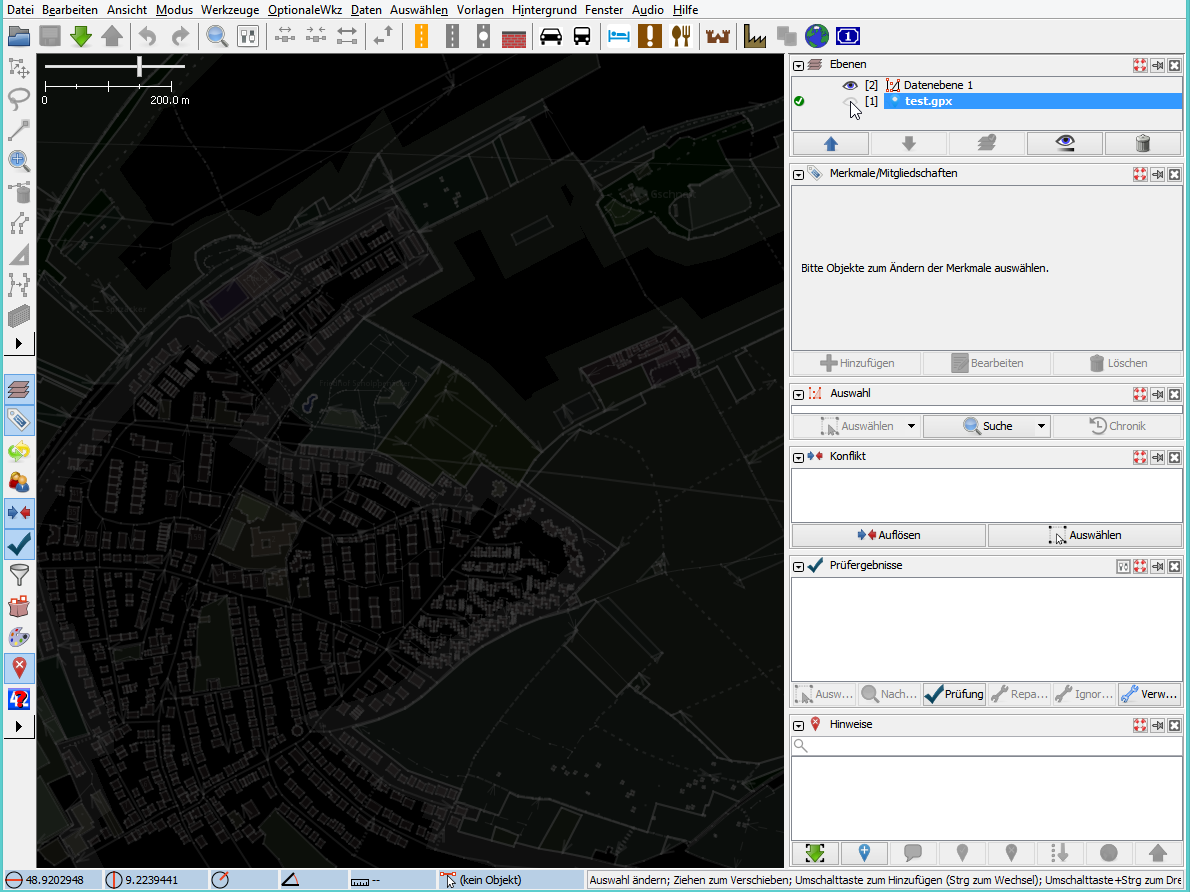
The OSM ways are grey and not editable. Deactiviating the GPX layer via the eye symbol does NOT help, the GPX track vanishes but the OSM ways are still grey and not editable. After deleting the GPX layer via the trash symbol the OSM ways immediately get their colours back and the ways are editable again.
Please provide any additional information below. Attach a screenshot if possible.
JOSM1.png: The normal and expected state. No GPX file loaded
JOSM2.png: GPX file loaded. The elements are grey and not editable.
I did this many times in the past: Loading GPX files from several sources (Garmin satnav device, several smartphones, GPX files from various other sources, GPX files created by GPSBabel and other tools) and it has always worked until some JOSM version. I noticed this behavior with at least JOSM version.
URL:https://josm.openstreetmap.de/svn/trunk
Repository:UUID: 0c6e7542-c601-0410-84e7-c038aed88b3b
Last:Changed Date: 2022-03-06 10:38:55 +0100 (Sun, 06 Mar 2022)
Build-Date:2022-03-07 02:31:09
Revision:18387
Relative:URL: ^/trunk

Identification: JOSM/1.5 (18387 de) Windows 8.1 64-Bit
OS Build number: Windows 8.1 Pro (9600)
Memory Usage: 205 MB / 455 MB (68 MB allocated, but free)
Java version: 1.8.0_311-b11, Oracle Corporation, Java HotSpot(TM) 64-Bit Server VM
Look and Feel: com.sun.java.swing.plaf.windows.WindowsLookAndFeel
Screen: \Display0 1920×1200 (scaling 1.00×1.00)
Maximum Screen Size: 1920×1200
Best cursor sizes: 16×16→32×32, 32×32→32×32
System property file.encoding: Cp1252
System property sun.jnu.encoding: Cp1252
Locale info: de_DE
Numbers with default locale: 1234567890 -> 1234567890

Plugins:
+ FixAddresses (35893)
+ buildings_tools (35916)
+ continuosDownload (99)
+ fieldpapers (v0.5.0)
+ openqa (0.2.2)
+ utilsplugin2 (35893)

Last errors/warnings:
- 00005.243 W: Unable to request certificate of https://grca.nat.gov.tw
- 00005.482 W: Unable to request certificate of https://grca.nat.gov.tw
Attachments (2)
Change History (9)
by , 5 years ago
comment:1 by , 5 years ago
| Keywords: | gpx added |
|---|---|
| Priority: | major → normal |
| Resolution: | → worksforme |
| Status: | new → closed |
JOSM always activates new data and gpx layers. In order to edit a layer you need to activate it ( ), see Help/Dialog/LayerList.
comment:2 by , 5 years ago
Okay, this way it works for me, too, so it's not a bug. However, up to a few months ago I didn't have to click the green "check" symbol after loading a GPX file in order to edit the map - has this behaviour changed recently?
comment:3 by , 5 years ago
| Cc: | added |
|---|---|
| Resolution: | worksforme |
| Status: | closed → reopened |
comment:5 by , 5 years ago
| Keywords: | importer added |
|---|---|
| Milestone: | → 22.03 |
| Summary: | OSM elements are not editable if a GPX file is loaded → [Patch] Keep OSM layer activated when loading GPX layer |
Looks like I introduced that with r18287.
-
src/org/openstreetmap/josm/gui/io/importexport/GpxImporter.java
### Eclipse Workspace Patch 1.0
#P josm
16 16 import org.openstreetmap.josm.gui.layer.GpxLayer; 17 17 import org.openstreetmap.josm.gui.layer.GpxRouteLayer; 18 18 import org.openstreetmap.josm.gui.layer.ImageryLayer; 19 import org.openstreetmap.josm.gui.layer.Layer; 20 import org.openstreetmap.josm.gui.layer.MainLayerManager; 19 21 import org.openstreetmap.josm.gui.layer.OsmDataLayer; 20 22 import org.openstreetmap.josm.gui.layer.markerlayer.MarkerLayer; 21 23 import org.openstreetmap.josm.gui.progress.ProgressMonitor; … … 139 141 public static void addLayers(final GpxImporterData data) { 140 142 // FIXME: remove UI stuff from the IO subsystem 141 143 GuiHelper.runInEDT(() -> { 144 MainLayerManager manager = MainApplication.getLayerManager(); 142 145 if (data.markerLayer != null) { 143 MainApplication.getLayerManager().addLayer(data.markerLayer);146 manager.addLayer(data.markerLayer); 144 147 } 145 148 if (data.gpxRouteLayer != null) { 146 MainApplication.getLayerManager().addLayer(data.gpxRouteLayer);149 manager.addLayer(data.gpxRouteLayer); 147 150 } 148 151 if (data.gpxLayer != null) { 149 MainApplication.getLayerManager().addLayer(data.gpxLayer); 150 MainApplication.getLayerManager().setActiveLayer(data.gpxLayer); 152 manager.addLayer(data.gpxLayer); 153 Layer activeLayer = manager.getActiveLayer(); 154 if (activeLayer == null || activeLayer instanceof GpxLayer || activeLayer instanceof MarkerLayer) { 155 manager.setActiveLayer(data.gpxLayer); 156 } 151 157 } 152 158 data.postLayerTask.run(); 153 159 });



Screenshot of working JOSM, without a loaded GPX file