Opened 6 years ago
Last modified 6 years ago
#19887 closed defect
Parallel ways tool: bottom toolbar unusable to view offset measurement after update to stable release 17084, probably an unintended side effect of the 'fix' for ticket #19830. — at Version 4
| Reported by: | Squizie3 | Owned by: | team |
|---|---|---|---|
| Priority: | normal | Milestone: | 20.11 |
| Component: | Core | Version: | latest |
| Keywords: | template_report parallel ways measurement bottom toolbar regression | Cc: | GerdP |
Description (last modified by )
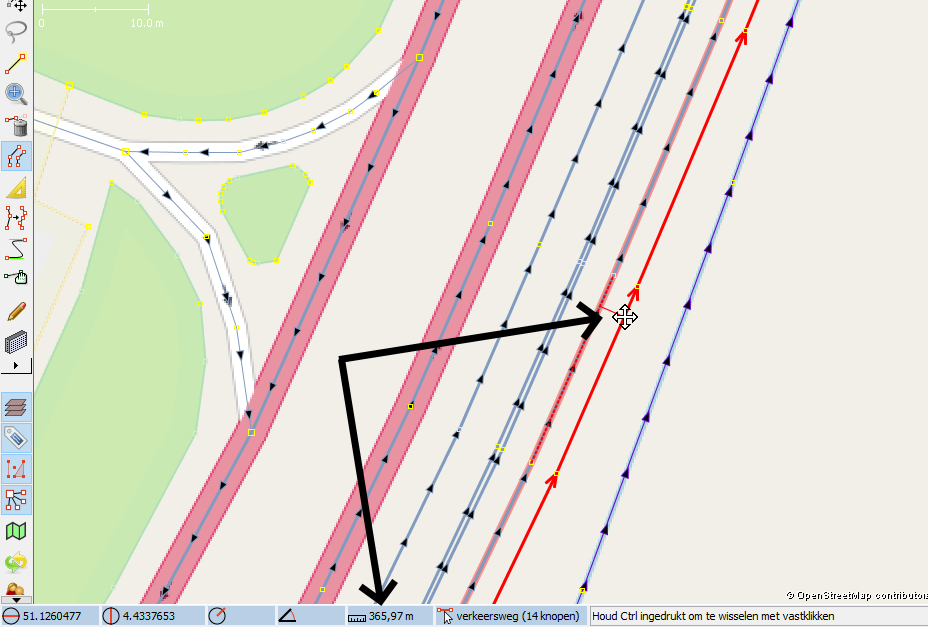
Parallel ways tool: the bottom toolbar 'offset measurement' switches almost instantly to show the 'way length measurement', meaning you can't determine the offset you're at anymore, making the parallel way tool very hard to use. This is most likely caused by stable release 17084 which included a fix for ticket #19830 as a 'medium enhancement', but has an unintented side effect on the parallel ways tool.
What steps will reproduce the problem?
- Activate the parallel ways tool in the sidebar
- Select a random way with your mouse and drag it to the side to create a parallel way
- Watch the bottom toolbar's measurement box flicker between the offset you're making and the way length while you're dragging the mouse, making it extremely hard to see the offset you're dragging it at.
What is the expected result?
The offset being shown in the measurement box while using the parallel ways tool, until you deselect that way or select another way. This was the behaviour before the update to version 17084. Or at least keep the offset shown until you release the mouse button when dragging.
What happens instead?
The offset is only shown for literal milliseconds and gets overridden by the way's length constantly, making it almost impossible to see the offset you're making.
Please provide any additional information below. Attach a screenshot if possible.

URL:https://josm.openstreetmap.de/svn/trunk
Repository:UUID: 0c6e7542-c601-0410-84e7-c038aed88b3b
Last:Changed Date: 2020-10-03 13:42:38 +0200 (Sat, 03 Oct 2020)
Build-Date:2020-10-04 01:30:47
Revision:17084
Relative:URL: ^/trunk

Identification: JOSM/1.5 (17084 nl) Windows 10 64-Bit
OS Build number: Windows 10 Home 2004 (19041)
Memory Usage: 824 MB / 1820 MB (667 MB allocated, but free)
Java version: 1.8.0_261-b12, Oracle Corporation, Java HotSpot(TM) 64-Bit Server VM
Look and Feel: com.sun.java.swing.plaf.windows.WindowsLookAndFeel
Screen: \Display0 1280x768 (scaling 1.0x1.0)
Maximum Screen Size: 1280x768
Best cursor sizes: 16x16 -> 32x32, 32x32 -> 32x32
VM arguments: [-Djava.security.manager, -Djava.security.policy=file:<java.home>\lib\security\javaws.policy, -DtrustProxy=true, -Djnlpx.home=<java.home>\bin, -Djnlpx.origFilenameArg=%UserProfile%\AppData\LocalLow\Sun\Java\Deployment\cache\6.0\56\1ee8cfb8-7bd2a134, -Djnlpx.remove=false, -Djava.util.Arrays.useLegacyMergeSort=true, -Djnlpx.heapsize=NULL,2048m, -Djnlpx.splashport=60643, -Djnlp.application.href=https://josm.openstreetmap.de/download/josm.jnlp, -Djnlpx.jvm=<java.home>\bin\javaw.exe]
Dataset consistency test: No problems found

Plugins:
+ FastDraw (35499)
+ PicLayer (35405)
+ buildings_tools (35563)
+ log4j (35092)
+ measurement (35405)
+ pbf (35446)
+ public_transport (35405)
+ reverter (35556)
+ routing (35405)
+ splinex (35454)
+ turnrestrictions (35515)
+ utilsplugin2 (35487)

Map paint styles:
- https://josm.openstreetmap.de/josmfile?page=Styles/PublicTransportV2&zip=1
Change History (5)
by , 6 years ago
| Attachment: | JOSM bug parallel ways.png added |
|---|
comment:1 by , 6 years ago
| Keywords: | regression added |
|---|
comment:2 by , 6 years ago
| Description: | modified (diff) |
|---|
comment:3 by , 6 years ago
| Cc: | added |
|---|
comment:4 by , 6 years ago
| Description: | modified (diff) |
|---|