


Opened 6 years ago
Closed 6 years ago
#18289 closed defect (fixed)
Download map is misaligned
| Reported by: | maarten | Owned by: | team |
|---|---|---|---|
| Priority: | normal | Milestone: | 19.11 |
| Component: | JMapViewer | Version: | latest |
| Keywords: | regression zoom download bounds | Cc: | wiktorn |
Description (last modified by )
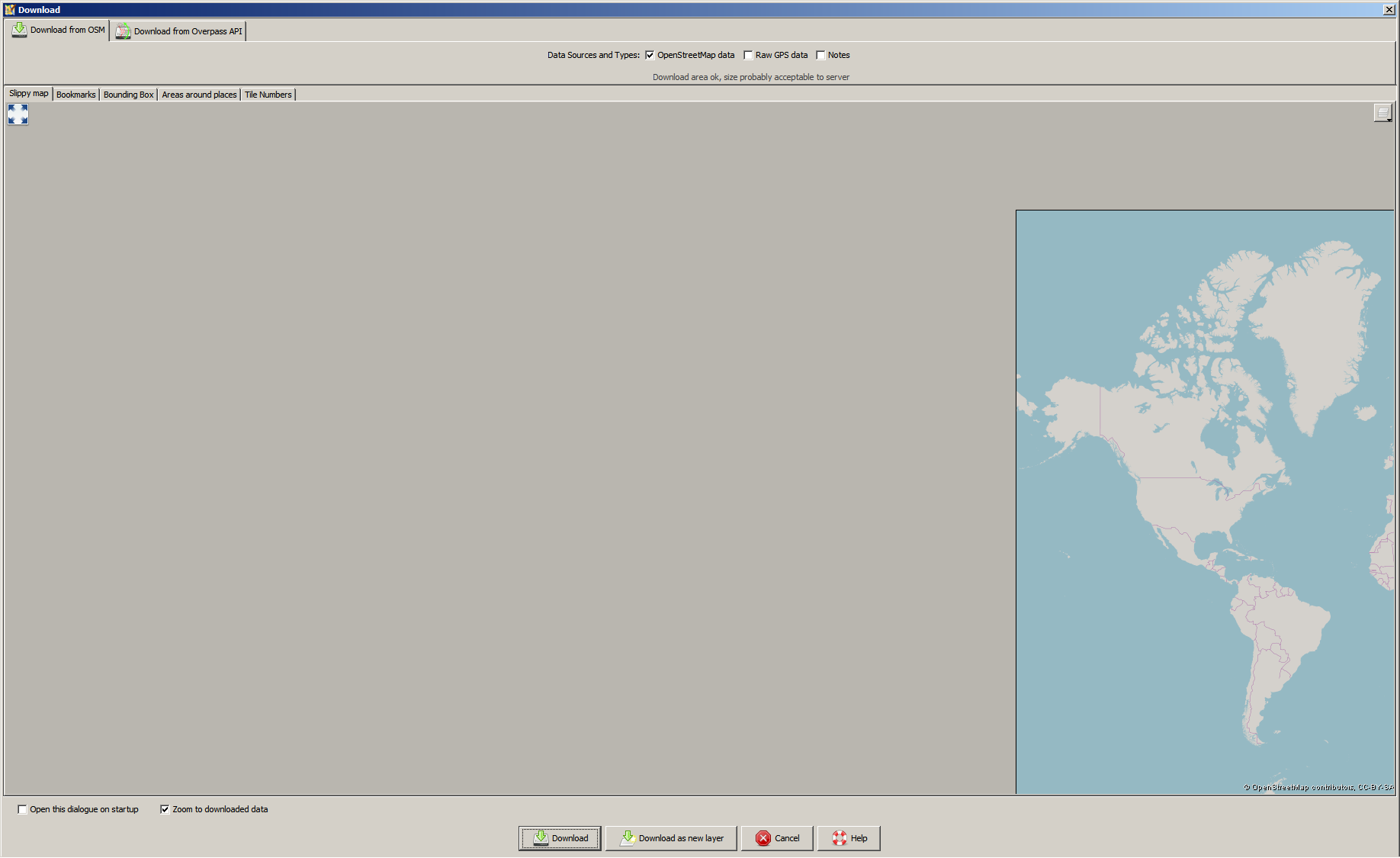
In JOSM 15492 when I press the download button (ctrl-shift-down), no map is shown. When I zoom out a lot, the zoom 0 map is shown completely at the right side of the screen. So it appears that the map is misaligned when you want to download something.
See screenshot.
Also, when pasting a link from the openstreetmap site to go to a download area, the map moves away again, even when you are zoomed in to roughly the correct area.

Attachments (1)
Change History (21)
by , 6 years ago
| Attachment: | misaligned_map.png added |
|---|
comment:1 by , 6 years ago
| Description: | modified (diff) |
|---|
comment:2 by , 6 years ago
| Description: | modified (diff) |
|---|
comment:3 by , 6 years ago
comment:4 by , 6 years ago
| Description: | modified (diff) |
|---|---|
| Owner: | changed from to |
| Priority: | major → normal |
| Status: | new → needinfo |
comment:5 by , 6 years ago
| Description: | modified (diff) |
|---|
comment:7 by , 6 years ago
| Description: | modified (diff) |
|---|---|
| Priority: | normal → major |
In the advanced preferences, osm-download.bounds is set to 51.2913382;5.7640457;51.302394;5.7897949
When I go to the download dialog and zoom out and go to that area, the downloadbox is set there. But the map does not center there.
Even when I download data and go back to the download dialog, the map behaves the same: no map visible and when I zoom out it's all the way to the left.
It looks like JOSM wants to display the map at longitude -354.2359543 and not at 5.7640457.
comment:8 by , 6 years ago
| Priority: | major → normal |
|---|
comment:9 by , 6 years ago
| Description: | modified (diff) |
|---|
comment:10 by , 6 years ago
| Owner: | changed from to |
|---|---|
| Status: | needinfo → new |
comment:11 by , 6 years ago
Please backup your preferences.xml somewhere and try with a fresh profile. Let us know if the problem is still here.
comment:12 by , 6 years ago
| Owner: | changed from to |
|---|---|
| Status: | new → needinfo |
comment:13 by , 6 years ago
Yes that worked. But obviously I'm not going to work with a completely new profile that I have to customise again, so I tried removing the osm-download.bounds key from my preferences and that also solved it.
For info, the key was:
<tag key='osm-download.bounds' value='51.315742;6.0204017;51.3169845;6.0230605'/>
I tried replicating it by downloading outside of the map, but it looks like the bounds get set in the key correctly.
Very strange behaviour.
I have attached my preferences.xml so you can test to see what goes wrong here.
comment:14 by , 6 years ago
Thanks. I have downloaded the file then deleted it, as it contains your OAuth access token.
comment:15 by , 6 years ago
| Cc: | added |
|---|---|
| Component: | Core → Core imagery |
| Keywords: | regression zoom download bounds added |
| Milestone: | → 19.11 |
Problem comes from these preference entries:
  <maps key='imagery.entries'>
    <map>
      <tag key='name' value='OpenStreetMap'/>
      <tag key='type' value='tms'/>
      <tag key='url' value='http://tile.openstreetmap.org/{zoom}/{x}/{y}.png'/>
      <tag key='attribution-text' value='© OpenStreetMap contributors, CC-BY-SA'/>
      <tag key='attribution-url' value='http://openstreetmap.org/'/>
    </map>
    <map>
      <tag key='name' value='OpenStreetMap Carto (Standard)'/>
      <tag key='id' value='standard'/>
      <tag key='type' value='tms'/>
      <tag key='url' value='https://{switch:a,b,c}.tile.openstreetmap.org/{zoom}/{x}/{y}.png'/>
      <tag key='attribution-text' value='© OpenStreetMap contributors, CC-BY-SA'/>
      <tag key='attribution-url' value='https://www.openstreetmap.org/'/>
      <tag key='max-zoom' value='19'/>
      <tag key='cookies' value=''/>
      <tag key='icon' value='data:image/png;base64,iVBORw0KGgoAAAANSUhEUgAAABgAAAAYCAYAAADgdz34AAAGb0lEQVR4Xq3MS2xcVx3H8e855z7m3vH1jMdjO43zshIrtpM0SZ3WFEcRVFFKoRWPBYtAHwgWCFUsQN100QeCsqAhCESrirRASdWWIkoUqgKFJm3UZ5o2oW2akrR5uXbi2ON4PPfOfZ17iERW2bCAz1/f3V8/cfDC02UEj4OxKHjdFMUfmUzOlAeXZFZuuVIKN8zi1dPh7Hcn5091G2EOB5b//NplA28/9tAT4bq111jD64ZKHR2VQWPEbULI0aHqZz7NZeLNmSeVMOJu4AfGgNEGLsR/95YuetcRzprcFJvaaVxrpm2mmqfp8FxKSYk8ck+0pt1nykFp0A/k9Tnt/lq3T2dHEOmi2DxSu+EdAAFwcPqp640xe42h26Qa2hqnXsFVHs04pNFuYgvbtOWCmD3aMj2VNaLi1+jwyxgpCKOQRCdMN6ZMd5Bmw1cPfG+5O/7LeX0ECyBppx9Zrn0c6BbNHJNr4qhFYWtsJCWpSFUm3ntxips2bxe+p1BKIJQECpRbkCQ2wu0XzbnIeemvhzYCVNR6JMDm5bdNF9qcwhiKbpvMg2KujZDmUgX1jgqT719gy+iX6QxsPM9F2YqclHbRRpUEXmCRZTGFlZGKxSMbR6+uA0gu863OzLc7cVUZN6jgKI8kicl0ykzjAiW5lGrVAWUwokApSa3UTY/XR2B3UlDgVy1sB8od7tgt2++4AcACOHL+uRW2bW8QQiCxcUoS6XssyBbnF6Y5+8kci8vjlJwqjnQwWpDlgtRYZDpHmxJzWUyk26gOYXxK0g+8G4bXX/snC0DZcmVh9EoQ5DpDSIVJYmIiGvkCurAQpkLU9kkTEEJeCjxbURSCZgTkfVjOApoM6Qtc3109Nj7uWO9M70EbPQT4YMhNjrWQEdHmTPs8SgfUisUgDLoAgcGyEjJtEaeaVlKQ5gVSGYwBhETaEmVJcemQaZ44aRpvyLIEnedGoNHNkNTTeI5DT2kRljeJziVhnKNlE1GaJFfnuRi3SXMDxmA7IUqCI20qdifkxfED+/dlanzb1cYL3BFhsTXPU4Ep0FGKUVALegCb1oLN7FlNpd5HIUNQLYxIsO0EKcByWljuAmXbp7fcIwgVb7xyaNeep3YfUnt272PLjaP1em/lZqmEk4cJQoMKfBxVIcwjlAp47okX6ap3XaoP221CIREyx7La2E6O7/h0eTXK+Bw+8uHrP7znvocXLe6flwCHXj06kab5hJAS6dhQFOgiJ2qXsKLVuHqAgdVD7HrwXibPTKJzFyMMAgECHGXTJTqxE4t3T5xMD7y29+mFRjgpLSUlYJ793T9ORWF0Lk1StCzQNqTTAle30flbzJ/bx6n3Xsa2Fb9/5Eccfu19wnlNFBniWJA3JecbDfa/8y5nJg7bW7ZeuyYKZwyF0QIAkC988Ogzfof6SppapHGZqgNTExPsfngfgaXpqyWk9QF6lwWk7YJlK1fQaTysqk8sE6LwIq4OEMql1DH3/O03PnBHUCk3JMCeA7/q6u1a0ltiNZ1eL719cPrcWR752d+Yn2lx/HSDY40qY2Pb2PapjYxv3YBX1syZ88weP3bp90Omw3PMOxNUe9FTn9gn5uemQqfk5BbAisHBlVo7g7PFx9TdgDMnZvjtzheI51qkWY5xYWxTLxXfJ5IVevIZ6gMDxCYnPjWDXZ0nSiOkEmYqO5l8cGT6FSD6+NhRJMCF1sWV88VkX6f3n/FHd+xl9uwsrTDEOIbPfWEj120eorw0JEzLhGWfop3ixxKrP0CTIQSAEVmhw5/f94uXAANg3b/r+1YrnV1T86ucPDzBrp3PcvHcHGmaUekL+OKtm9m0ailOUEe4FrXyWaKFblM4HmUvElNzF4jTxFiOhRRSJO34JHCOy6RU0i60uepfx07nO+593FycapAkCbX+Kl+/cxvXfXYIU3GjN/Yf2vPPg2/9JVxoNYNqQ+hcilznlKWDcpSwlCWiZrtx/O3Tf+AKClj88I9v/9aD99/aHBkaLlYNDTXuvPubH/3kN3e9vP3bn78HGAP6gSXA6K3fufnOXz+/888vHH3i9O4XH3j1roe+8dDo1pGvAeuAClfa/+aTQH35Yztuenz7l4aPLB9c81O/3H3L5VHFlUACZaAH6AQc/pv1o9cEiwbWbRlev+mrazeOblg3usnj/6nWV2fVyFp71fCa0sDgkOKyq5av4H/xb0Ky8po5hQEuAAAAAElFTkSuQmCC'/>
      <tag key='valid-georeference' value='true'/>
      <tag key='modTileFeatures' value='true'/>
      <tag key='customHttpHeaders' value='{}'/>
      <tag key='transparent' value='true'/>
      <tag key='minimumTileExpire' value='3600'/>
      <tag key='category' value='osmbasedmap'/>
    </map>
  </maps>
  <tag key='slippy_map_chooser.mapstyle' value='OpenStreetMap'/>
It works if we change it to:
<tag key='slippy_map_chooser.mapstyle' value='standard'/>
I guess this is a side effect of the change of default max-zoom done in #18064 as you have here a very old imagery entry without any zoom information.
@Wiktor, can you please take a look?
comment:16 by , 6 years ago
| Owner: | changed from to |
|---|---|
| Status: | needinfo → new |
comment:17 by , 6 years ago
The problem is due to following part of the code in JMapViewer(#302-314):
        if (markers && mapMarkerList != null) {
            synchronized (this) {
                for (MapMarker marker : mapMarkerList) {
                    if (marker.isVisible()) {
                        Point p = tileSource.latLonToXY(marker.getCoordinate(), mapZoomMax);
                        xMax = Math.max(xMax, p.x);
                        yMax = Math.max(yMax, p.y);
                        xMin = Math.min(xMin, p.x);
                        yMin = Math.min(yMin, p.y);
                    }
                }
            }
        }
As you can see, we are calling tileSource.latLonToXY with zoom 24. It means, that Point will overflow, as it can hold only int's, and to be proper we should change the interface of latLonToXY to return custom Point, that uses internally long instead of int.
This was already known bug when committing this change (though I haven't pinpointed it to specific line of code). But fixing that would require total overhaul of types that we use in JOSM.
There is a dirty fix for that (line to be added before the section quoted above):
mapZoomMax = Math.min(31 - (int) (Math.log(tileController.getTileSource().getDefaultTileSize()) / Math.log(2)), mapZoomMax);
Which prevents using zoom levels for which we overflow when calculating X/Y Coordinates.
This is probably least what we can do, without turning JMapViewer upside down and getting rid of Point class.
comment:19 by , 6 years ago
| Component: | Core imagery → JMapViewer |
|---|

JOSM remembers the last bounding box you used in this dialog. Next time you open this dialog, the last bounding box is shown. For me it looks like JOSM uses a "strange" bBox for this.
This setting is stored in the preference file. Can you please go to "Preferences" -> "Setting Preference entries directly. Use with caution!". This panel is only visible, if you activate the "Expert Mode" (Checkbox at the button of "Preference" window). Search for "osm-download.bounds" and post the value here (it should be lat and lon for lower left and upper right corner).