


#16937 closed defect (fixed)
Support user logins ending by " !"
| Reported by: | anonymous | Owned by: | Don-vip |
|---|---|---|---|
| Priority: | normal | Milestone: | 18.12 |
| Component: | Core | Version: | latest |
| Keywords: | template_report windows space login javabug | Cc: | michael2402, wiktorn, floscher |
Description
What steps will reproduce the problem?
- I have a new laptop, haven't installed JOSM before in this laptop. I downloaded the latest JOSM installer version 14382. I have Java 8 Update 191 installed in my laptop before I install.
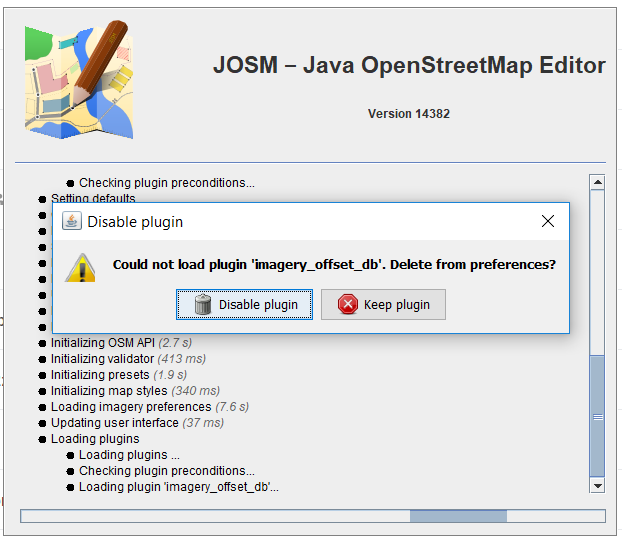
- when I opened JOSM for the first time, it showed notification about plugin imagery offset and turnrestrictions is not up-to-date and need to be update. I have chose both Keep plugin and Disable plugin in some attempts but this notification kept showing up. (pic 1 and pic 2)
- I set my preference such as put my OSM username and password and download building and utilsplugin. then I restart the JOSM
- After JOSM is opened again, I couldn't open my preference window, even from preference button. (pic 3).
What is the expected result?
- Can open preference window
- can manage plugins properly
What happens instead?
- Can not open preference window
Please provide any additional information below. Attach a screenshot if possible.
URL:https://josm.openstreetmap.de/svn/trunk
Repository:UUID: 0c6e7542-c601-0410-84e7-c038aed88b3b
Last:Changed Date: 2018-10-28 22:27:31 +0100 (Sun, 28 Oct 2018)
Build-Date:2018-10-28 21:33:32
Revision:14382
Relative:URL: ^/trunk

Identification: JOSM/1.5 (14382 en) Windows 10 64-Bit
OS Build number: Windows 10 Home 1803 (17134)
Memory Usage: 247 MB / 989 MB (71 MB allocated, but free)
Java version: 1.8.0_191-b12, Oracle Corporation, Java HotSpot(TM) Client VM
Screen: \Display0 1920x1080
Maximum Screen Size: 1920x1080

Plugins:
+ buildings_tools (34572)
+ utilsplugin2 (34506)

Map paint styles:
+ %UserProfile%\Dropbox\HOT\Tool Setting Files\FB_style.mapcss
+ %UserProfile%\Dropbox\HOT\Tool Setting Files\FB_rainbow_color_style.mapcss

Validator rules:
+ %UserProfile%\Dropbox\HOT\Tool Setting Files\FB_rules_HOT.validator.mapcss

Last errors/warnings:
- E: Handled by bug report queue: org.openstreetmap.josm.tools.JosmRuntimeException: Fatal: failed to locate image 'utils.???'. This is a serious configuration problem. JOSM will stop working.
- W: java.nio.file.NoSuchFileException: C:\Users\HOT%20!\AppData\Roaming\JOSM\plugins\utilsplugin2.jar
- W: Unable to read image: java.io.FileNotFoundException: C:\Users\HOT  (The system cannot find the file specified)
- E: Handled by bug report queue: org.openstreetmap.josm.tools.JosmRuntimeException: Fatal: failed to locate image 'utils.???'. This is a serious configuration problem. JOSM will stop working.
- W: java.nio.file.NoSuchFileException: C:\Users\HOT%20!\AppData\Roaming\JOSM\plugins\utilsplugin2.jar
- W: Unable to read image: java.io.FileNotFoundException: C:\Users\HOT  (The system cannot find the file specified)
- E: Handled by bug report queue: org.openstreetmap.josm.tools.JosmRuntimeException: Fatal: failed to locate image 'utils.???'. This is a serious configuration problem. JOSM will stop working.
- W: java.nio.file.NoSuchFileException: C:\Users\HOT%20!\AppData\Roaming\JOSM\plugins\utilsplugin2.jar
- W: Unable to read image: java.io.FileNotFoundException: C:\Users\HOT  (The system cannot find the file specified)
- E: Handled by bug report queue: org.openstreetmap.josm.tools.JosmRuntimeException: Fatal: failed to locate image 'utils.???'. This is a serious configuration problem. JOSM will stop working.


=== REPORTED CRASH DATA ===
BugReportExceptionHandler#handleException:
No data collected.

Warning issued by: BugReportExceptionHandler#handleException

=== STACK TRACE ===
Thread: AWT-EventQueue-0 (15) of main
org.openstreetmap.josm.tools.JosmRuntimeException: Fatal: failed to locate image 'utils.???'. This is a serious configuration problem. JOSM will stop working.
	at org.openstreetmap.josm.tools.ImageProvider.getResource(ImageProvider.java:713)
	at org.openstreetmap.josm.tools.ImageProvider.get(ImageProvider.java:673)
	at org.openstreetmap.josm.tools.ImageProvider.get(ImageProvider.java:780)
	at org.openstreetmap.josm.gui.preferences.PreferenceTabbedPane.addGUITabs(PreferenceTabbedPane.java:494)
	at org.openstreetmap.josm.gui.preferences.PreferenceTabbedPane.buildGui(PreferenceTabbedPane.java:457)
	at org.openstreetmap.josm.gui.preferences.PreferenceDialog.build(PreferenceDialog.java:83)
	at org.openstreetmap.josm.gui.preferences.PreferenceDialog.<init>(PreferenceDialog.java:53)
	at org.openstreetmap.josm.actions.PreferencesAction.run(PreferencesAction.java:106)
	at org.openstreetmap.josm.actions.PreferencesAction.actionPerformed(PreferencesAction.java:101)
	at javax.swing.AbstractButton.fireActionPerformed(Unknown Source)
	at javax.swing.AbstractButton$Handler.actionPerformed(Unknown Source)
	at javax.swing.DefaultButtonModel.fireActionPerformed(Unknown Source)
	at javax.swing.DefaultButtonModel.setPressed(Unknown Source)
	at javax.swing.plaf.basic.BasicButtonListener.mouseReleased(Unknown Source)
	at java.awt.AWTEventMulticaster.mouseReleased(Unknown Source)
	at java.awt.Component.processMouseEvent(Unknown Source)
	at javax.swing.JComponent.processMouseEvent(Unknown Source)
	at java.awt.Component.processEvent(Unknown Source)
	at java.awt.Container.processEvent(Unknown Source)
	at java.awt.Component.dispatchEventImpl(Unknown Source)
	at java.awt.Container.dispatchEventImpl(Unknown Source)
	at java.awt.Component.dispatchEvent(Unknown Source)
	at java.awt.LightweightDispatcher.retargetMouseEvent(Unknown Source)
	at java.awt.LightweightDispatcher.processMouseEvent(Unknown Source)
	at java.awt.LightweightDispatcher.dispatchEvent(Unknown Source)
	at java.awt.Container.dispatchEventImpl(Unknown Source)
	at java.awt.Window.dispatchEventImpl(Unknown Source)
	at java.awt.Component.dispatchEvent(Unknown Source)
	at java.awt.EventQueue.dispatchEventImpl(Unknown Source)
	at java.awt.EventQueue.access$500(Unknown Source)
	at java.awt.EventQueue$3.run(Unknown Source)
	at java.awt.EventQueue$3.run(Unknown Source)
	at java.security.AccessController.doPrivileged(Native Method)
	at java.security.ProtectionDomain$JavaSecurityAccessImpl.doIntersectionPrivilege(Unknown Source)
	at java.security.ProtectionDomain$JavaSecurityAccessImpl.doIntersectionPrivilege(Unknown Source)
	at java.awt.EventQueue$4.run(Unknown Source)
	at java.awt.EventQueue$4.run(Unknown Source)
	at java.security.AccessController.doPrivileged(Native Method)
	at java.security.ProtectionDomain$JavaSecurityAccessImpl.doIntersectionPrivilege(Unknown Source)
	at java.awt.EventQueue.dispatchEvent(Unknown Source)
	at java.awt.EventDispatchThread.pumpOneEventForFilters(Unknown Source)
	at java.awt.EventDispatchThread.pumpEventsForFilter(Unknown Source)
	at java.awt.EventDispatchThread.pumpEventsForHierarchy(Unknown Source)
	at java.awt.EventDispatchThread.pumpEvents(Unknown Source)
	at java.awt.EventDispatchThread.pumpEvents(Unknown Source)
	at java.awt.EventDispatchThread.run(Unknown Source)
Attachments (3)
Change History (19)
by , 8 years ago
by , 8 years ago
by , 8 years ago
comment:1 by , 8 years ago
comment:2 by , 8 years ago
You have a space and a ! in your username. That rings a bell for me, IIRC Java can't handle paths correctly with some special characters. If I can find the reference where I already saw this in the past, I'll add that here.
In the following lines from your log, the path is cut at the space character in the second message:
- W: java.nio.file.NoSuchFileException: C:\Users\HOT%20!\AppData\Roaming\JOSM\plugins\utilsplugin2.jar
- W: Unable to read image: java.io.FileNotFoundException: C:\Users\HOT (The system cannot find the file specified)
That indicates to me that the space character is the culprit.
comment:3 by , 8 years ago
| Keywords: | windows space login added |
|---|---|
| Priority: | critical → normal |
| Summary: | Unable to open Preference window → Unable to open Preference window (user login with space character) |
comment:4 by , 8 years ago
| Summary: | Unable to open Preference window (user login with space character) → Support user logins with space character |
|---|
Without surprise, testing a Windows user account with a space in it is currently unsupported. I can't even start JOSM 14385 with Java 11:
$ pwd
/c/Users/HOT !/Downloads

$ java -jar josm-latest.jar
Exception in thread "main" java.nio.file.InvalidPathException: Trailing char < > at index 12: C:\Users\HOT
        at java.base/sun.nio.fs.WindowsPathParser.normalize(WindowsPathParser.java:191)
        at java.base/sun.nio.fs.WindowsPathParser.parse(WindowsPathParser.java:153)
        at java.base/sun.nio.fs.WindowsPathParser.parse(WindowsPathParser.java:77)
        at java.base/sun.nio.fs.WindowsPath.parse(WindowsPath.java:92)
        at java.base/sun.nio.fs.WindowsFileSystem.getPath(WindowsFileSystem.java:229)
        at java.base/java.io.File.toPath(File.java:2290)
        at java.base/java.util.zip.ZipFile$Source.get(ZipFile.java:1222)
        at java.base/java.util.zip.ZipFile$CleanableResource.<init>(ZipFile.java:824)
        at java.base/java.util.zip.ZipFile$CleanableResource$FinalizableResource.<init>(ZipFile.java:850)
        at java.base/java.util.zip.ZipFile$CleanableResource.get(ZipFile.java:839)
        at java.base/java.util.zip.ZipFile.<init>(ZipFile.java:246)
        at java.base/java.util.zip.ZipFile.<init>(ZipFile.java:176)
        at java.base/java.util.jar.JarFile.<init>(JarFile.java:346)
        at java.base/sun.net.www.protocol.jar.URLJarFile.<init>(URLJarFile.java:103)
        at java.base/sun.net.www.protocol.jar.URLJarFile.getJarFile(URLJarFile.java:72)
        at java.base/sun.net.www.protocol.jar.JarFileFactory.get(JarFileFactory.java:94)
        at java.base/sun.net.www.protocol.jar.JarURLConnection.connect(JarURLConnection.java:125)
        at java.base/sun.net.www.protocol.jar.JarURLConnection.getInputStream(JarURLConnection.java:155)
        at java.base/java.net.URL.openStream(URL.java:1117)
        at org.openstreetmap.josm.tools.Utils.openStream(Utils.java:1847)
        at org.openstreetmap.josm.tools.I18n.load(I18n.java:415)
        at org.openstreetmap.josm.tools.I18n.init(I18n.java:372)
        at org.openstreetmap.josm.gui.MainApplication.main(MainApplication.java:697)

$ java -version
java version "11" 2018-09-25
Java(TM) SE Runtime Environment 18.9 (build 11+28)
Java HotSpot(TM) 64-Bit Server VM 18.9 (build 11+28, mixed mode)
comment:5 by , 8 years ago
| Owner: | changed from to |
|---|---|
| Status: | new → assigned |
follow-up: 11 comment:6 by , 8 years ago
Have you also tested with usernames like "HOT HOT"? Java rejects directories with trailing spaces on purpose: https://bugs.openjdk.java.net/browse/JDK-8190546
In this case the space is maybe incorrectly recognized as being a trailing space, because it's only followed by a special character. Then the exception message "Trailing char" makes more sense. Just a thought.
comment:8 by , 8 years ago
| Keywords: | javabug added |
|---|
comment:10 by , 8 years ago
| Cc: | added |
|---|
With r14406 JOSM starts with Java 11 but is unusable. When I try to open the download dialog this exception is logged (by who?) and the UI freezes:
Uncaught error fetching image:
java.nio.file.InvalidPathException: Trailing char < > at index 12: C:\Users\HOT
        at java.base/sun.nio.fs.WindowsPathParser.normalize(WindowsPathParser.java:191)
        at java.base/sun.nio.fs.WindowsPathParser.parse(WindowsPathParser.java:153)
        at java.base/sun.nio.fs.WindowsPathParser.parse(WindowsPathParser.java:77)
        at java.base/sun.nio.fs.WindowsPath.parse(WindowsPath.java:92)
        at java.base/sun.nio.fs.WindowsFileSystem.getPath(WindowsFileSystem.java:229)
        at java.base/java.io.File.toPath(File.java:2290)
        at java.base/java.util.zip.ZipFile$Source.get(ZipFile.java:1222)
        at java.base/java.util.zip.ZipFile$CleanableResource.<init>(ZipFile.java:824)
        at java.base/java.util.zip.ZipFile$CleanableResource$FinalizableResource.<init>(ZipFile.java:850)
        at java.base/java.util.zip.ZipFile$CleanableResource.get(ZipFile.java:839)
        at java.base/java.util.zip.ZipFile.<init>(ZipFile.java:246)
        at java.base/java.util.zip.ZipFile.<init>(ZipFile.java:176)
        at java.base/java.util.jar.JarFile.<init>(JarFile.java:346)
        at java.base/sun.net.www.protocol.jar.URLJarFile.<init>(URLJarFile.java:103)
        at java.base/sun.net.www.protocol.jar.URLJarFile.getJarFile(URLJarFile.java:72)
        at java.base/sun.net.www.protocol.jar.JarFileFactory.get(JarFileFactory.java:94)
        at java.base/sun.net.www.protocol.jar.JarURLConnection.connect(JarURLConnection.java:125)
        at java.base/sun.net.www.protocol.jar.JarURLConnection.getInputStream(JarURLConnection.java:155)
        at java.desktop/sun.awt.image.URLImageSource.getDecoder(URLImageSource.java:112)
        at java.desktop/sun.awt.image.InputStreamImageSource.doFetch(InputStreamImageSource.java:263)
        at java.desktop/sun.awt.image.ImageFetcher.fetchloop(ImageFetcher.java:212)
        at java.desktop/sun.awt.image.ImageFetcher.run(ImageFetcher.java:176)
The EDT is blocked:
"AWT-EventQueue-0" #19 prio=6 os_prio=0 cpu=5437.50ms elapsed=355.69s tid=0x000001bcd3d7e800 nid=0x52e4 in Object.wait()  [0x00000024743fa000]
   java.lang.Thread.State: WAITING (on object monitor)
        at java.lang.Object.wait(java.base@11.0.1/Native Method)
        - waiting on <no object reference available>
        at java.awt.MediaTracker.waitForID(java.desktop@11.0.1/MediaTracker.java:679)
        - waiting to re-lock in wait() <0x0000000701a87a48> (a java.awt.MediaTracker)
        at javax.swing.ImageIcon.loadImage(java.desktop@11.0.1/ImageIcon.java:314)
        - waiting to re-lock in wait() <0x0000000701a87a48> (a java.awt.MediaTracker)
        at javax.swing.ImageIcon.<init>(java.desktop@11.0.1/ImageIcon.java:204)
        at javax.swing.ImageIcon.<init>(java.desktop@11.0.1/ImageIcon.java:217)
        at org.openstreetmap.gui.jmapviewer.JMapViewer.initializeZoomSlider(JMapViewer.java:177)
        at org.openstreetmap.gui.jmapviewer.JMapViewer.<init>(JMapViewer.java:150)
        at org.openstreetmap.gui.jmapviewer.JMapViewer.<init>(JMapViewer.java:119)
        at org.openstreetmap.josm.gui.bbox.SlippyMapBBoxChooser.<init>(SlippyMapBBoxChooser.java:176)
        at org.openstreetmap.josm.gui.download.SlippyMapChooser.<init>(SlippyMapChooser.java:35)
        at org.openstreetmap.josm.gui.download.DownloadDialog.buildMainPanel(DownloadDialog.java:125)
        at org.openstreetmap.josm.gui.download.DownloadDialog.<init>(DownloadDialog.java:227)
        at org.openstreetmap.josm.gui.download.DownloadDialog.<init>(DownloadDialog.java:215)
        at org.openstreetmap.josm.gui.download.DownloadDialog.getInstance(DownloadDialog.java:81)
        - locked <0x00000007059aba40> (a java.lang.Class for org.openstreetmap.josm.gui.download.DownloadDialog)
        at org.openstreetmap.josm.actions.DownloadAction.actionPerformed(DownloadAction.java:35)
        at javax.swing.AbstractButton.fireActionPerformed(java.desktop@11.0.1/AbstractButton.java:1967)
        at javax.swing.AbstractButton$Handler.actionPerformed(java.desktop@11.0.1/AbstractButton.java:2308)
        at javax.swing.DefaultButtonModel.fireActionPerformed(java.desktop@11.0.1/DefaultButtonModel.java:405)
        at javax.swing.DefaultButtonModel.setPressed(java.desktop@11.0.1/DefaultButtonModel.java:262)
        at javax.swing.plaf.basic.BasicButtonListener.mouseReleased(java.desktop@11.0.1/BasicButtonListener.java:279)
        at java.awt.AWTEventMulticaster.mouseReleased(java.desktop@11.0.1/AWTEventMulticaster.java:297)
        at java.awt.Component.processMouseEvent(java.desktop@11.0.1/Component.java:6632)
        at javax.swing.JComponent.processMouseEvent(java.desktop@11.0.1/JComponent.java:3342)
        at java.awt.Component.processEvent(java.desktop@11.0.1/Component.java:6397)
        at java.awt.Container.processEvent(java.desktop@11.0.1/Container.java:2263)
        at java.awt.Component.dispatchEventImpl(java.desktop@11.0.1/Component.java:5008)
        at java.awt.Container.dispatchEventImpl(java.desktop@11.0.1/Container.java:2321)
        at java.awt.Component.dispatchEvent(java.desktop@11.0.1/Component.java:4840)
        at java.awt.LightweightDispatcher.retargetMouseEvent(java.desktop@11.0.1/Container.java:4918)
        at java.awt.LightweightDispatcher.processMouseEvent(java.desktop@11.0.1/Container.java:4547)
        at java.awt.LightweightDispatcher.dispatchEvent(java.desktop@11.0.1/Container.java:4488)
        at java.awt.Container.dispatchEventImpl(java.desktop@11.0.1/Container.java:2307)
        at java.awt.Window.dispatchEventImpl(java.desktop@11.0.1/Window.java:2772)
        at java.awt.Component.dispatchEvent(java.desktop@11.0.1/Component.java:4840)
        at java.awt.EventQueue.dispatchEventImpl(java.desktop@11.0.1/EventQueue.java:772)
        at java.awt.EventQueue$4.run(java.desktop@11.0.1/EventQueue.java:721)
        at java.awt.EventQueue$4.run(java.desktop@11.0.1/EventQueue.java:715)
        at java.security.AccessController.doPrivileged(java.base@11.0.1/Native Method)
        at java.security.ProtectionDomain$JavaSecurityAccessImpl.doIntersectionPrivilege(java.base@11.0.1/ProtectionDomain.java:85)
        at java.security.ProtectionDomain$JavaSecurityAccessImpl.doIntersectionPrivilege(java.base@11.0.1/ProtectionDomain.java:95)
        at java.awt.EventQueue$5.run(java.desktop@11.0.1/EventQueue.java:745)
        at java.awt.EventQueue$5.run(java.desktop@11.0.1/EventQueue.java:743)
        at java.security.AccessController.doPrivileged(java.base@11.0.1/Native Method)
        at java.security.ProtectionDomain$JavaSecurityAccessImpl.doIntersectionPrivilege(java.base@11.0.1/ProtectionDomain.java:85)
        at java.awt.EventQueue.dispatchEvent(java.desktop@11.0.1/EventQueue.java:742)
        at java.awt.EventDispatchThread.pumpOneEventForFilters(java.desktop@11.0.1/EventDispatchThread.java:203)
        at java.awt.EventDispatchThread.pumpEventsForFilter(java.desktop@11.0.1/EventDispatchThread.java:124)
        at java.awt.EventDispatchThread.pumpEventsForHierarchy(java.desktop@11.0.1/EventDispatchThread.java:113)
        at java.awt.EventDispatchThread.pumpEvents(java.desktop@11.0.1/EventDispatchThread.java:109)
        at java.awt.EventDispatchThread.pumpEvents(java.desktop@11.0.1/EventDispatchThread.java:101)
        at java.awt.EventDispatchThread.run(java.desktop@11.0.1/EventDispatchThread.java:90)

   Locked ownable synchronizers:
        - None
Any idea how to prevent that?
comment:11 by , 8 years ago
Replying to floscher:
Have you also tested with usernames like "HOT HOT"? Java rejects directories with trailing spaces on purpose: https://bugs.openjdk.java.net/browse/JDK-8190546
In this case the space is maybe incorrectly recognized as being a trailing space, because it's only followed by a special character. Then the exception message "Trailing char" makes more sense. Just a thought.
Not tried but you're right, the issue must only happen with logins ending exactly by " !".
comment:12 by , 8 years ago
| Summary: | Support user logins with space character → Support user logins ending by " !" |
|---|
comment:13 by , 8 years ago
Hi All, thanks for your help.
Yes, you're right, the problem is because the directory ending with "!".
Then I added new user on my PC with normal character and open JOSM through this user and it works now.
Thanks again! :)
comment:14 by , 8 years ago
| Milestone: | 18.11 → 18.12 |
|---|




One more thing.
Building tools plugin was successfully installed, but this plugin is missing, I couldn't find it in toolbar.