


Opened 9 years ago
Last modified 9 years ago
#16077 closed defect
No /dirty and /status menu entries — at Version 6
| Reported by: | nkamapper | Owned by: | team |
|---|---|---|---|
| Priority: | normal | Milestone: | 18.03 |
| Component: | Core imagery | Version: | |
| Keywords: | template_report | Cc: |
Description (last modified by )
What steps will reproduce the problem?
I have no /dirty and /status menu entries in the context menu.
Expert mode is on and standard Carto is the only imagery selected.
Same problem across 4 Macs.
Please provide any additional information below. Attach a screenshot if possible.

URL:https://josm.openstreetmap.de/svn/trunk
Repository:UUID: 0c6e7542-c601-0410-84e7-c038aed88b3b
Last:Changed Date: 2018-03-04 16:20:37 +0100 (Sun, 04 Mar 2018)
Build-Date:2018-03-04 15:24:13
Revision:13500
Redirecting:to URL 'https://josm.openstreetmap.de/svn/trunk':
Relative:URL: ^/trunk

Identification: JOSM/1.5 (13500 nb) Mac OS X 10.13.3
OS Build number: Mac OS X 10.13.3 (17D47)
Memory Usage: 665 MB / 1820 MB (194 MB allocated, but free)
Java version: 1.8.0_161-b12, Oracle Corporation, Java HotSpot(TM) 64-Bit Server VM
Screen: Display 69732864 1440x900
Maximum Screen Size: 1440x900
VM arguments: [-Djava.security.policy=file:<java.home>/lib/security/javaws.policy, -DtrustProxy=true, -Djnlpx.home=<java.home>/bin, -Djava.security.manager, -Djnlpx.origFilenameArg=${HOME}/Library/Application Support/Oracle/Java/Deployment/cache/6.0/56/1ee8cfb8-40e36ffa, -Djnlpx.remove=false, -Dsun.awt.warmup=true, -Djava.util.Arrays.useLegacyMergeSort=true, -Dmacosx.jnlpx.dock.name=JOSM, -Dmacosx.jnlpx.dock.icon=${HOME}/Library/Application Support/Oracle/Java/Deployment/cache/6.0/16/47ee53d0-3ef1ec79.icns, -Djnlp.application.href=https://josm.openstreetmap.de/download/josm.jnlp , -Djnlpx.jvm="<java.home>/bin/java"]

Plugins:
+ PicLayer (34021)
+ SeaChart (33995)
+ apache-commons (33668)
+ conflation (0.5.6)
+ ejml (32680)
+ geotools (33958)
+ imagery-xml-bounds (34077)
+ jts (32699)
+ opendata (34072)
+ reverter (34036)
+ todo (30303)
+ utilsplugin2 (33991)

Tagging presets:
+ https://josm.openstreetmap.de/josmfile?page=Presets/LaneAttributes&zip=1
+ https://raw.githubusercontent.com/OpenNauticalChart/josm/master/INT-1-preset.xml

Map paint styles:
+ https://josm.openstreetmap.de/josmfile?page=Styles/Lane_and_Road_Attributes&zip=1
- https://raw.githubusercontent.com/OpenSeaMap/josm/master/INT1_Seamark.mapcss
- http://osm.wzh.be/josm/entur_1.0.mapcss

Last errors/warnings:
- W: No configuration settings found.  Using hardcoded default values for all pools.
- W: Warning: Failed to scan file 'site-svn.openstreetmap.org-_applications_editors_josm_plugins_opendata_modules.txt' for module information. Skipping.
Change History (9)
by , 9 years ago
| Attachment: | Skjermbilde 2018-03-11 kl. 07.39.12.png added |
|---|
comment:1 by , 9 years ago
| Description: | modified (diff) |
|---|
Please update your imagery list (blue reload button on the right at wiki:Help/Preferences/Imagery) and then check if the osm carto is green in the lower table.
Please also add a screenshot of the full josm window with the context menu.
comment:2 by , 9 years ago
| Owner: | changed from to |
|---|---|
| Status: | new → needinfo |
This is an expert feature. Did you enable the Expert mode in preferences?
comment:3 by , 9 years ago
| Component: | Core → Core imagery |
|---|
comment:4 by , 9 years ago
Please update your imagery list (blue reload button on the right at wiki:Help/Preferences/Imagery) and then check if the osm carto is green in the lower table.
The Carto entry was green. I updated but no change.
Please also add a screenshot of the full josm window with the context menu.
Done, attached.
This is an expert feature. Did you enable the Expert mode in preferences?
Yes. Also tried to toggle on/off, but no change.
comment:5 by , 9 years ago
| Owner: | changed from to |
|---|---|
| Status: | needinfo → new |
comment:6 by , 9 years ago
| Description: | modified (diff) |
|---|



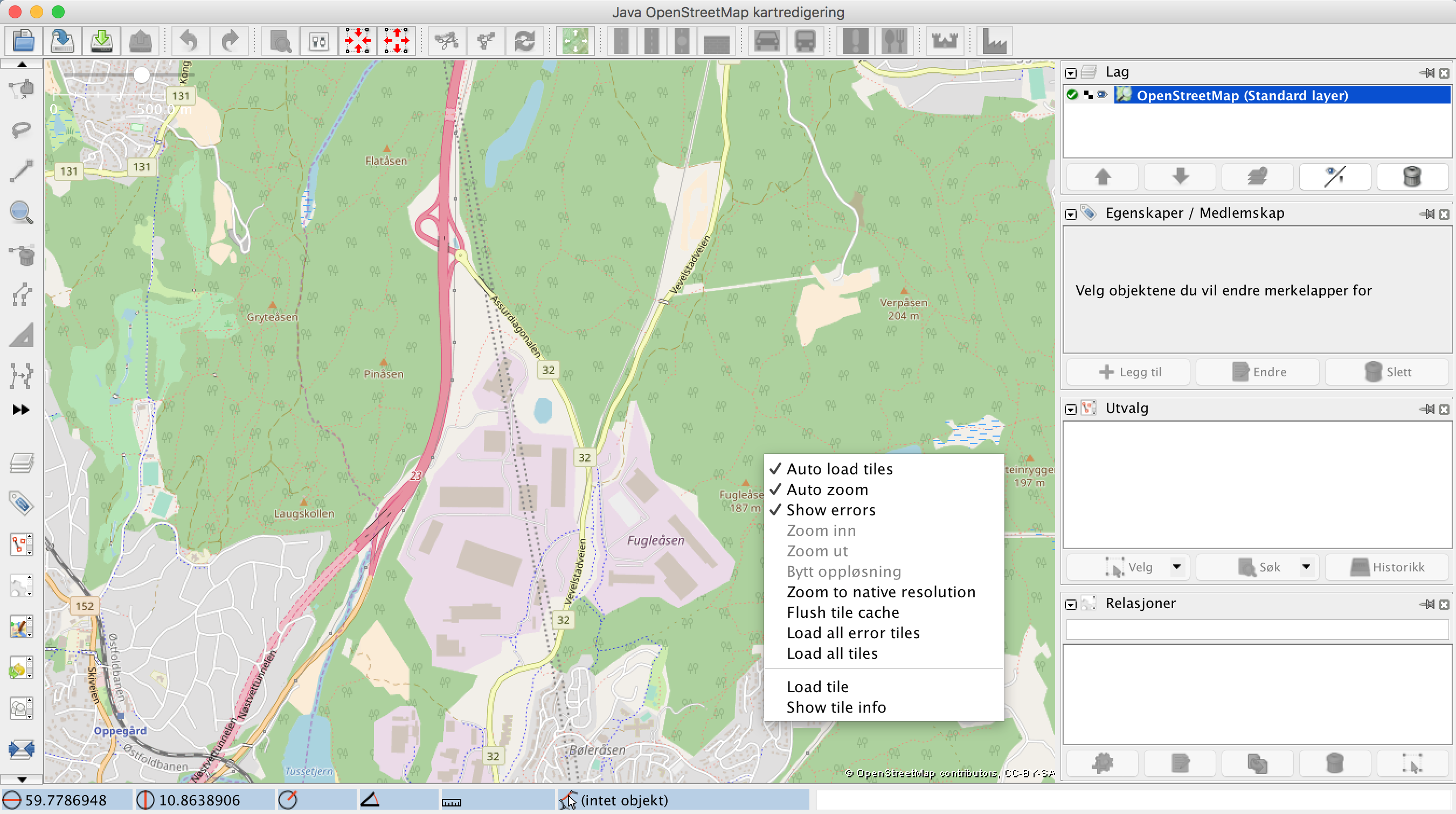


Screenshot