


Opened 12 years ago
Last modified 11 years ago
#11151 closed defect
Not all buttons are shown in exit confirmation dialog — at Initial Version
| Reported by: | holgermappt | Owned by: | team |
|---|---|---|---|
| Priority: | normal | Milestone: | 15.10 |
| Component: | Core | Version: | latest |
| Keywords: | template_report | Cc: | malenki |
Description
What steps will reproduce the problem?
- Optional: Choose a language with long translations, e.g. German
- Create a data layer with unsaved changed
- Quit JOSM (Ctrl+q)
- Reduce the width of the Unsaved changes dialog window
What is the expected result?
All options are shown: Perform actions before exiting, Exit now, Cancel. Or an indication that there are more options, e.g. a scroll bar.
What happens instead?
Depending on the window size, one or two buttons are not displayed. There is no active button if no action is active and the window is small.
Please provide any additional information below. Attach a screenshot if possible.
Build-Date: 2015-02-22 17:57:05
Revision: 8098
Is-Local-Build: true

Identification: JOSM/1.5 (8098 SVN de) Linux openSUSE 13.2 (Harlequin) (x86_64)
Memory Usage: 481 MB / 7141 MB (342 MB allocated, but free)
Java version: 1.7.0_75, Oracle Corporation, OpenJDK 64-Bit Server VM
Java package: java-1_7_0-openjdk:x86_64-1.7.0.75
Dataset consistency test: No problems found
Change History (3)
by , 12 years ago
| Attachment: | unsaved_changes_german_default_size.png added |
|---|
by , 12 years ago
| Attachment: | unsaved_changes_german_increased_width.png added |
|---|
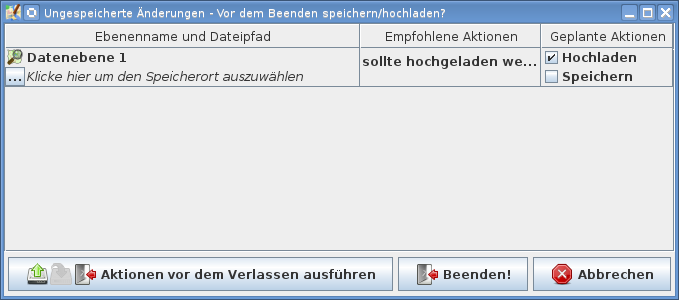
German with wider window, now all buttons are shown.
by , 12 years ago
| Attachment: | unsaved_changes_english_reduced_width.png added |
|---|
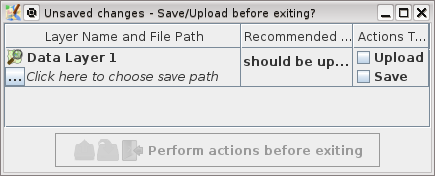
English with reduced width, the only button is grayed out.
Note:
See TracTickets
for help on using tickets.


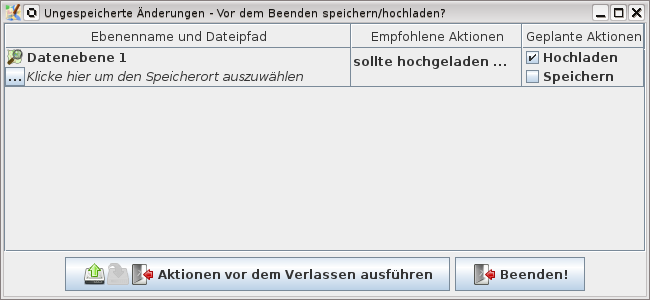


German with default window size, Cancel is missing.