


Opened 12 years ago
Closed 12 years ago
#10598 closed defect (fixed)
In Toolbar Icon of mappaint style not displayed if linked with relative path
| Reported by: | Klumbumbus | Owned by: | team |
|---|---|---|---|
| Priority: | normal | Milestone: | 14.10 |
| Component: | Core | Version: | |
| Keywords: | template_report, toolbar, icon | Cc: | stoecker |
Description (last modified by )
What steps will reproduce the problem?
- add the mappaint style Styles/Lane_and_Road_Attributes
- add a shortcut to this style to the toolbar (note that you need to open the toolbar customization preference window twice, until the list in the right column gets updated and the new style shows up)
What is the expected result?
The icon should be displayed in the toolbar.
What happens instead?
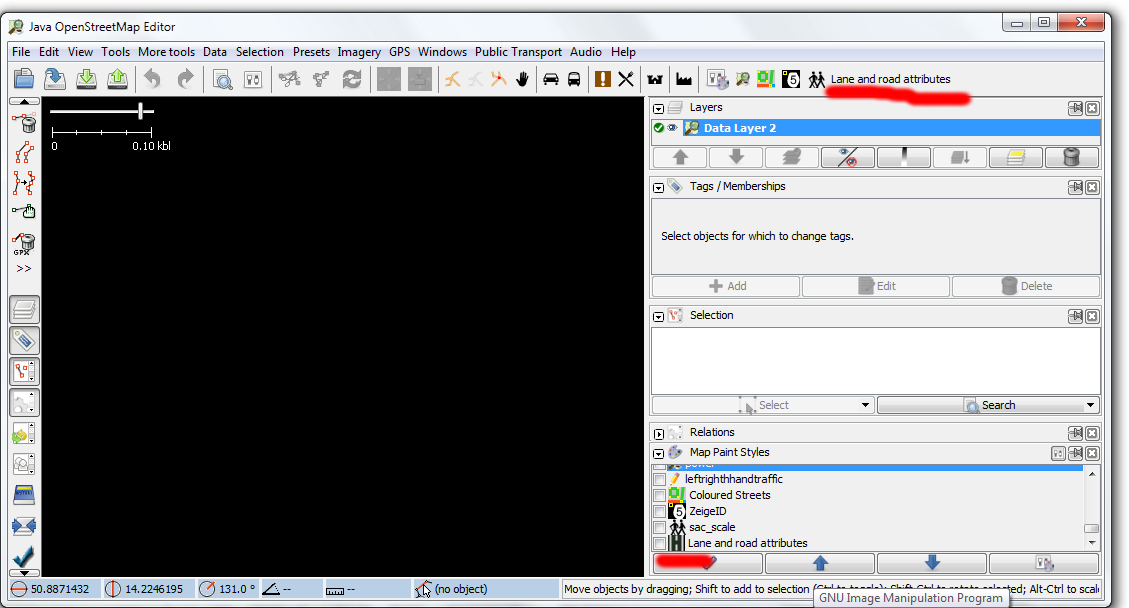
Only the text is displayed.
Please provide any additional information below. Attach a screenshot if
possible.
For mappaint styles with a full http://... path for the icon this works well. However the icon path in the style Lane and road attributes is icon: "images/icon.png";. In the mappaint style dialog the icon is shown fine, but not in the toolbar (see screenshot). ( The icon is also missing in the toolbar customization preference window.)
I think I deleted all relevant caches. I also tried it on another computer where the style was not used before. Same problem there.
Note that there is also an Error in the console: - E: Failed to locate image 'images/icon.png'

Repository Root: http://josm.openstreetmap.de/svn
Build-Date: 2014-10-05 01:34:55
Last Changed Author: Don-vip
Revision: 7599
Repository UUID: 0c6e7542-c601-0410-84e7-c038aed88b3b
Relative URL: ^/trunk
URL: http://josm.openstreetmap.de/svn/trunk
Last Changed Date: 2014-10-05 01:24:20 +0200 (Sun, 05 Oct 2014)
Last Changed Rev: 7599

Identification: JOSM/1.5 (7599 en) Windows 7 32-Bit
Memory Usage: 247 MB / 742 MB (159 MB allocated, but free)
Java version: 1.7.0_67, Oracle Corporation, Java HotSpot(TM) Client VM
VM arguments: [-Djava.security.policy=file:C:\Program Files\Java\jre7\lib\security\javaws.policy, -DtrustProxy=true, -Djnlpx.home=<java.home>\bin, -Djnlpx.origFilenameArg=C:\Program Files\josm-latest.jnlp, -Djnlpx.remove=true, -Djava.util.Arrays.useLegacyMergeSort=true, -Djnlpx.heapsize=256m,768m, -Djnlpx.splashport=53678, -Djnlpx.jvm=<java.home>\bin\javaw.exe, -Djnlpx.vmargs=LURqYXZhLnV0aWwuQXJyYXlzLnVzZUxlZ2FjeU1lcmdlU29ydD10cnVlAA==]
Program arguments: [--debug]
Dataset consistency test: No problems found

Plugins:
- DirectUpload (30697)
- HouseNumberTaggingTool (30416)
- OpeningHoursEditor (30609)
- PicLayer (30436)
- Tracer2 (30416)
- buildings_tools (30485)
- download_along (30416)
- editgpx (30634)
- imagery_offset_db (30534)
- measurement (30641)
- notes (v0.9.4)
- public_transport (30664)
- reltoolbox (30587)
- reverter (30521)
- terracer (30643)
- turnrestrictions (30651)
- undelete (30416)
- utilsplugin2 (30460)

Last errors/warnings:
- W: Detected deprecated 'canvas{background-color}' in 'https://github.com/bastik/mapcss-tools/raw/osm/mapnik2mapcss/osm-results/mapnik.zip' which will be removed shortly. Use 'fill-color' instead.
- E: Failed to locate image 'images/icon.png'
Attachments (1)
Change History (8)
by , 12 years ago
| Attachment: | iconbug02.png added |
|---|
comment:1 by , 12 years ago
| Description: | modified (diff) |
|---|
comment:2 by , 12 years ago
| Cc: | added |
|---|---|
| Milestone: | → 14.10 |
comment:3 by , 12 years ago
| Summary: | In Toobar Icon of mappaint style not displayed if linked with relative path → In Toolbar Icon of mappaint style not displayed if linked with relative path |
|---|
comment:4 by , 12 years ago
| Cc: | removed |
|---|---|
| Keywords: | toolbar icon added |
comment:6 by , 12 years ago
Just for information, I don't if this helps:
The Styles/Fixme uses icon: "dialogs/mappaint/error_small.png";, which works fine. This links to an josm internal icon, while in Styles/Lane_and_Road_Attributes it links to an icon in the zip file of the style. However the mapcss syntax is the same. Maybe there is a conflict at this point.

:)