


Opened 12 years ago
Last modified 12 years ago
#10230 closed defect
Security warning when starting JOSM on Windows for the first time — at Version 2
| Reported by: | jfd553 | Owned by: | team |
|---|---|---|---|
| Priority: | blocker | Milestone: | 14.07 |
| Component: | Core remotecontrol | Version: | |
| Keywords: | windows https certificate | Cc: |
Description (last modified by )
Automatic update of JOSM through web start ...
Security Warning popup (attached) saying I am about to install a root certificate allowing any further certificates issued by "localhost" being automatically installed...

Is it right? Windows cannot validate that the certificate is actually from the certification authority (CA) localhost? Sounds strange to me...
Repository Root: http://josm.openstreetmap.de/svn
Build-Date: 2014-07-03 22:03:52
Last Changed Author: Don-vip
Revision: 7287
Repository UUID: 0c6e7542-c601-0410-84e7-c038aed88b3b
URL: http://josm.openstreetmap.de/svn/trunk
Last Changed Date: 2014-07-04 00:00:19 +0200 (Fri, 04 Jul 2014)
Last Changed Rev: 7287

Identification: JOSM/1.5 (7287 en) Windows 7 64-Bit
Memory Usage: 53 MB / 247 MB (16 MB allocated, but free)
Java version: 1.7.0_55, Oracle Corporation, Java HotSpot(TM) Client VM
VM arguments: [-Djava.util.Arrays.useLegacyMergeSort=true, -Djnlp.application.href=http://josm.openstreetmap.de/download/josm.jnlp, -Xbootclasspath/a:C:\Program Files (x86)\Java\jre7\lib\javaws.jar;C:\Program Files (x86)\Java\jre7\lib\deploy.jar;C:\Program Files (x86)\Java\jre7\lib\plugin.jar, -Djnlpx.vmargs=-Djava.util.Arrays.useLegacyMergeSort=true -Djnlp.application.href=http://josm.openstreetmap.de/download/josm.jnlp, -Djnlpx.jvm=<java.home>\bin\javaw.exe, -Djnlpx.splashport=51349, -Djnlpx.home=<java.home>\bin, -Djnlpx.remove=false, -Djnlpx.offline=false, -Djnlpx.relaunch=true, -Djnlpx.session.data=C:\Users\Daniel\AppData\Local\Temp\session865389477705309319, -Djnlpx.heapsize=NULL,NULL, -Djava.security.policy=file:C:\Program Files (x86)\Java\jre7\lib\security\javaws.policy, -DtrustProxy=true, -Xverify:remote, -Dsun.awt.warmup=true]

Plugin: PicLayer (30436)
Plugin: imageryadjust (30416)
Plugin: openstreetbugs (30436)
Plugin: turnrestrictions (30454)
Change History (3)
by , 12 years ago
| Attachment: | SecurityWarning.png added |
|---|
comment:1 by , 12 years ago
| Keywords: | windows https certificate added; template_report removed |
|---|---|
| Milestone: | → 14.07 |
| Priority: | major → normal |
| Summary: | Security warning → Security warning when starting JOSM on Windows for the first time |
Yes, this is expected behaviour to achieve #10033.
If you click yes, this allows you to use the "Edit" button of osm.org (if accessed in https) to launch JOSM.
I agree it can be frightening at first, so I will probably add another JOSM popup before installing the certificate to explain that better.
comment:2 by , 12 years ago
| Description: | modified (diff) |
|---|
Note:
See TracTickets
for help on using tickets.

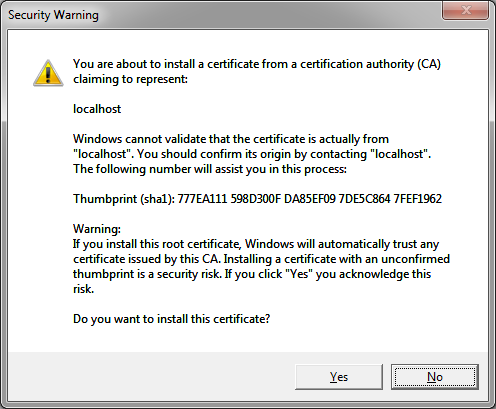
Print Screen of the Security Warning Popup