Search:
Login
Preferences
Help/Guide
About Trac
Register
Forgot your password?
Wiki
Timeline
Changelog
Browse Source
View Tickets
New Ticket
Roadmap
Builds
Sonar
Search
Context Navigation
+0
Start Page
Index
History
Editing Help/Dialog/MapPaint/StyleSettings
Adjust edit area height:
8
12
16
20
24
28
32
36
40
Edit side-by-side
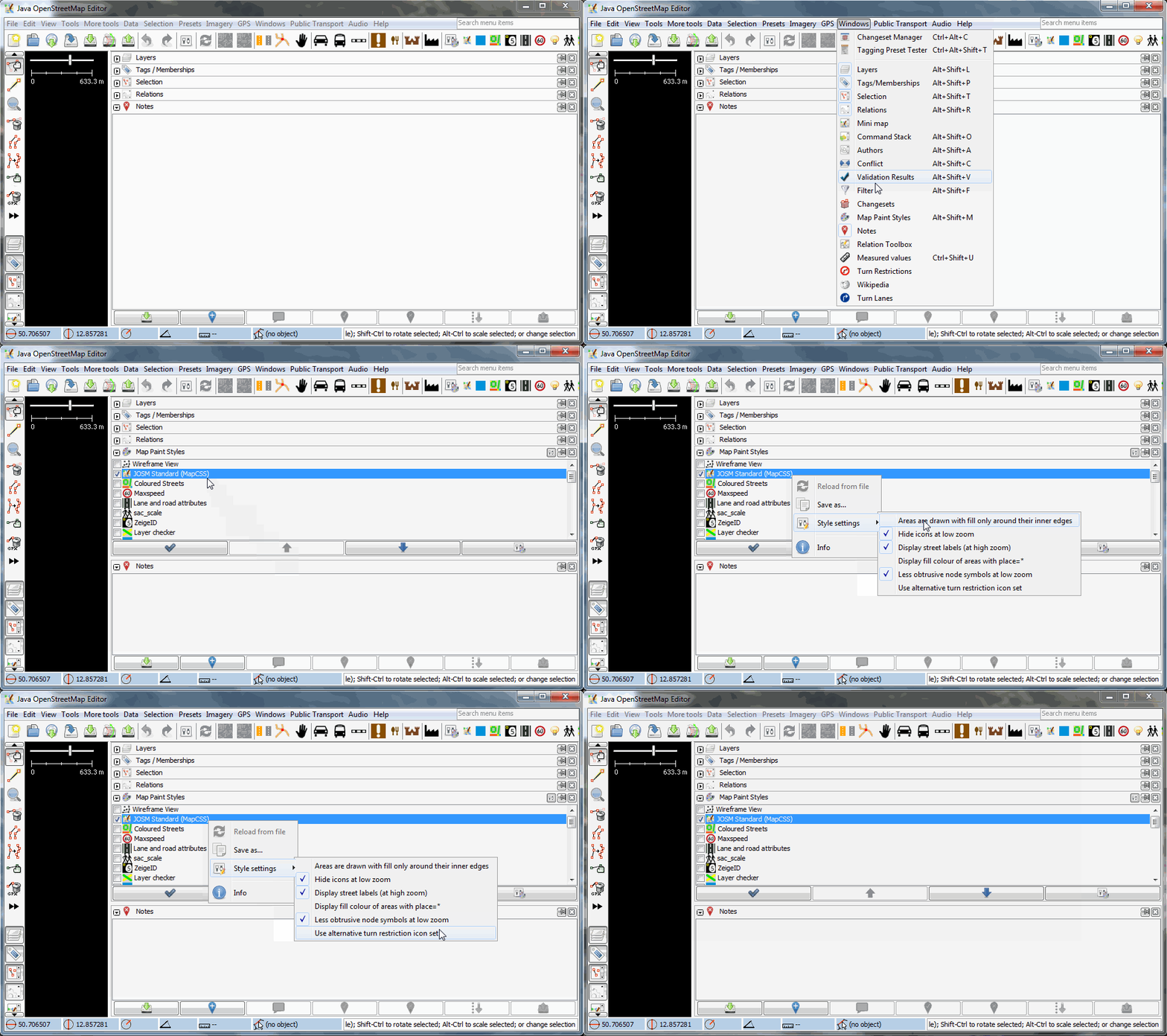
= Style settings = A '''style setting''' is a special setting which modifies a [wiki:Styles mappaint style]. They are availible in the [wiki:Help/Dialog/MapPaint Map Paint Styles Dialog]. To adjust a style setting foloow the following steps or watch the screencast below: * activate the [wiki:Help/Dialog/MapPaint Map Paint Styles Dialog] in the [wiki:Help/ToggleDialogs Windows menu] * in the !MapPaint Styles Dialog right click on a supported style e.g. "JOSM Standard (MapCSS)" * Style settings [[Image(stylesettings.gif)]] The following mappaint styles support style settings: * [source:trunk/styles/standard/elemstyles.mapcss JOSM Standard (MapCSS)] (the default internal JOSM mappaint style) * [wiki:Styles/Coloured_Streets Coloured Streets] * [wiki:Styles/LayerChecker Layer checker] * [wiki:Styles/Maxspeed Maxspeed] * [wiki:Styles/light_source light_source] {{{ #!comment Check here for more wiki hosted styles supporting style settings: https://josm.openstreetmap.de/search?q=setting%3A%3A&noquickjump=1&wiki=on }}} After changing a style setting the [wiki:Help/MapView] will update automatically. Some styles support more advanced settings which can be reached via: * [wiki:Help/Preferences/Display#Colors Display Settings] (color changes) * [wiki:Help/Preferences/Advanced Advanced Preferences] ---- Back to [wiki:Help/Dialog/MapPaint MapPaint Dialog][[BR]] Back to [wiki:Help/ToggleDialogs Toggle Dialogs][[BR]] Back to [wiki:Help Main Help]
Note:
See
WikiFormatting
and
TracWiki
for help on editing wiki content.
Change information
Your email or username:
E-mail address and name can be saved in the
Preferences
Comment about this change (optional):
Attachments
(1)
stylesettings.gif
(
344.6 KB
) - added by
Klumbumbus
10 years ago
.
Download all attachments as:
.zip
Note:
See
TracWiki
for help on using the wiki.