| Version 11 (modified by , 15 years ago) ( diff ) |
|---|
Languages:
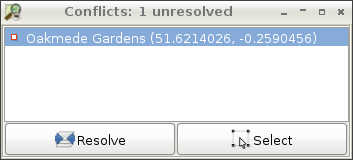
Conflict List Dialog
 Keyboard shortcut:
 Alt+Shift+C
The Conflict List Dialog displays the list of conflicts in the current data layer.
Showing/Hiding the Conflict List Dialog
- Click on the
 conflict icon in the button column on the left of the JOSM main window to show or hide the Conflict List Dialog.
- Press
Alt+Cto show or hide the Conflict List Dialog.
Working with the Conflict List Dialog

- The Conflict List Dialog displays a list of conflicts. The total amount of unresolved conflicts is shown in the header. You can select a conflict by clicking on it.
- Resolve launches the Conflict Dialog for the selected conflict. The Conflict Dialog is used to resolve the conflict. Double-Click on a conflict in the list also launches the Conflict Dialog.
 Select selects the objects which the currently selected conflicts have been generated for.
- Use View ->
 Zoom to selection if the selected element is not visible in the current view.
- Use View ->


see also
Back to Toggle Dialogs
Back to Main Help
Attachments (1)
-
conflict_list_dialog.png
(166.0 KB
) - added by 15 years ago.
fixed new screenshot
Download all attachments as: .zip
Note:
See TracWiki
for help on using the wiki.