| Version 8 (modified by , 17 years ago) ( diff ) |
|---|
Languages:
Changeset Query Dialog
Work in progress!
The features described here are not yet available in either latest or tested.
Launching the dialog
The Changeset Query Dialog is launched from the Changeset Manager.
- Launch the Changeset Manager
- Click on
 in the toolbar section of the Changeset Manager

The Changeset Query Dialog

Basic Queries

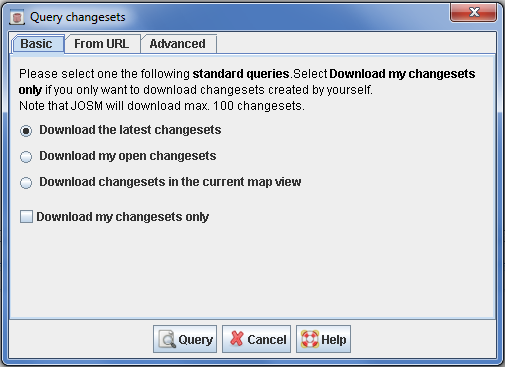
Click on the tab Basic to select one of a set of predefined standard queries.
You can choose among
- Download the latest changesets - this will query and download the latest changesets submitted to the OSM server. Max. 100 changesets are replied. If you select the checkbox Download my changesets only, only the latest changesets submitted by you are queried.
- Download my open changesets - this will query and download the open changesets owned by you. Max. 100 changesets are replied. This query is disabled if you are using JOSM in anonymous mode, i.e. if you didn't enter an OSM user name and password in the JOSM preferences.
- Download changesets in the current map view - this will query the changesets related to the bounding box in the current Map View. This query is disabled unless there is a current map view, i.e. unless there is at least one layer.
Queries from OSM API URLs
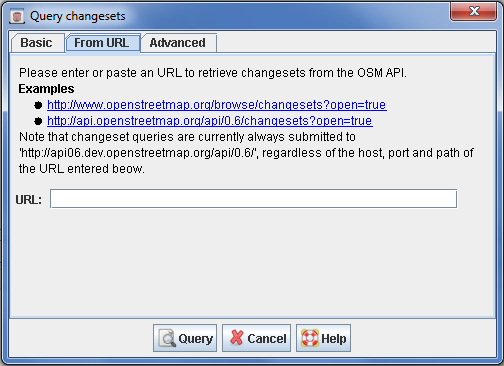
You can also copy a query URL used on the OSM Website to define a changeset query in JOSM. In order to do so, copy and paste the URL in the input field in the tab From URL, see below:

You can paste both URL used to query changesets for browsing and URL used to query changesets in the OSM API. Two examples are provided in the dialog, see the screenshot.
If the URL pasted into the input field represents a valid changeset query, the icon  is displayed, otherwise you will see the icon
  .
.
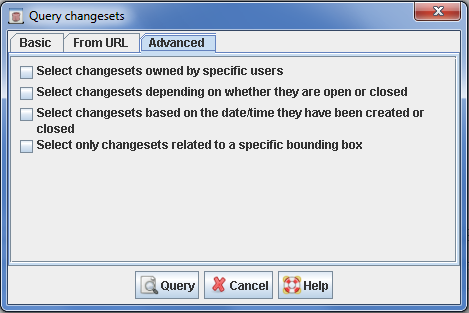
Advanced Queries

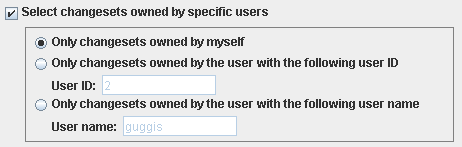
Query changesets owned by a specific user

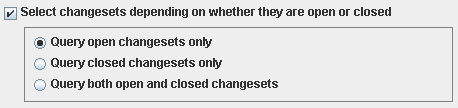
Query changesets depending on whether they are open or closed
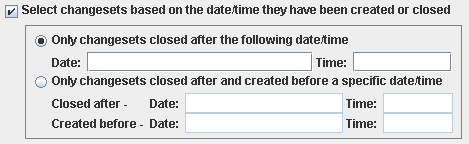
Query changesets based on the date/time they have been created or closed
Query changesets coverting a specific bounding box
Attachments (8)
- changeset-query-dialog-ss.png (36.8 KB ) - added by 17 years ago.
- basic-tab.png (2.3 KB ) - added by 17 years ago.
- url-based-query.png (36.5 KB ) - added by 17 years ago.
- advanced-tab.png (33.6 KB ) - added by 17 years ago.
- advanced-based-on-user.png (5.5 KB ) - added by 17 years ago.
- advanced-based-on-openclosed.png (4.1 KB ) - added by 17 years ago.
- advanced-based-on-datetime.png (5.8 KB ) - added by 17 years ago.
- advanced-based-on-bbox.png (5.0 KB ) - added by 17 years ago.
Download all attachments as: .zip