| Version 2 (modified by , 17 years ago) ( diff ) |
|---|
Upload Selection
You can upload a single modified object or an arbitrary collection of modified objects to the server.
Upload a single object to the server
- Click on a modified node or a modified way or select a modified relation in the Relation Dialog
- Click on File->Upload Selection
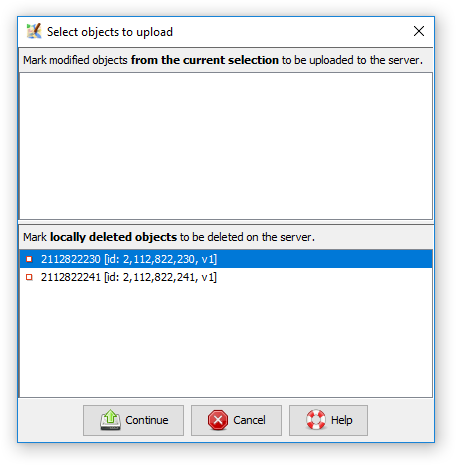
- The following dialog shows the object you've selected for uploading

- Click Continue to proceed to the Upload Dialog and continue uploading.

Upload multiple objects to the server
- Select multiple nodes, ways, or relations
- Click on File->Upload Selection
- The following dialog shows the object you've selected for uploading

In this dialog, you can still change the list of objects to upload. Just modify the selected entries in the upper list. - Click Continue to proceed to the Upload Dialog and continue uploading.

Frequently Asked Questions
I've selected an object but it doesn't appear in the Upload Selection Dialog when it click on File->Upload Selection. Why's that?
The object must be modified in order to appear in the Upload Selection Dialog for uploading.
- a new object is always modified
- an existing object downloaded from the server is only modified if you've changed a tag, moved the object, added or removed nodes from a way, etc. since the last upload
Attachments (3)
- upload-selection-dialog.png (13.2 KB ) - added by 8 years ago.
- upload-selection-dialog-multiple.png (16.7 KB ) - added by 8 years ago.
- upload-selection-dialog-deleted-objects.png (13.7 KB ) - added by 8 years ago.
Download all attachments as: .zip
Note:
See TracWiki
for help on using the wiki.