| Version 26 (modified by , 9 years ago) ( diff ) |
|---|
This page is incomplete. A table which shows which plugin adds which file format is missing.
Languages:
File > Open…
 Keyboard shortcut:
 Ctrl-O
Open a file in a new layer.
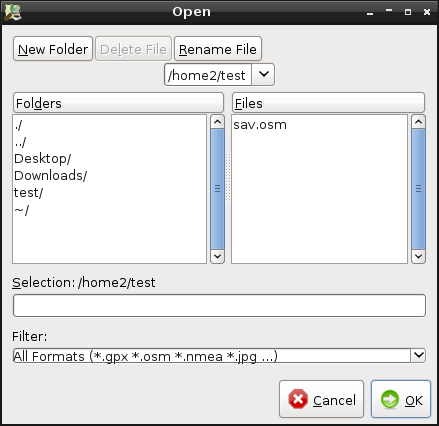
The following dialog is displayed:

By default JOSM can open OSM data files, GPX files, NMEA files, OSN files (Notes), WMS files, session files, JPEG and JPG files.
If you type the name of the file to open and omit the file extension, JOSM tries to guess it and opens the correct file.
Several file compression formats are supported too, including .zip, .gz, .bz, .bz2, .xz.
There are some Plugins which extend the file type list (see e.g. code snippets from core and plugins).
See also


Attachments (2)
-
open_dialog.png
(24.0 KB
) - added by 16 years ago.
screenshot
-
loading-a-josm-session.gif
(721.7 KB
) - added by 11 years ago.
https://github.com/mapbox/mapping/wiki/Saving-and-loading-a-JOSM-session#loading-a-josm-session https://github.com/mapbox/mapping/issues/162
Download all attachments as: .zip
Note:
See TracWiki
for help on using the wiki.