| Version 19 (modified by , 11 years ago) ( diff ) |
|---|
Languages:
File > Open…
 Keyboard shortcut:
 Ctrl-O
Open a file in a new layer.
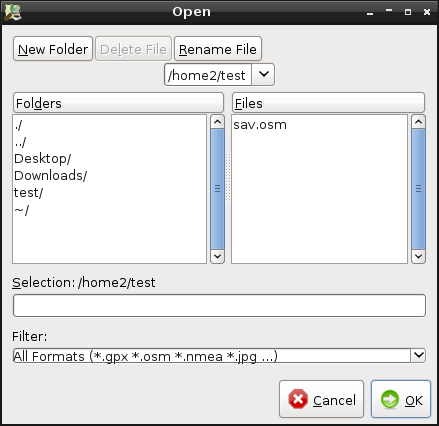
The following dialog is displayed:

JOSM can either open OSM data files, GPX files, NMEA files, OSN files (Notes) or JPG files.
If you type the name of the file to open and omit the file extension, JOSM tries to guess it and opens the correct file.
.osm and .gpx files can be compressed files with gzip or bzip2 compression.
See also


Attachments (2)
-
open_dialog.png
(24.0 KB
) - added by 16 years ago.
screenshot
-
loading-a-josm-session.gif
(721.7 KB
) - added by 11 years ago.
https://github.com/mapbox/mapping/wiki/Saving-and-loading-a-JOSM-session#loading-a-josm-session https://github.com/mapbox/mapping/issues/162
Download all attachments as: .zip
Note:
See TracWiki
for help on using the wiki.