| Version 20 (modified by , 12 years ago) ( diff ) |
|---|
Languages:
File > Download object
 Keyboard shortcut:
 Ctrl+Shift+O
Load one or several OSM objects (node, way or relation) from the OSM API server either in the current data layer or in a new data layer. The downloaded data will contain the way nodes for ways and optionally any referrers (ways or relations that reference the downloaded object).
Note: Only the referrers of the downloaded object itself are downloaded, not the referrers for any of its children (way nodes).
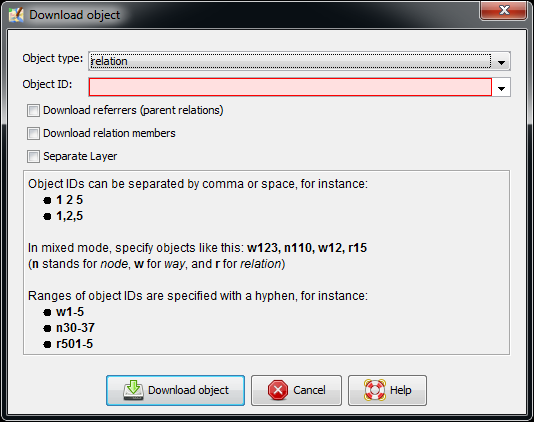
The following dialog is displayed:

You can choose the type of objects (  node,
node,  way,
way,  relation or mixed) to download and enter their ID. Clicking on Download object starts the download. Use a comma separated list for several objects of the same type and comma separated list with the first letter of the type for mixed objects (e.g.
 w123,n68,n211,r7).
Check boxes
- You can choose whether or not any referrers (parent relations and ways) are to be downloaded:
- if Download referrers is selected, any referring objects are downloaded
- if Download referrers is not selected, no referrers are downloaded
- You can choose whether or not any relation members are to be downloaded:
- if Download relation members is selected, any relation members are downloaded
- if Download relation members is not selected, no members are downloaded
- You can control whether the data is loaded into the current or in a new layer:
- if Separate layer is selected, the data is loaded into a new layer
- if Separate layer is not selected, the data is merged into the current data layer
If no data layer does exist, a new data layer is always created.
Data source
The OSM API server specified in Connection Settings is the data source used here.
See also

Attachments (1)
-
DownloadObjectDialog.png
(33.1 KB
) - added by 11 years ago.
Screenshot for Download Object dialog (updated)
Download all attachments as: .zip