| Version 1 (modified by , 14 years ago) ( diff ) |
|---|
Altres idiomas:
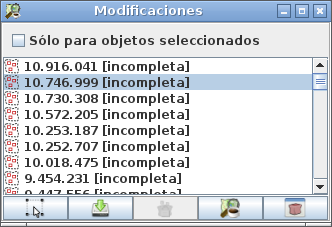
Diálogo de Lista de Conjunto de cambios
El  Diálogo de Lista de Conjunto de cambios es uno de los diálogos alternantes en JOSM. Se muestra una lista de conjuntos de cambios. Se puede mostrar
- La lista de conjuntos de cambios de los objetos seleccionados actualmente se asignan a
- La lista de conjuntos de cambios de los objetos en la capa de datos actual se asigna a
- the list of changesets the currently selected objects are assigned to
- the list of changesets the objects in the current data layer are assigned to
Abrir y cerrar el cuadro de diálogo
- Haga clic en
 en la barra de herramientas de edición para abrir el cuadro de diálogo
- Haga clic en en la barra de herramientas de edición de nuevo para cerrarla.
El Diálogo de Lista de Conjunto de cambios

El Menú Emergente en Diálogo de Lista de Conjunto de cambios
El diálogo de la lista de conjunto de cambios ofrece un menú emergente. Use el ratón estándar o gestos de teclado en su plataforma para lanzar esto (es decir, haga clic derecho en Windows).

Trabajar con el Diálogo de Lista de Conjunto de cambios
El cambio entre las listas de los conjuntos de cambios que se muestran Switching beween the lists of displayed changesets
The Changeset List Dialog either displays
- the list of changesets the currently selected objects are assigned to
- the list of changesets the objects in the current data layer are assigned to
Select the checkbox For selected objects only to display changesets the currently selected objects are assigned to.
Unselect the checkbox For selected objects only to display changesets the objects in the current data layer are assigned to.
Select objects assigned to a changeset
Double-click on a changeset in the Changeset List Dialog to select the objects assigned to this changeset in the map window.
Alternatively, you can select one or more changesets in the Changeset List Dialog and click on  or on the respective item in the popup menu.
Download changesets
JOSM only knows the unique id of a changeset unless one explicitly downloads more information from the OSM server.
To download information about a changeset, select one or more changesets in the Changeset List Dialog and click on  or on the respective item in the popup menu.
Close changesets
Changesets can either be open or closed.
You can explicitly close changesets which are still open. Select one or more open changesets in the Changeset List Dialog and click on  or on the respective item in the popup menu.
Show information about changesets
If you need additional information about a changeset the OSM server provides a web pages for each changeset.
In order to launch a browser with this webpage, select one or more open changesets in the Changeset List Dialog and click on  or on the respective item in the popup menu.
Véase también
 Cerrar conjunto de cambios
- [Dialog/ChangesetQueryDialog Diálogo Consulta de Conjunto de cambios]
- Administrador de Conjunto de cambios
Volver a Diálogos Alternantes
Volver a Ayuda principal
Attachments (2)
- changeset-list-dialog-screenshot.png (21.5 KB ) - added by 14 years ago.
- changeset-list-dialog-popup.png (9.1 KB ) - added by 14 years ago.
Download all attachments as: .zip