


Opened 13 years ago
Last modified 12 years ago
#8940 closed enhancement
Some things about Kendzi 3D custom renderer for Traffic_signs — at Version 4
| Reported by: | yopaseopor | Owned by: | kendzi |
|---|---|---|---|
| Priority: | normal | Milestone: | |
| Component: | Plugin kendzi3d | Version: | |
| Keywords: | render, special characters, models, textures, list | Cc: |
Description (last modified by )
1) List of model doesn't save in pointModelLayer.xml file.The list works well but it doesn't save it to the file, so every time I reset JOSM list has to be re-done manually.
2) Special characters in pointModelLayer.xml like "/: (for example , in list " works well but in file " and /" doesn't work well because this characters define other fields)
3) Possibility of superposition of textures.Two textures at same position.How about "layers" or orders like map styles?
4) "List" of textures? (like List of models) with list,file, etc.
-What about function with Download OSM Data continously plugin (for the world,to never ends the navigation... ;)
Change History (6)
by , 13 years ago
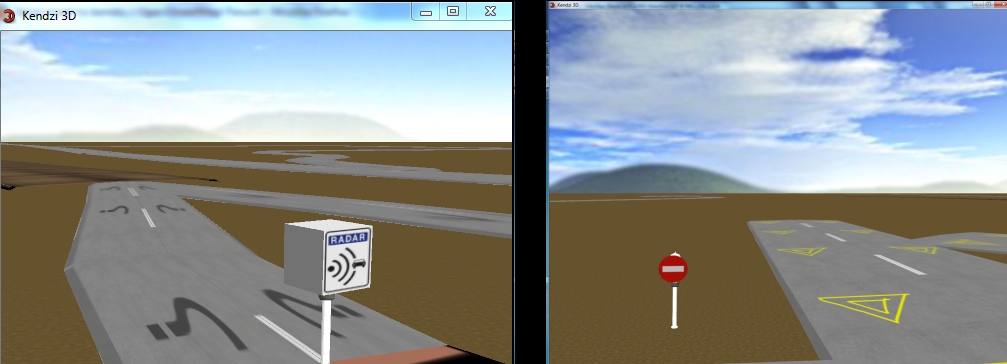
| Attachment: | traffic_sign_kendzi3d.jpg added |
|---|
comment:1 by , 13 years ago
| Description: | modified (diff) |
|---|
follow-up: 3 comment:2 by , 13 years ago
An "official" bug tracking for this plugin is here:
https://github.com/kendzi/kendzi3d/issues?sort=created&state=open
It is not trivial to fix this so I will add the new issues there and close this.
1) I compliantly forgot that it is possible to edit model list using this form. Now I see that this form need some additional work.
Currently you can create file inside plugin directory:
${PLUGIN_DIR}/models/pointModelLayer.xml
this file should be loaded at plugin startup.
2) char like " is special in xml and you need escape them in xml file eg. like this:
" replace with: "
or by use single '
for example if you need matcher like: "test:test"=tree2 in xml you can write it like: matcher='"test:test"=tree2'
The best option is to use some xml editor I'm using editor build into eclipse.
3) eh...
4) there is some plugin for that in JOSM. I could add support for this but currently this plugin don't handle well lot of object in JOSM. So it is better if there is small number of downloaded data...
by , 13 years ago
| Attachment: | highway_example.png added |
|---|
Example of render of a lane with your future upgraded plugin
comment:3 by , 13 years ago
I explain third
When I was investigating your pluggin, I have decompressed, found texture folder and I start to toogle between textures for a easy existent key, like highway.
Then I "invent" a texture with highway key but a "give_way" value, with a yellow triangle like Yield, as a test.
But what if I want to show some other textures with other keys "on" the road 3D made by renderer?
This affect to keys like change:lanes:forward , change:lanes:backward , turn:direction:forward and turn:direction:backward
I attach an example made with Photoshop of what about would be the result.
I assume if two textures are at the same place...we can order that, instead its opacity (road first, second texture smoothness, third= lines of change lanes - overtaking, fourth turn:lanes arrows).
With this we can put the road marks on the road, and also its real surface with the key smoothness, so the real road will be rendered in its real situation.
Also I assume that forward and backward values can has different textures (this can be "linked" with the issue of number of lanes).
For the fourth point I know it is not the better way, but some possibility with interaction with this pluggin (like a option in your preset menu that enable/disable this interaction) will be able to navigate in 3D with car or by air without end, if not, I have to change windows, download more data, and continue with 3D renderer, toogling a lot of time between JOSM and Kendzi3D (or download big big data so my "trip" has "no limit"
And also I add a fifth point.What about "easy orientation" for models? (one key like direction= or side= take the model rendered and move it or rotate it in 3D view) .Traffic_signs has an orientation respect to the road (forward or backward) and a side (right or left).Nowadays all the models are at the same side with the same orientation also instead of the route.
I hope these little ideas can help to upgrade your plugin to a new version ;)
Replying to kendzi:
An "official" bug tracking for this plugin is here:
https://github.com/kendzi/kendzi3d/issues?sort=created&state=open
It is not trivial to fix this so I will add the new issues there and close this.
1) I compliantly forgot that it is possible to edit model list using this form. Now I see that this form need some additional work.
Currently you can create file inside plugin directory:
${PLUGIN_DIR}/models/pointModelLayer.xml
this file should be loaded at plugin startup.
2) char like " is special in xml and you need escape them in xml file eg. like this:
" replace with: "
or by use single '
for example if you need matcher like: "test:test"=tree2 in xml you can write it like: matcher='"test:test"=tree2'
The best option is to use some xml editor I'm using editor build into eclipse.
3) eh...
4) there is some plugin for that in JOSM. I could add support for this but currently this plugin don't handle well lot of object in JOSM. So it is better if there is small number of downloaded data...
comment:4 by , 13 years ago
| Description: | modified (diff) |
|---|




My intention