


Opened 15 years ago
Last modified 10 months ago
#6556 closed defect
Preferences "OK", "Cancel", & "Help" buttons unclickable on Netbooks because of Screen Resolution — at Version 7
| Reported by: | rickmastfan67 | Owned by: | team |
|---|---|---|---|
| Priority: | major | Milestone: | |
| Component: | Core | Version: | tested |
| Keywords: | Cc: |
Description (last modified by )
Alright, I just installed JOSM onto my Netbook because I wanted to try out the liveGPS plugin with a GPS unit I have to see if I can do some tracing with it tomorrow.
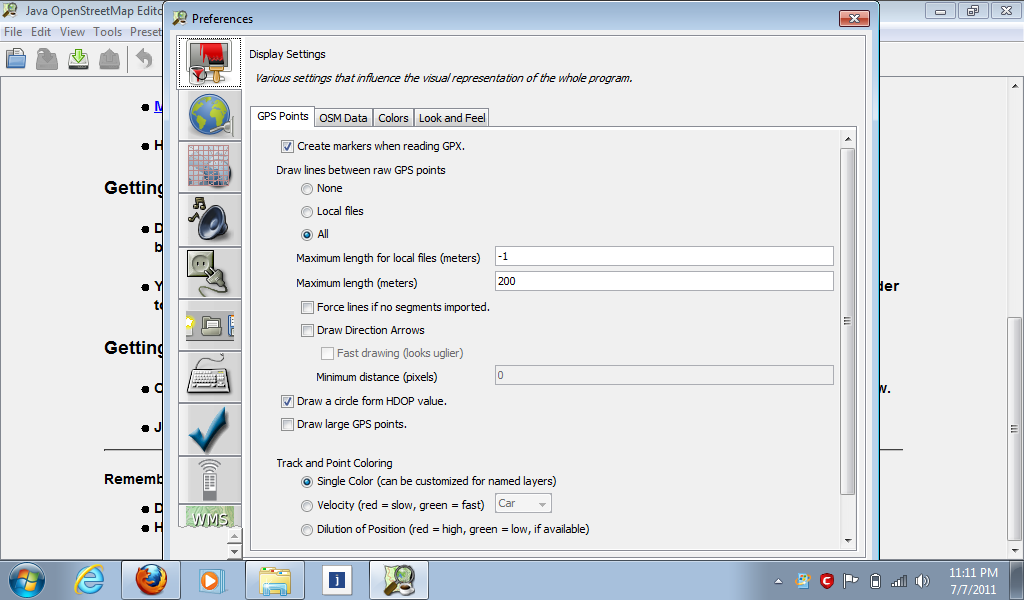
The problem is that when I go into the Preferences menu (F12), I can't access the "OK", "Cancel", & "Help" buttons because they show up below my screen resolution which is: 1024x600.
Is it possible that this can be fixed? Because the only way to get out of the Preferences area is to hit the "X" button, so I can't save any changes. Screenshot will be attached in a few.
Repository Root: http://josm.openstreetmap.de/svn
Build-Date: 2011-07-04 01:31:38
Last Changed Author: stoecker
Revision: 4201
Repository UUID: 0c6e7542-c601-0410-84e7-c038aed88b3b
URL: http://josm.openstreetmap.de/svn/trunk
Last Changed Date: 2011-07-04 00:07:05 +0200 (Mon, 04 Jul 2011)
Last Changed Rev: 4201

Identification: JOSM/1.5 (4201 en)
Memory Usage: 37 MB / 494 MB (4 MB allocated, but free)
Java version: 1.6.0_25, Sun Microsystems Inc., Java HotSpot(TM) Client VM
Operating system: Windows 7
Change History (8)
by , 15 years ago
| Attachment: | PreferencesProblem.png added |
|---|
comment:1 by , 15 years ago
comment:3 by , 15 years ago
To solve your issue, you can either delete the existing preferences file in "(where ever windows hides this)\Application Data\JOSM" or you can resize the dialog manually like you would any other windows. This should work unless Microsoft changed resizing after Windows XP.
comment:4 by , 10 months ago
I have this issue using java2d.uiScale=2. I need to upscale for everything to be legible. Everything works fine but I cannot resize the preferences tab smaller than the screen. There should be a key in the advances preferences to override the minimum screen resolution for the preferences tab.
comment:5 by , 10 months ago
| Resolution: | fixed |
|---|---|
| Status: | closed → reopened |
comment:6 by , 10 months ago
Looking at https://josm.openstreetmap.de/browser/josm/trunk/src/org/openstreetmap/josm/gui/preferences/PreferenceDialog.java
line 57 this.setMinimumSize(new Dimension(800, 600));
With 2x scaling the dimension is doubled so that the minimum size now has a height of 1200 which is too big on my 1080p screen.
Is it possible to just edit the minimum size to be 400, 300 at least so that it is compatible with more devices?
comment:7 by , 10 months ago
| Description: | modified (diff) |
|---|
I can reproduce the problem on my Windows laptop when I use a clean installation and
java-options=-Dsun.java2d.uiScale=2
in the cfg. BTW: when I click ESC and F12 again the dialog shows the lower part with the buttons.
To be honest, I don't know why we use the setMinimumSize() at all. For me, JOSM works fine when I remove the statement, both with and without the sun.java2d.uiScale=2. Maybe it is needed with other OS or older JRE?


Yes, in doesn`t even fit in 1024x768!