


#5441 closed defect (needinfo)
No additional plugins in 3514
| Reported by: | MagicMoses | Owned by: | ulfl |
|---|---|---|---|
| Priority: | critical | Milestone: | |
| Component: | Installer Windows | Version: | tested |
| Keywords: | Plugin | Cc: |
Description (last modified by )
I installed JOSM 3514 without having a former version on the system (Win7, 64bit).
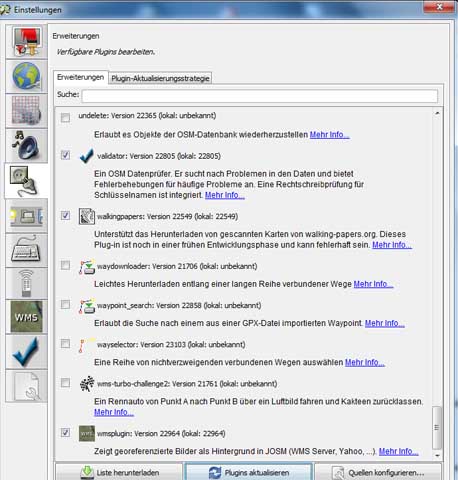
During installation, the standard plugins were installed correctly and work. When I try to install additional plugins I press F12 to enter the preferences menu. I tick walkingpapers and piclayer (attached screenshot). Both plugins are downloaded and JOSM tells me to restart JOSM in order to use the above mentioned plugins. As I found out, the new plugins are to be seen in the plugin-folder of the installation. After restarting I enter the preferences menu again to look up if the new plugins are still ticked, but the ticks are gone and the plugins still do not work (attached screenshot). I can still find the new plugins in the plugin-folder of the installation. I tried to install several additional plugins in the way discribed above, but the result is always the same.
Let me know, if you need more information.
Repository Root: http://josm.openstreetmap.de/svn
Build-Date: 2010-09-06 01:31:24
Last Changed Author: stoecker
Revision: 3514
Repository UUID: 0c6e7542-c601-0410-84e7-c038aed88b3b
URL: http://josm.openstreetmap.de/svn/trunk
Last Changed Date: 2010-09-05 23:03:46 +0200 (Sun, 05 Sep 2010)
Last Changed Rev: 3514
Identification: JOSM/1.5 (3514 de)
Memory Usage: 52 MB / 494 MB (28 MB allocated, but free)
Java version: 1.6.0_21, Sun Microsystems Inc., Java HotSpot(TM) Client VM
Operating system: Windows 7
Plugin: openstreetbugs (22723)
Plugin: remotecontrol (22734)
Plugin: validator (22805)
Plugin: wmsplugin (22964)
cache.motd.html=1284296012
cache.motd.html.lang=De:
cache.motd.html.version=3514
cache.wmsplugin.expire=2419200
cache.wmsplugin.maxsize=70
gui.geometry=1366x768+0+0
gui.maximized=false
josm.version=3514
mirror.http://svn.openstreetmap.org/applications/editors/josm/plugins/validator/ignoretags.cfg=1284296016383;C:\Users\Moses\AppData\Roaming\JOSM\plugins\validator\mirror_http___svn.openstreetmap.org_applications_editors_josm_plugins_validator_ignoretags.cfg
mirror.http://svn.openstreetmap.org/applications/editors/josm/plugins/validator/tagchecker.cfg=1284296016570;C:\Users\Moses\AppData\Roaming\JOSM\plugins\validator\mirror_http___svn.openstreetmap.org_applications_editors_josm_plugins_validator_tagchecker.cfg
mirror.http://svn.openstreetmap.org/applications/editors/josm/plugins/wmsplugin/sources.cfg=1284296015275;C:\Users\Moses\AppData\Roaming\JOSM\plugins\wmsplugin\mirror_http___svn.openstreetmap.org_applications_editors_josm_plugins_wmsplugin_sources.cfg
mirror.http://svn.openstreetmap.org/applications/utils/planet.osm/java/speller/words.cfg=1284296016149;C:\Users\Moses\AppData\Roaming\JOSM\plugins\validator\mirror_http___svn.openstreetmap.org_applications_utils_planet.osm_java_speller_words.cfg
org.openstreetmap.josm.gui.preferences.PreferenceDialog.geometry=x=333,y=0,width=700,height=800
osb.api.disabled=false
osb.auto_download=true
osb.include_date=true
osb.uri.close=http://openstreetbugs.schokokeks.org/api/0.1/closePOIexec
osb.uri.download=http://openstreetbugs.schokokeks.org/api/0.1/getBugs
osb.uri.edit=http://openstreetbugs.schokokeks.org/api/0.1/editPOIexec
osb.uri.new=http://openstreetbugs.schokokeks.org/api/0.1/addPOIexec
pluginmanager.lastupdate=1284296184696
pluginmanager.version=3514
plugins=openstreetbugsremotecontrolvalidatorwmsplugin
shortcut.groups.1=128
shortcut.groups.10=64
shortcut.groups.11=576
shortcut.groups.12=64
shortcut.groups.13=512
shortcut.groups.15=640
shortcut.groups.16=640
shortcut.groups.17=576
shortcut.groups.18=512
shortcut.groups.19=128
shortcut.groups.2=128
shortcut.groups.20=512
shortcut.groups.3=0
shortcut.groups.4=512
shortcut.groups.5=0
shortcut.groups.6=512
shortcut.groups.8=192
shortcut.groups.9=192
shortcut.groups.configured=true
wmsplugin.default.html:http://josm.openstreetmap.de/wmsplugin/YahooDirect.html?=true
wmsplugin.default.http://irs.gis-lab.info/?layers_landsat&=true
wmsplugin.default.http://onearth.jpl.nasa.gov/wms.cgi?request_GetMap&layers_global_mosaic&styles_&format_image/jpeg&=true
wmsplugin.url.0.name=LandSat
wmsplugin.url.0.url=http://onearth.jpl.nasa.gov/wms.cgi?request=GetMap&layers=global_mosaic&styles=&format=image/jpeg&
wmsplugin.url.1.name=Landsat (Spiegelserver)
wmsplugin.url.1.url=http://irs.gis-lab.info/?layers=landsat&
wmsplugin.url.2.name=Yahoo Sat
wmsplugin.url.2.url=html:http://josm.openstreetmap.de/wmsplugin/YahooDirect.html?
Attachments (2)
Change History (11)
by , 16 years ago
| Attachment: | restart.jpg added |
|---|
by , 16 years ago
| Attachment: | ticked.jpg added |
|---|
comment:1 by , 16 years ago
comment:2 by , 16 years ago
| Component: | Plugin piclayer → Installer Windows |
|---|---|
| Description: | modified (diff) |
| Owner: | changed from to |
| Priority: | normal → critical |
comment:3 by , 16 years ago
@ulfl: maybe it's not a installer problem, but generally windows 7 related. Unfortunately I couldn't reproduce on win xp 32bit.
comment:4 by , 16 years ago
This could be a problem with JOSMs plugin install mechanism (however, I don't think so), or with the installer on 64-bit Windows 7.
This "smells" like a duplicate of #5302, the windows installer is not 64bit aware (I don't own such a system myself and the report there doesn't give a lot of details).
So we need to know if it's the plugin mechanism or the installer ...
Could you try if http://josm.openstreetmap.de/josm-tested.jar works as expected and report here?
comment:5 by , 16 years ago
@ulfl:
I cannot imagine how 64 vs. 32 bit can cause such a specific error. After all it can load plugins, just the new ones from the server somehow do not work.
@bug-reporters:
Let me add some details:
- We need to know if there is be a difference when you start the josm-tested.jar (in the same folder as josm.exe) directly. (To do this, double click the file or type
java -jar C:\PATH\TO\josm-tested.jarin a console window.)
- If it is the same, rename or delete JOSM's preferences folder. Can you install plugins now? If not, look at the downloaded plugins: Do they have extension *.jar or *.jar.new?
Sebastian
comment:6 by , 16 years ago
I did as Sebastian told me.
I startet the josm-tested.jar in the same folder as josm.exe. Problem was the same.
Then i deleted the plugins manually and started josm-tested.jar again. After installing the now missing plugins again, I restarted.
Same problem again.
The extension oft the plugins are *.jar
comment:7 by , 16 years ago
Thanks, please delete the entire folder (including preferences file), not only the individual plugins.
If it fails again, please try the same with
- the latest version
- a version that predates some potentially problematic changes: http://josm.openstreetmap.de/download/Archiv/josm-snapshot-3329.jar
Basically you have 2 states:
(1) after fresh installation, where all plugins work normally
(2) after removing the plugins and redownloading the same again, when plugins do not function.
We have to find the element that makes the difference between (1) and (2). The following are relevant:
- the
preferencesfile - the (absence or presence) of the plugin cache file
site-josm.openstreetmap.de-_plugin.txt - the (absence or presence) of the plugin icon cache file
site-josm.openstreetmap.de-_plugin-icons.zip(only for josm >= 3330) - the individual plugin files
- (josm version)
You can keep a copy of the preference folder from state (1) and replace each element one by one to find the culprit.
(Of course, any error output from the console would also be interesting.)
comment:8 by , 16 years ago
| Resolution: | → needinfo |
|---|---|
| Status: | new → closed |
Cannot do anything without response from but reporters.
comment:9 by , 15 years ago
| Version: | latest → tested |
|---|
I've got the same probelem, but it was caused by closing the preferences window from the X-button on top-right instead of clicking OK button. This is because I'm on a netbook with too narrow screen (bottom buttons are partially out of screen) and plugins dialog look somehow embossed.



Hello!
I have exactement the same problem with this version. If installing additional plugins they are gone with the restart.