


#5298 closed defect (wontfix)
import of gpx file shows data in an unusual way
| Reported by: | anonymous | Owned by: | reini122 |
|---|---|---|---|
| Priority: | normal | Milestone: | |
| Component: | Core | Version: | |
| Keywords: | Cc: | reini122 |
Description
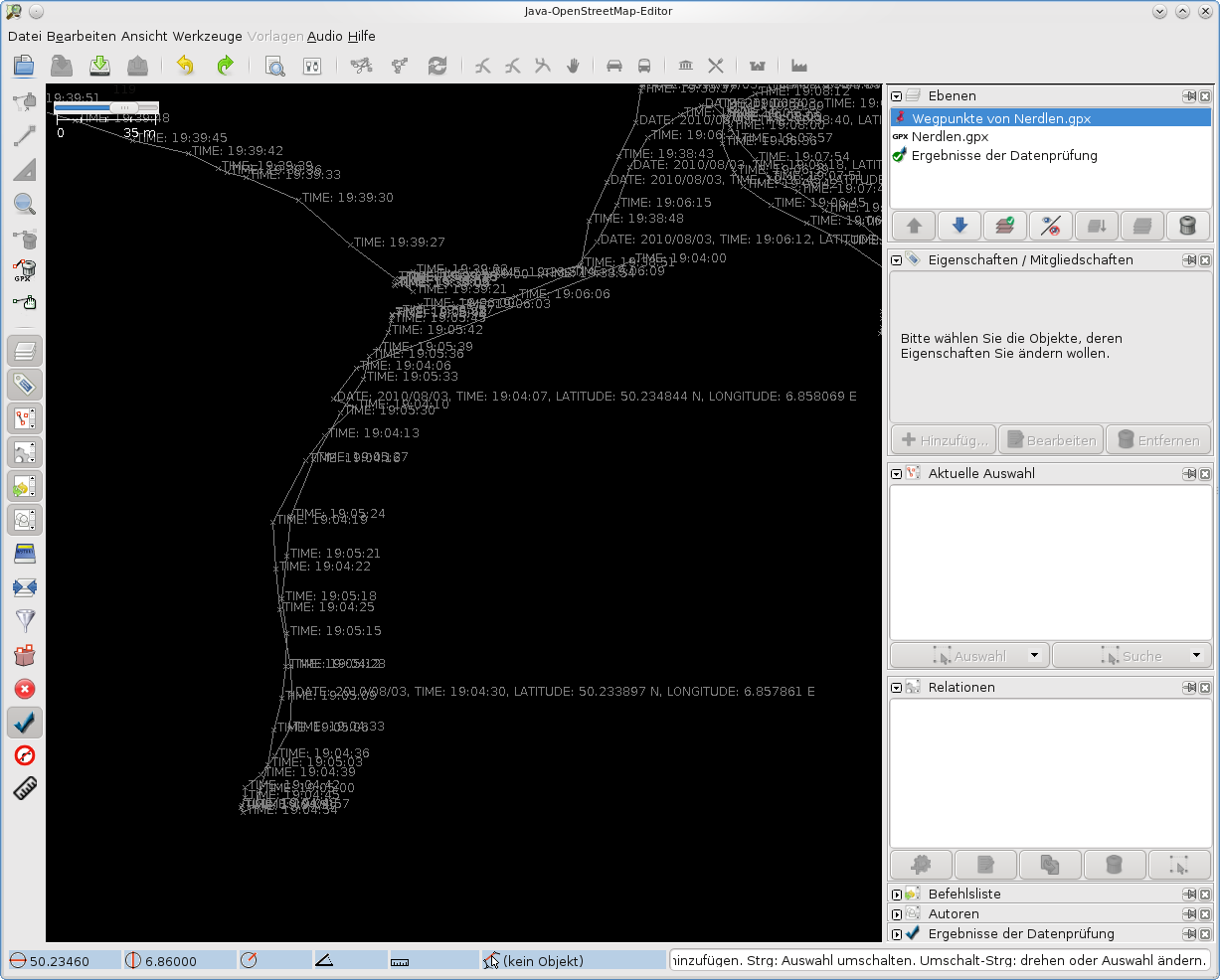
antile version 3395 the import of gpx file looks like this way: josm-3395version.png;
the markers are shown with complete date and time stamp; others only with time stamp;
but now (latest version 3413 included) the same data file looks like: josm-3413version.png
this is unusual for me, please change in a way like in last functionall version 3395!
Attachments (3)
Change History (6)
by , 16 years ago
| Attachment: | josm-3395version.png added |
|---|
comment:1 by , 16 years ago
| Cc: | added |
|---|---|
| Owner: | changed from to |
comment:2 by , 16 years ago
| Resolution: | → wontfix |
|---|---|
| Status: | new → closed |
This is not a bug - it is a new feature.
The default settings changed in the new version. In your GPX are for each waypoint values for attribute name and desc (Description). In the old version only name was displayed (desc was only used when name was empty).
In the new version both attributes are shown (setting auto). If you don't like this you can change it in the preferences. Choose for Waypoint labelling the option name and the waypoint labelling will be like in the old version.




v3395